

 4.9 (400+
reviews)
4.9 (400+
reviews)
Turn Every Visit Into a Review, Without Risking a Public Complaint
Request reviews after visits and give staff a way to follow up on private feedback. Emitrr connects invitations, location-specific links, and responses to your patient communication.
Voice and SMS, one AI, live on your current number in days.
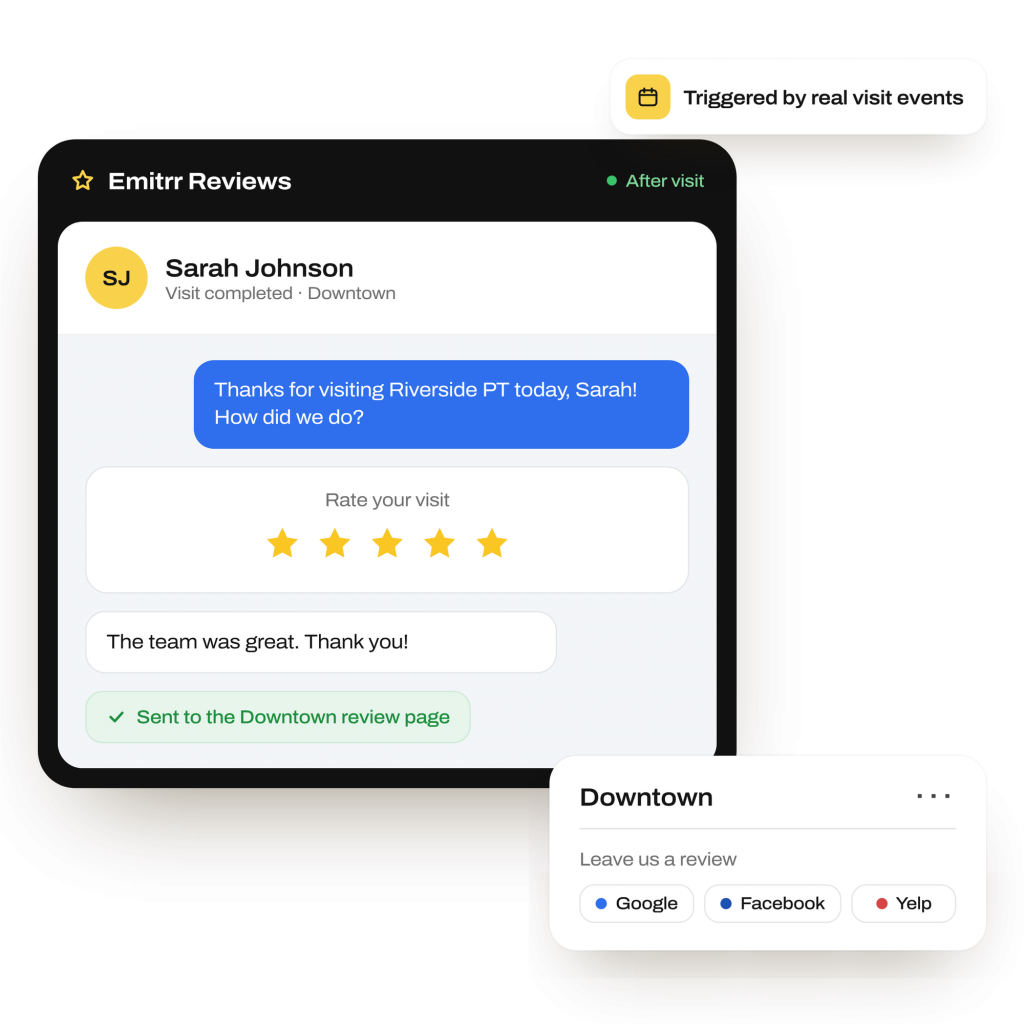
What is Emitrr’s Review and Reputation Management
Emitrr’s review and reputation management software helps healthcare practices and service businesses request reviews, collect feedback, and coordinate follow-up across locations.
- Feedback routing: Surveys direct satisfied respondents to public sites and dissatisfied responses to staff privately.
- Visit-based requests: Choose initial evaluation, discharge, visit type, or a set number of days after a visit.
- Local review pages: Each clinic gets a branded page with its own Google, Facebook, or Yelp review links.
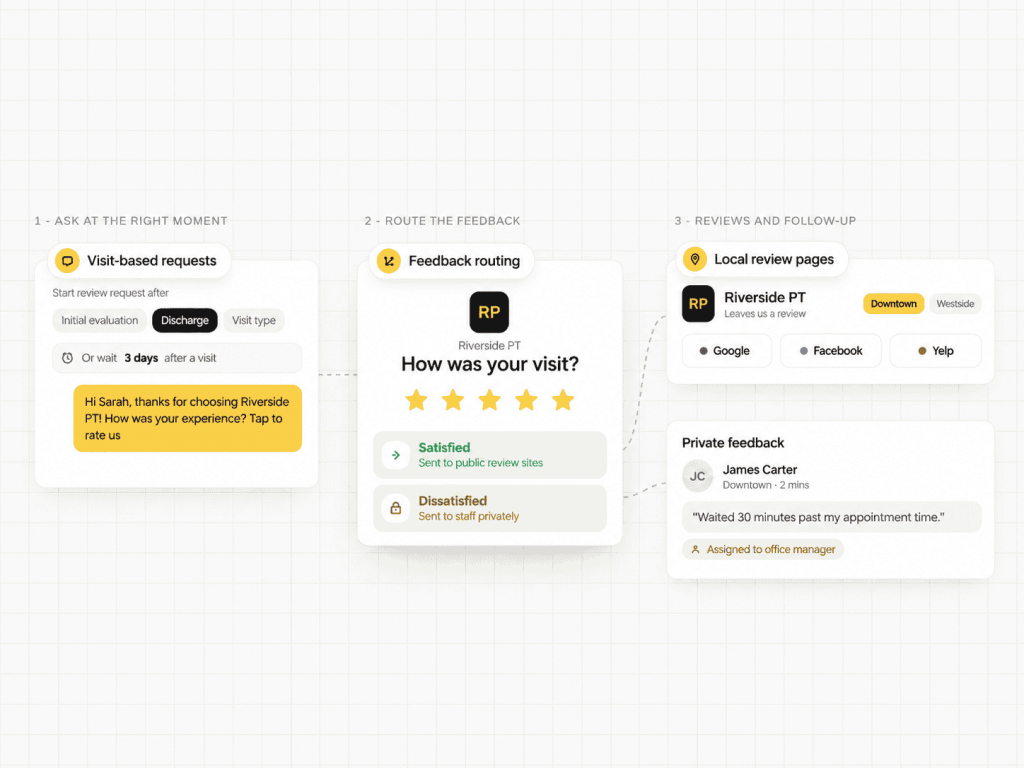
How Does Emitrr’s Review and Reputation Management Work
Set when patients receive a request, where their feedback goes, and who follows up.
Choose when to ask
Configure requests after a completed visit, initial evaluation, or discharge. Adjust timing by visit type or days since the appointment.
Send a personalized invitation
Send a review request by text or email using patient and visit details. Each location has its own branded review page.
Collect reviews and private feedback
The survey directs satisfied respondents to public review sites and dissatisfied responses privately to staff. Patients can still post independently.
What Emitrr’s Review and Reputation Management Can Do
A useful review program needs consistent invitations and a clear response process. Configure both around your visits, locations, and team.
Voice Agent
-
Public Review and Private Feedback Routing
Patient feedback surveys direct satisfied respondents to public sites and route dissatisfied responses privately to staff.
-
Review Page per Location
Give each clinic a branded page with its own public review links, keeping requests tied to the office visited.
-
Automated Post-Visit Review Requests
Send post-visit review requests after an initial evaluation, discharge, or a chosen number of days after the appointment.
-
Conditional Workflows
Adjust timing or channel by visit type or response. Review follow-up workflows can move from SMS to email to an AI call.
-
Templates and Personalization
Reuse review request templates for SMS and email, with fields for patient name, provider, and visit type.
-
Consent and Carrier Controls
Capture consent, honor opt-outs, and use registered 10DLC texting with controls for carrier and TCPA requirements.
-
EHR and Scheduling Triggers
Set EHR-triggered review requests from appointment completion, no-show, or visit-type events in connected systems.
-
Negative Feedback Capture
Store private patient feedback, route it to the responsible team, and create tasks. Emitrr does not publish internal responses.
-
Review Analytics and Reporting
Use review conversion tracking with send, open, click, and response rates. Compare campaigns and locations.
-
Location-Aware Routing
Send Google review requests and Facebook review requests, or Yelp links, for the clinic the patient visited.
-
Deliverability Tools
Use link shorteners and messaging patterns designed to reduce carrier filtering and help requests reach recipients.
SMS Agent
What Teams Use Review Requests For
Make requests part of routine follow-up and keep concerns assigned to staff. Review request automation supports a consistent process across your practice.
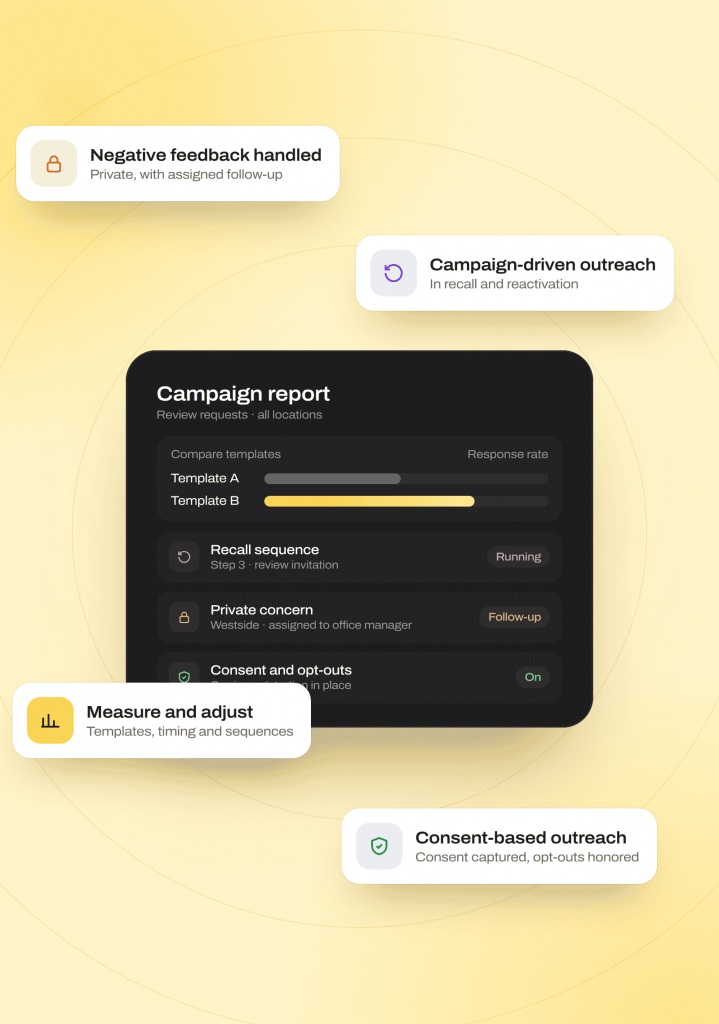
Review Collection Across Your Locations
Post-Appointment Review Collection
Request reviews for selected visits, such as initial evaluations. Stop further requests after a positive submission through the configured workflow.
Consistent Review Collection
Use review generation software to replace occasional manual requests with scheduled SMS review requests or email review requests tied to visits.
Tailored Follow-Up Sequences
Adjust invitations by patient segment, age, procedure, or language. Match request timing and messages to the experience being reviewed.
Multi-Location Reputation Management
Run one program across clinics. Keep each location’s review page and public links separate while reviewing results centrally.
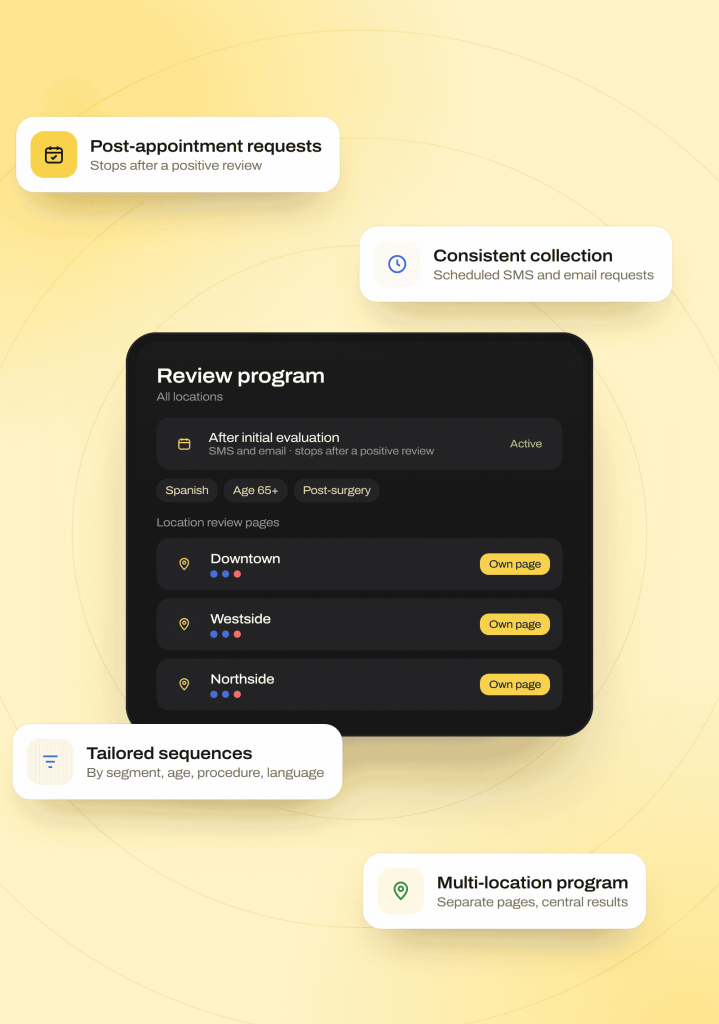
Feedback Follow-Up and Campaign Controls
Negative Feedback Management
Collect concerns privately and assign follow-up. Staff can respond to the reported experience without publishing the internal feedback.
Campaign-Driven Outreach
Include invitations in patient recall or reactivation sequences. Keep review collection connected to ongoing patient communication.
Measurement and Quality Checks
Compare templates, timing, and sequences through review campaign reporting. Use response and conversion data to adjust your program.
Consent-Based Outreach
Capture consent and honor opt-outs. Carrier registration and delivery controls help reduce filtering and blocking risk during outreach.
Where Emitrr Review and Reputation Management Fits Best
Healthcare webchat fits practices with website inquiries needing follow-up. Customer chat workflows also support booking, intake, and outreach across service businesses.
Industries
Specialities
Dental
As a dental AI receptionist, it handles recall and hygiene visit scheduling, new patient intake
Physical Therapy
New patient booking across multiple locations, rebooking cancellations
Orthopedics
Reducing no-shows through proactive rescheduling calls and texts
Pediatrics
Handling parent calls for scheduling, forms, and general questions
Dermatology
Managing high call volume for cosmetic and medical appointment requests
Urgent Care
Speeding up check-in and triage-style intake questions
Chiropractic
Filling last-minute cancellations automatically
Veterinary
Booking and rebooking pet visits without tying up front-desk staff
Primary Care
Managing high daily call volume across scheduling, refills, and referrals
Review Requests Triggered by What Actually Happened
Send invitations when configured events occur. Your team can review the response with the patient’s other communication before deciding how to follow up.
How the write-back works
-
01
Appointment completion, no-show, or selected visit-type events from your connected EHR or scheduler can trigger a request.
-
02
Each request uses the configured location’s Google, Facebook, or Yelp links to direct patients to the relevant listing.
-
03
Review history and replies appear alongside calls, texts, and AI summaries, with private feedback routed to staff for follow-up.
Connected systems









Why Businesses Choose Emitrr Over a Standalone Review Tool
Compare how a chat widget handles follow-up after visitors leave. Emitrr connects website conversations with your team’s shared inbox, records, and next actions.
| What Matters | Standalone Chat Widgets | Emitrr |
|---|---|---|
| When the visitor leaves | Check how follow-up continues | Two-way SMS continues in the same thread |
| Conversation history | Check connection to other channels | Same inbox as calls, texts, forms, and faxes |
| AI handling | Check channels and handoff support | AI with voice, SMS, and chat handoffs in one workflow |
| PHI handling | Check protected healthcare channels | Built-in OTP-verified secure chat for PHI |
| Healthcare integrations | Check supported records and actions | EHR connections including Spry, athenahealth, and eClinicalWorks |
| Routing | Check team and per-page controls | Location and skill-based routing with per-page widgets |
| Language support | Check translation options | Built-in two-way translation |
| Enterprise options | Check multi-location and partner support | 10DLC, number hosting, partner, and white-label models |
Built for Compliance-Sensitive Conversations
Patient conversations can include protected health information (PHI). Emitrr supports HIPAA-aligned workflows, with a Business Associate Agreement (BAA) available for healthcare customers.
HIPAA
Compliant
SOC 2
Type II
Trained for HIPAA-sensitive conversations with compliant scripting logic
Do-not-call lists, STOP requests, and consent capture are managed automatically on voice and SMS
Lowers the risk of spam, spoofed numbers, and misrouted conversations
Every call and text is logged with a transcript, recording (for calls), and AI summary
TLS 1.2+ in transit and AES-256 for stored data
Independently audited on security, confidentiality, process integrity, availability, and privacy
Staff see only the conversations and records their role requires
Redundancy across Availability Zones, with an RTO of four hours and an RPO of one hour or less
Real Results From Businesses Using Emitrr’s Review and Reputation Management
Before Emitrr, Pinnacle Medical Group had no system in place to actively collect patient reviews, some offices had as few as three, or even zero. Their appointment reminders were also one-way, with no ability for patients to confirm or ask questions. Emitrr’s two-way texting let patients confirm appointments and ask questions directly, reducing missed appointments and phone tag, while automated review requests drove a rapid jump in review volume and ratings across every office.
Read the Full Pinnacle Medical Group StoryHow Pinnacle Medical Group Improved Its Online Reputation with Emitrr
Pinnacle Medical Group, multi-specialty practice, 5 locations
4X
more website conversions
80+
hours of manual work saved
3x
Online reviews
4.9/5
Average rating across 400+ reviews
1,000+
Customers using the Emitrr platform
High volume
Handles simultaneous, high-volume call traffic without added staffing
Fewer routine calls
Automated refill and routine-call handling has cut overall call volume meaningfully for healthcare customers
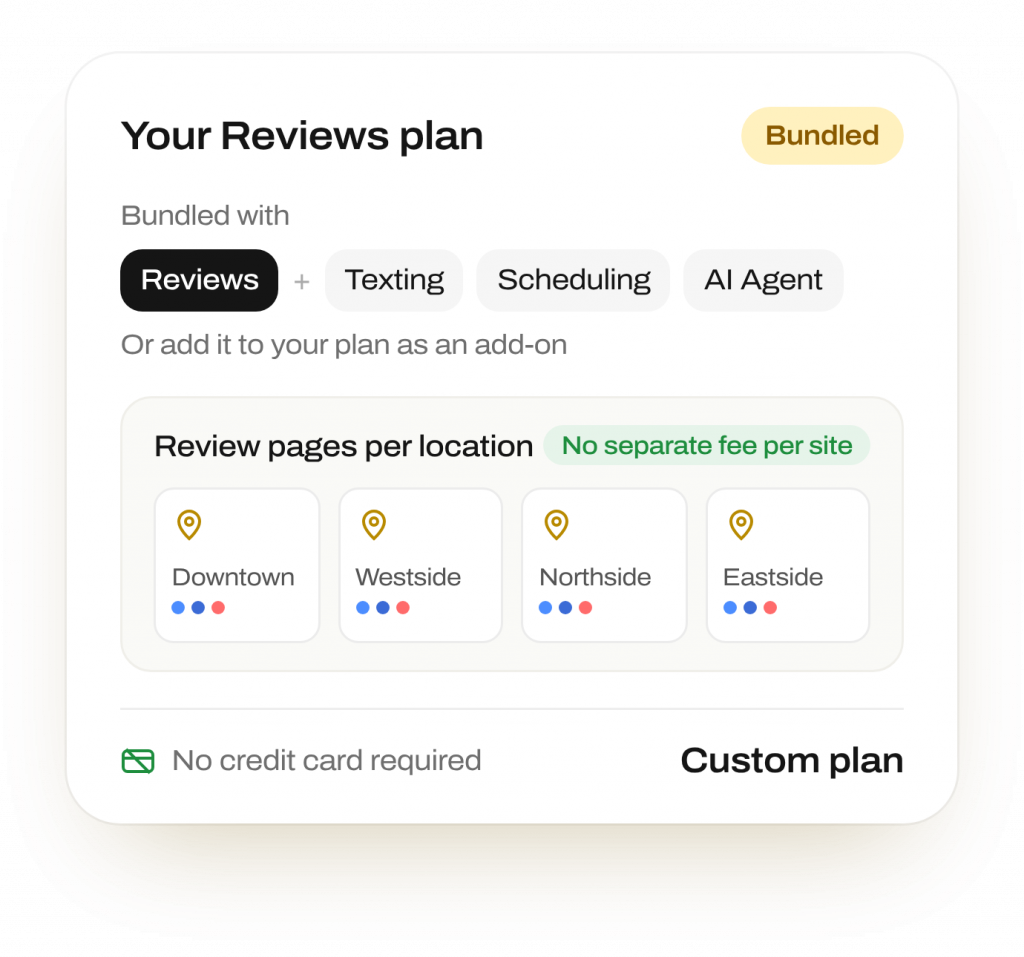
Simple, Bundled Pricing
Review and reputation management is bundled with Emitrr’s texting, scheduling, and AI Agent products, or available as an add-on
No credit card required to start · Flexible, usage-based pricing across voice and SMS
Frequently Asked Questions
No. Patients can post independently. Emitrr routes dissatisfied survey responses privately to staff and directs satisfied respondents to public sites. Your team can follow up, and Emitrr does not publish internal feedback.
Yes. Automated review requests follow configured events, such as completed appointments or selected visit types. You choose the timing and triggers, so staff do not send every invitation manually.
No. Each location has a branded page with its own Google, Facebook, or Yelp links. Requests direct patients to the clinic they visited.
Yes. Conditional workflows adjust timing and channel by appointment type and prior responses. Follow-up can move between SMS, email, and an AI call under your configured rules.
Yes. Registered 10DLC messaging, consent capture, and automatic STOP processing support carrier- and TCPA-aligned outreach. These controls help manage requests and honor recipient opt-outs across future campaigns.
Yes. Reporting covers send, open, click, and response rates, review conversion, and location performance. Compare campaigns to see which templates and timing lead to responses and completed reviews.
Yes. Connected appointment completion, no-show, and visit-type events can trigger requests. Emitrr works alongside athenahealth, eClinicalWorks, DrChrono, Dentrix, and other integrations.
Yes. Emitrr’s patient feedback software keeps review history and replies in the same inbox as calls, texts, and AI summaries. Staff can review context before responding or assigning follow-up.
Most businesses go live with Emitrr’s AI Agent within days. You set up prompts, knowledge sources, and fallback messages, and no developers are needed.
Make Review Requests Part of Patient Follow-Up
Give every location a consistent process for invitations, feedback, and staff follow-up.