

 4.9 (400+
reviews)
4.9 (400+
reviews)
Digital Patient Intake Forms Your Patients Can Finish From Their Phone
Send digital intake forms, consent, and screening in one text link. Emitrr tracks completion and reminds patients about unfinished forms, so your team can prepare before check-in.
Voice and SMS, one AI, live on your current number in days.
What is Emitrr Forms
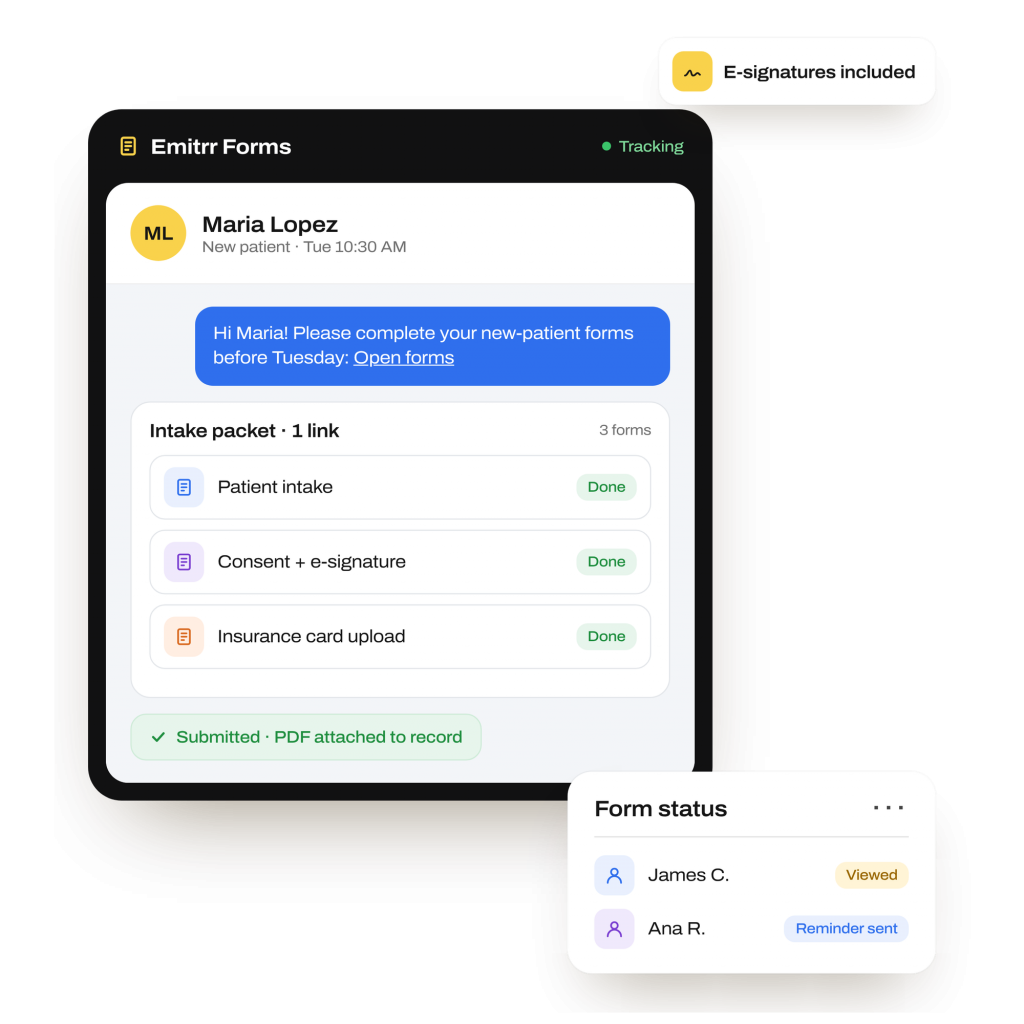
Emitrr Forms is patient intake form software for healthcare practices and service businesses. Build online patient intake forms, send them by text, and track responses in the conversation.
- One mobile packet: Bundle intake, consent, and screening in one link, with one submission and no portal login.
- Visible progress: Track viewed, partial, and submitted status. Automate delivery and unfinished-form reminders.
- Usable records: Keep downloadable PDFs on patient or contact records and trigger the next workflow step.
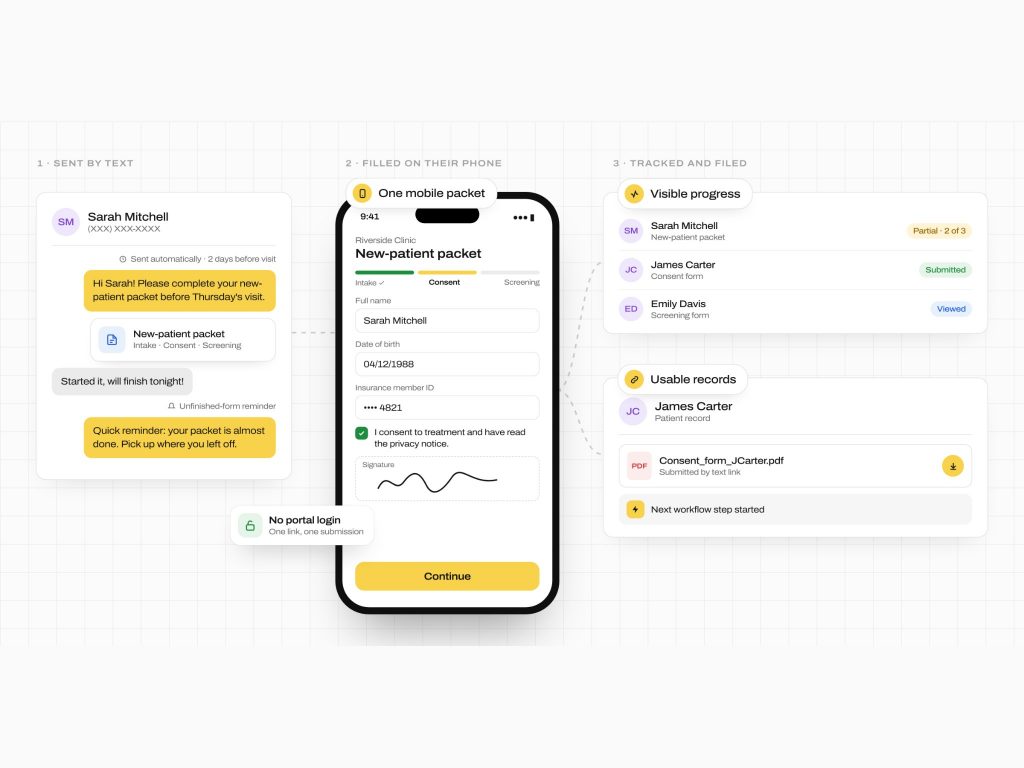
How Emitrr’s Form Works
Create the paperwork your practice needs, send it by text, and track it through completion.
Create your form packet
Start with a template or build a form. Add required fields, uploads, and signatures, then bundle related forms into one packet.
Send one link by text
Send the packet from the patient’s conversation or automatically after a configured event, such as a new appointment or missed call.
Patients complete it on their phones
Patients open the link, answer questions, upload documents, and sign. They submit the packet without a portal login.
What Emitrr Forms Can Do
Patients need a clear way to complete paperwork. Your team needs to know what’s still missing. Emitrr brings both into the same conversation.
Voice Agent
-
Mobile-Friendly Form Builder
Build mobile-friendly intake forms with text, number, and date fields, uploads, signatures, and instructions.
-
Single-Link Distribution
Send SMS intake forms through one secure, trackable link in a staff or AI reply. Patients open it on their phone.
-
Bundled Forms
Combine intake, consent, PHQ-9, and GAD-7 questionnaires in one packet, with a single submission.
-
Conditional Delivery
Send forms only when your rules apply. For example, skip a credit-card collection form for Medicaid patients.
-
Form Completion Tracking
See viewed, partial, and submitted status in the thread. Download completed responses as PDFs for review and charting.
-
Attachments and Media
Collect insurance card uploads, photos, and other files with the patient’s answers, reducing separate document requests.
-
Automated Form Reminders
Schedule follow-ups for unfinished forms and configure reminders to continue until the patient submits.
-
Record Handling
Store submitted forms as PDFs on patient or contact records. Staff can also download them manually for charting.
-
Integration Triggers
Use completion or non-completion to update a contact list, start follow-up, or notify the next team.
-
HIPAA-Capable Delivery
Use secure links, opt-out handling, and Business Associate Agreement (BAA)-backed workflows for regulated information.
-
Patient E-Signatures
Collect signatures on consent, financial responsibility, and intake documents. Retain signed responses for review.
-
100+ Template Library
Customize patient intake form templates and other ready-to-use forms instead of building every document from scratch.
SMS Agent
What Teams Use Digital Forms For
Digital forms help collect missing information at the point patients need to provide it, from the first inquiry through ongoing care.
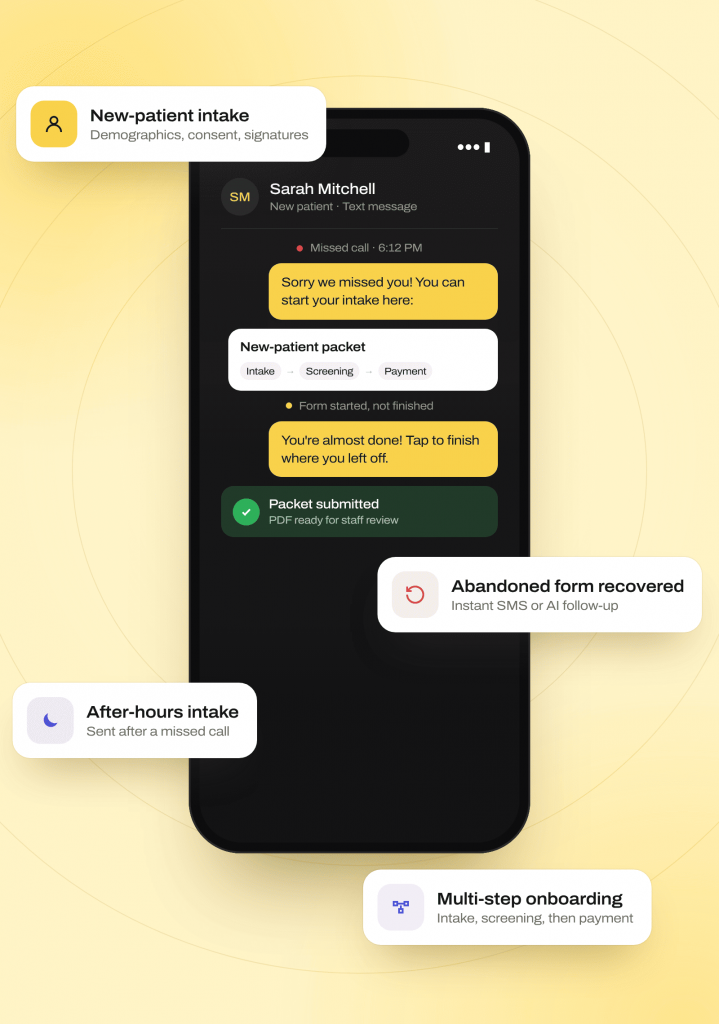
Starting and Completing Patient Intake
New-Patient Intake
Collect demographics, consent, and signatures through a bundled SMS link. Give staff a completed PDF to review before arrival.
Abandoned-Form Recovery
Detect abandoned web intake and send an immediate SMS or AI follow-up. Help the contact return to the unfinished form.
After-Hours or Missed-Call Intake
Send a form after a missed call or partial AI intake. Collect remaining details, including birth date, insurance, and signatures.
Multi-Step Onboarding
Send intake, screening, and payment forms in sequence. Workflow rules keep each step in order as the patient progresses.
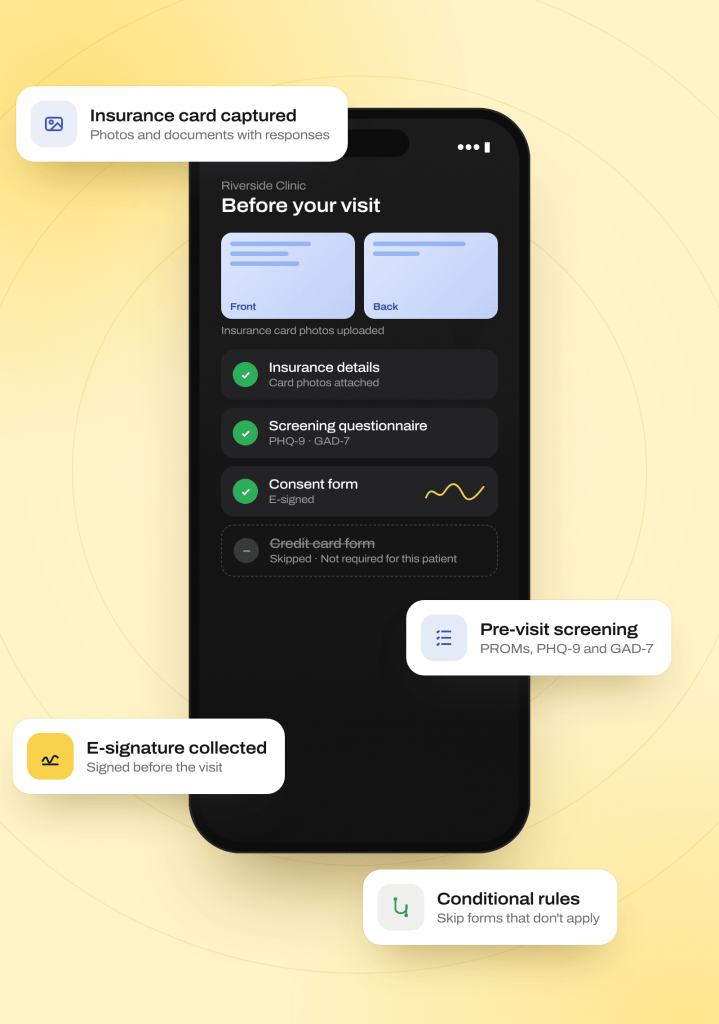
Collecting Details Before the Visit
Insurance and Documentation Capture
Collect insurance card photos and required documents with form responses. Reduce separate calls and messages for missing paperwork.
Pre-Visit Clinical Screening
Send pre-visit screening forms and patient screening questionnaires, including patient-reported outcome measures (PROMs), PHQ-9 for depression, and GAD-7 for anxiety.
Online Consent and Signatures
Send online consent forms and collect patient e-signatures before the visit. Retain signed responses for your team to review.
Billing and Financial Responsibility
Send financial responsibility and credit-card collection forms. Conditional rules skip documents that do not apply, including for Medicaid patients.
Coordinating Ongoing Forms and Records
Referral and Fax-Replacement Workflows
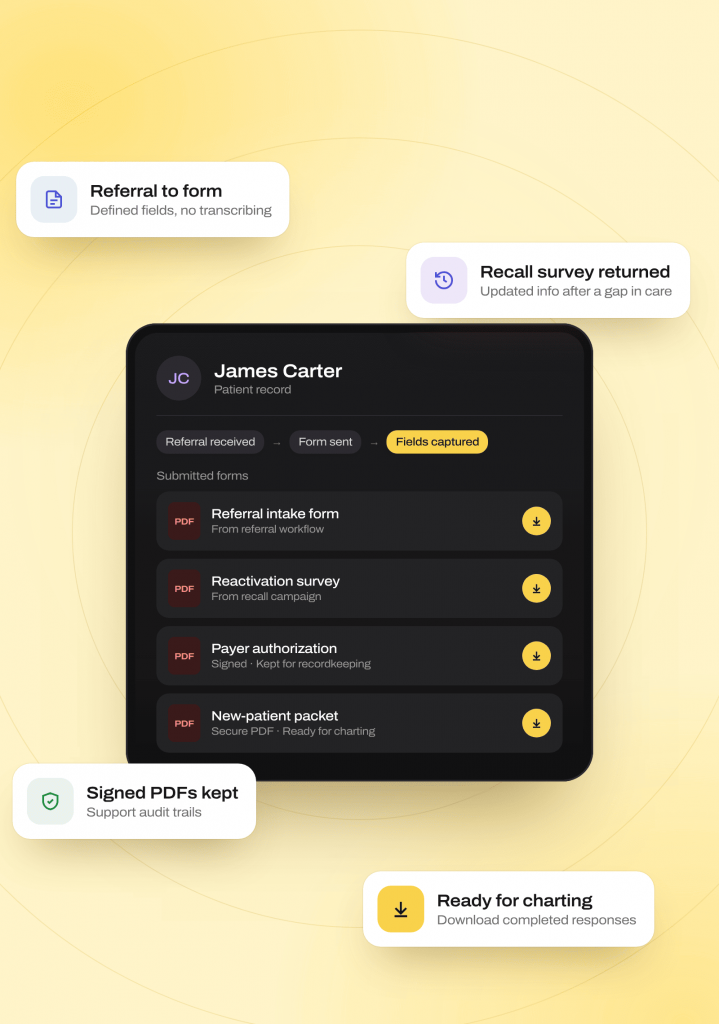
Turn an incoming referral into an SMS form workflow. Collect answers in defined fields rather than transcribing details from faxed paperwork.
Recall and Reactivation Campaigns
Include reactivation forms or short surveys in recall sequences. Collect updated information from patients returning after a gap in care.
Regulatory and Payer Documentation
Capture signed documents as PDFs for recordkeeping. Keep the paperwork available to support audit trails and compliance requirements.
Preparing Forms for Charting
Keep submitted forms as secure PDFs on patient or contact records. Staff can download completed responses for charting.
Where Emitrr Forms Fits Best
A healthcare form builder is useful when staff need information, signatures, or documents before an appointment. Emitrr also supports customer and applicant intake.
Industries
Specialities
Dental
As a dental AI receptionist, it handles recall and hygiene visit scheduling, new patient intake
Physical Therapy
New patient booking across multiple locations, rebooking cancellations
Orthopedics
Reducing no-shows through proactive rescheduling calls and texts
Pediatrics
Handling parent calls for scheduling, forms, and general questions
Dermatology
Managing high call volume for cosmetic and medical appointment requests
Urgent Care
Speeding up check-in and triage-style intake questions
Chiropractic
Filling last-minute cancellations automatically
Veterinary
Booking and rebooking pet visits without tying up front-desk staff
Primary Care
Managing high daily call volume across scheduling, refills, and referrals
Forms That Feed Your Existing Workflow
Patient intake automation should move the next task forward. Use form delivery and completion events to connect intake with charting and follow-up.
How the write-back works
-
01
Form responses update EHR fields directly where your integration supports write-back.
-
02
Where direct updates are unavailable, completed forms are stored as secure PDFs. Staff can download them for charting.
-
03
Completed or unfinished forms can update contact lists, start follow-up sequences, or notify the responsible team
Connected systems







Why Businesses Choose Emitrr Forms Over a Form-Hosting Tool
Keep intake connected to the people answering patient questions. Compare delivery, progress tracking, and record handling when reviewing form-hosting tools.
| What Matters | Form-Hosting Vendors | Emitrr |
|---|---|---|
| Where forms live | Check how forms connect to communication | Delivered and tracked beside calls and texts |
| Delivery format | Check packet and mobile-link options | Multiple forms in one mobile link |
| Automation | Check reminder and workflow requirements | Built-in reminders, triggers, and rules |
| Two-way communication | Check whether patients can reply | Two-way SMS from your office number |
| AI integration | Check voice and SMS agent support | AI can send forms during a conversation |
| Record handling | Check EHR linkage and export options | Record PDFs and manual downloads; field updates where supported |
| Visibility | Check which staff can view progress | Viewed, partial, and submitted status in the conversation |
Built for Regulated Data Collection
Collect patient information through protected form workflows, with secure uploads and signed responses available for staff review.
HIPAA
Compliant
SOC 2
Type II
Trained for HIPAA-sensitive conversations with compliant scripting logic
Do-not-call lists, STOP requests, and consent capture are managed automatically on voice and SMS
Lowers the risk of spam, spoofed numbers, and misrouted conversations
Every call and text is logged with a transcript, recording (for calls), and AI summary
TLS 1.2+ in transit and AES-256 for stored data
Independently audited on security, confidentiality, process integrity, availability, and privacy
Staff see only the conversations and records their role requires
Redundancy across Availability Zones, with an RTO of four hours and an RPO of one hour or less
Real Results From Businesses Using Emitrr Forms
Niagara Falls Urgent Care needed a faster, more accurate way to handle appointment bookings and patient paperwork.
Read the full Niagara Falls Urgent Care storyHow Niagara Falls Urgent Care Streamlined Operations With Emitrr
With Emitrr, patients began receiving appointment reminders by text and completing intake forms online instead of on paper at check-in, cutting down on data-entry mistakes and freeing up front-desk time.
90+
hours of manual work saved
Fewer
booking and intake errors from moving forms online
Faster
smoother check-in for patients
4.9/5
average rating across 400+ reviews
1,000+
customers using the Emitrr platform
SOC 2 Type II
audited infrastructure
Hippa Safe
HIPAA-safe PHI exchange available
Simple, Bundled Pricing
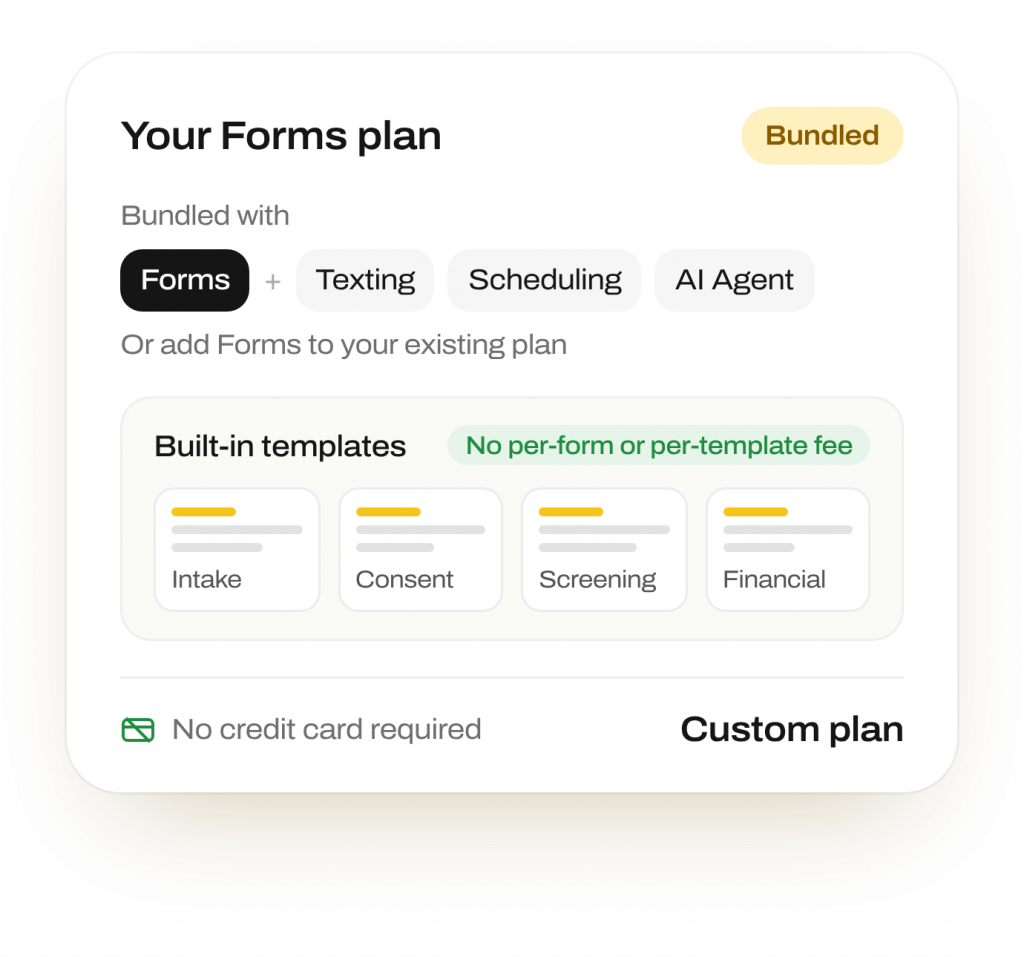
Forms are bundled with Emitrr’s texting, scheduling, and AI Agent products, or available as an add-on to an existing plan
No per-form or per-template fee for using the built-in template library · No credit card required to start
Frequently Asked Questions
Yes. Bundle digital patient intake forms, consent documents, and screening questionnaires in one link. Patients open the packet on their phone and submit it together.
Yes. Send patient forms by text for completion on a phone. Forms also work on tablets and desktop computers, so patients can use the device available to them.
Emitrr tracks viewed, partial, and submitted status. Configure automated form reminders for unfinished responses until submission. Staff can review progress alongside the patient’s texts.
Yes. Patients can upload files and photos with their responses, including insurance cards and other required documents. Your team receives those files with the submitted information.
Yes, where direct field updates are supported. Otherwise, use secure PDFs attached to the patient or contact record, or download them for charting. PDF storage does not mean every answer updates an EHR field.
Yes. Emitrr Forms uses secure links and BAA-backed healthcare workflows. E-signature support and platform encryption protect the collection and storage of regulated information.
Yes. A missed call, abandoned web booking, or new appointment can trigger delivery. Conditional rules control which forms each patient receives and skip documents that do not apply.
Yes. The AI Agent can collect initial details by phone or text, then send a form link for remaining information, document uploads, or a signature.
Get Patient Paperwork Ready Before Check-In
Put form delivery, completion tracking, and follow-up into your team’s existing conversation.