

 4.9 (400+
reviews)
4.9 (400+
reviews)
Online Appointment Scheduling Software Connected to Your EHR
Emitrr’s online appointment scheduling software lets patients book through text, phone, or web. Automate confirmations and offer cancellations to your waitlist, with EHR schedule where supported, reducing routine calls for your team.
Use desk phones, softphone, and mobile, all on your existing number.
What is Emitrr’s Online Scheduling
Emitrr’s online scheduling is patient scheduling software for healthcare practices and appointment-based businesses. Patients book through links or AI conversations by text, phone, or webchat.
- Connected booking: Update supported EHRs directly or create a request for staff to review and confirm.
- Two-way follow-up: Collect confirmation replies, send reminders, and notify waitlisted patients about openings.
- One patient thread: Keep bookings, changes, intake details, and other communication together for staff.
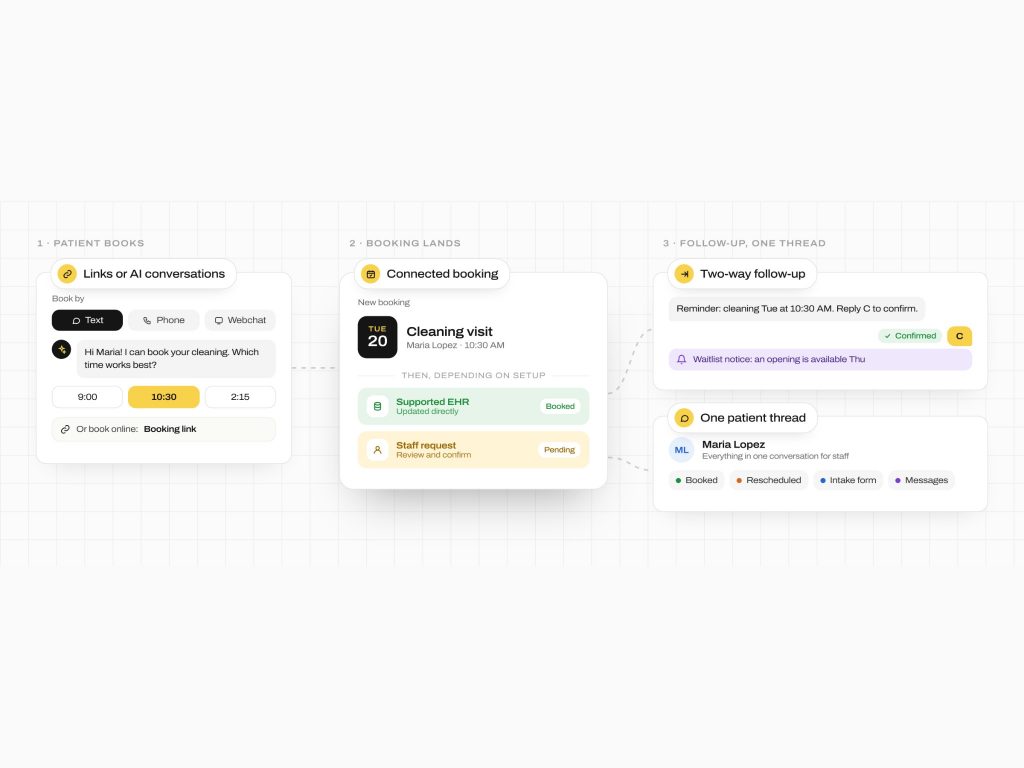
How Emitrr’s Online Scheduling Works
Give patients a way to book, then keep confirmations and appointment changes connected to your practice’s schedule.
Set your booking rules
Choose scheduling options by visit type, provider, location, language, or payer. Decide which requests need staff approval before confirmation.
Help patients choose an appointment
Patients use a booking link or speak with AI by phone or text. AI collects availability and intake details to guide the request.
Book or send for staff review
Create appointments directly where your EHR supports it. Otherwise, send a booking link or create a structured request for staff confirmation.
What Emitrr’s Online Appointment Scheduling Software Can Do
Patients can start booking in different ways. Your team controls which appointments can be automated and which need staff review.
Voice Agent
-
Two-Way Scheduling Links
Share appointment booking links from calls, missed-call texts, or workflows using the native widget, Acuity, or Calendly.
-
AI Receptionist Booking
Collect availability and intake details after missed or after-hours calls. Send a link or book directly where supported.
-
EHR-Aware Booking and Confirmations
Pull patient details and send booking or confirmation updates to your EHR where the integration supports them.
-
Conditional Booking Rules
Offer calendars by visit type, provider, location, language, or payer. Route patients according to your rules.
-
Two-Way Reminders and Confirmations
Send SMS, email, or AI reminders. Use replies for automated appointment confirmations and follow-up branches where supported.
-
Missed-Call Scheduling
Follow up through AI or SMS when staff cannot answer. Give missed callers a next step toward booking.
-
Webchat Handoff to Scheduling
Offer a booking link in website chat or continue through SMS or AI, keeping booking tied to the inquiry.
-
Waitlist and Open-Slot Automation
Notify selected patient groups about an opening. Patient waitlist management gives them a link to self-book.
-
Secure Scheduling for PHI
Use one-time passcode (OTP)-protected chat links when booking needs protected health information (PHI).
-
Forms and Intake Automation
Text intake forms with signature fields. Track completion and attach completed PDFs to the patient chart.
-
Multichannel Workflow Builder
Combine SMS, email, AI calls, delays, and reply-based branches for scheduling follow-up and patient recall campaigns.
-
Click to Text or Call From the Chart
Start a scheduling conversation through the Chrome extension in your EHR or CRM, with patient details loaded.
-
Multilingual Scheduling
Use automatic message translation and language-specific voice and text workflows to guide patients through booking.
-
Human Handoff and Review
Transfer AI conversations to staff. Set emergency transfer rules and queue requests for review before confirmation.
-
Appointment Scheduling Analytics
Review bookings, confirmations, no-show impact, calendar use, and the channels leading to appointments.
-
Flexible Deployment
Start with AI data collection and staff verification. Use direct EHR booking where supported or booking links otherwise.
SMS Agent
What Emitrr’s Online Scheduling Solves For
Automated appointment scheduling helps routine requests move forward. Use scheduling workflow automation with staff review where your practice needs it.
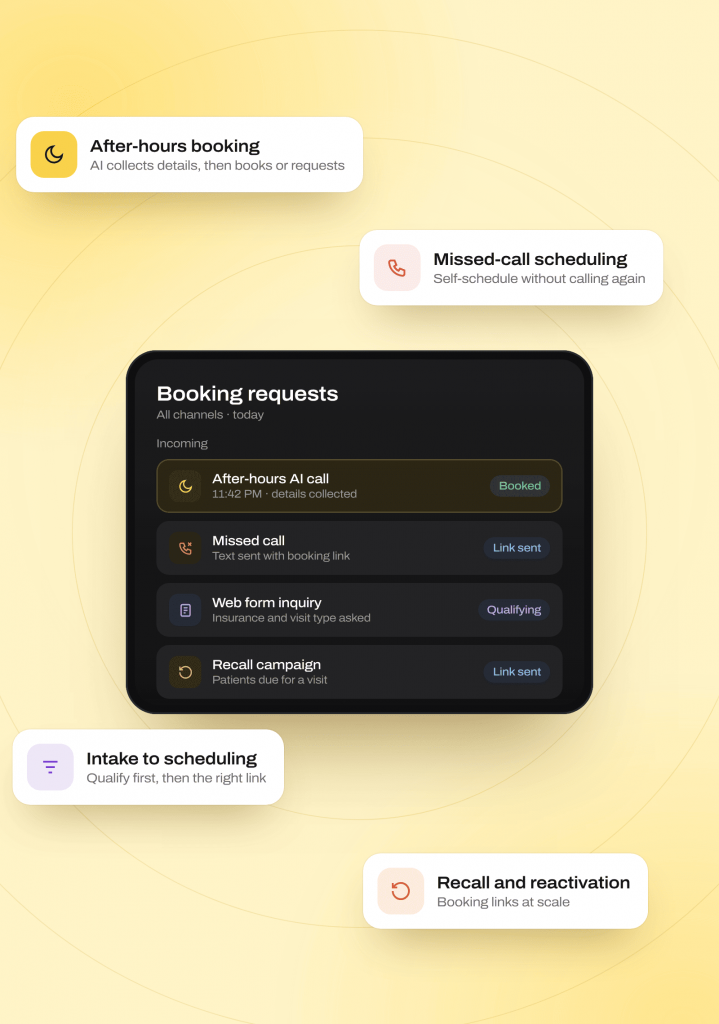
Booking and Intake Across Channels
After-Hours Appointment Booking
Use AI appointment scheduling to collect details. Book where EHR updates are supported, send a link, or create a request for staff confirmation.
Missed-Call Scheduling
Turn a missed call into a text with a booking link. Give patients a way to self-schedule without calling again.
Intake-to-Scheduling Workflows
Route web, chat, and form inquiries into SMS, email, and AI follow-up. Collect qualification details before offering the appropriate booking link.
Recall and Reactivation Booking
Use patient recall campaigns and reactivation lists to offer booking links at scale. Connect returning patients with the next scheduling step.
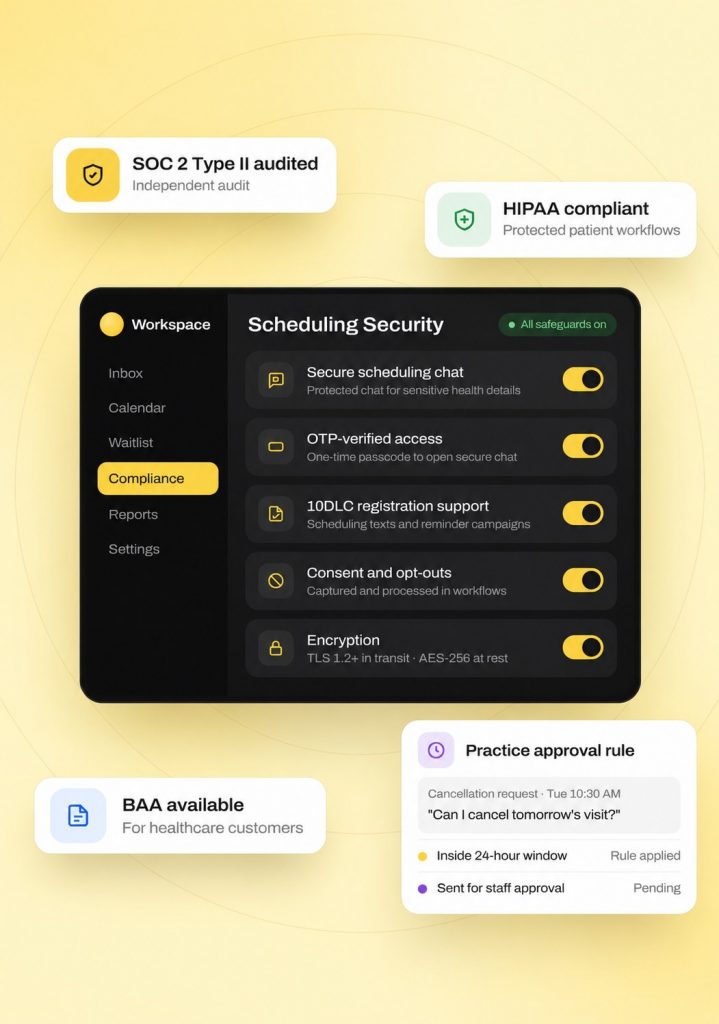
Schedule Updates and Practice Controls
EHR Booking and Confirmation Updates
Create bookings, requests, or status updates in supported EHRs. Two-way appointment reminders collect confirmations and cancellations under your rules.
Waitlist and Open-Slot Outreach
Use waitlist automation to notify selected patients about an opening. Give them a booking link; filling the slot depends on a patient choosing it.
Rescheduling and Cancellation Rules
Use appointment rescheduling and appointment cancellation management with approval rules, such as staff review inside a 24-hour cancellation window.
Controlled Booking Across Providers
Collect visit type, insurance, availability, and provider preference. Use multi-location scheduling and multi-provider scheduling with staff review or direct booking where supported.
Where Online Scheduling Fits Best
Medical appointment scheduling software fits teams managing frequent bookings and changes. Service businesses can use the same approach for structured appointments.
Industries
Specialities
Dental
As a dental AI receptionist, it handles recall and hygiene visit scheduling, new patient intake
Physical Therapy
New patient booking across multiple locations, rebooking cancellations
Orthopedics
Reducing no-shows through proactive rescheduling calls and texts
Pediatrics
Handling parent calls for scheduling, forms, and general questions
Dermatology
Managing high call volume for cosmetic and medical appointment requests
Urgent Care
Speeding up check-in and triage-style intake questions
Chiropractic
Filling last-minute cancellations automatically
Veterinary
Booking and rebooking pet visits without tying up front-desk staff
Primary Care
Managing high daily call volume across scheduling, refills, and referrals
Scheduling Tied to Your Real Calendar, Not a Separate One
EHR-integrated scheduling keeps supported bookings and reminders tied to your real calendar. Booking links provide another path when direct updates are unavailable.
How the write-back works
-
01
Emitrr reads appointment availability and patient details from supported EHR integrations to guide booking.
-
02
Bookings, confirmations, and scheduling changes update the connected EHR where those actions are supported, following your configured approval rules.
-
03
Where direct booking is unavailable, use booking links or structured requests for staff review and confirmation.
Connected systems









Why Businesses Choose Emitrr Over a Standalone Booking Widget
Compare how booking connects to replies, records, and staff review. Emitrr supports patient self-scheduling within your broader communication workflow.
| What Matters | Booking Widgets or VoIP Providers | Emitrr |
|---|---|---|
| EHR write-back | Check direct booking support | Reads schedules and writes appointments where supported |
| Reply handling | Check response options | Office-number replies and supported schedule updates |
| AI booking | Check AI and handoff support | Voice and SMS AI collects details, books, or hands off |
| Where it lives | Check calendar and inbox connections | Same inbox as calls, texts, and forms |
| Rollout flexibility | Check staff-review options | Data collection, staff confirmation, or direct booking |
| Compliance | Check healthcare safeguards | HIPAA workflows, OTP-secure chat, and conditional rules |
Built for Secure Patient Scheduling
HIPAA-compliant scheduling includes protected patient workflows and practice approval rules. Keep sensitive information and appointment changes within those controls.
HIPAA
Compliant
SOC 2
Type II
Trained for HIPAA-sensitive conversations with compliant scripting logic
Do-not-call lists, STOP requests, and consent capture are managed automatically on voice and SMS
Lowers the risk of spam, spoofed numbers, and misrouted conversations
Every call and text is logged with a transcript, recording (for calls), and AI summary
TLS 1.2+ in transit and AES-256 for stored data
Independently audited on security, confidentiality, process integrity, availability, and privacy
Staff see only the conversations and records their role requires
Redundancy across Availability Zones, with an RTO of four hours and an RPO of one hour or less
Real Results From Businesses Using Emitrr’s Scheduling
Before Emitrr, Dr. Mary Tilak and Associates ran patient communication almost entirely through a landline, with no way to track missed calls, wait times, or handling time. Roughly 40% of incoming calls went missed due to volume, which, at an average visit value of $300, represented a potential loss of $390,000. Patients also had to log into a portal just to communicate with the practice, adding friction to every interaction.
Read the full Dr. Mary Tilak storyHow Dr. Mary Tilak and Associates Reduced No-Shows by 90% with Emitrr
Dr. Mary Tilak and Associates, primary care, 2 locations (Schererville and Highland, Indiana)
After implementing Emitrr’s scheduling and reminder workflows, confirmations and rescheduling moved to two-way text, cutting no-shows dramatically.
90%
reduction in no-shows
15X
growth in patient reviews
Consistent
trackable scheduling communication across both locations
4.9/5
average rating across 400+ reviews
1,000+
customers using the Emitrr platform
SOC 2 Type II
audited infrastructure
Compatible Yealink and Polycom
phones supported, so practices may reuse existing hardware.
Simple, Scalable Pricing
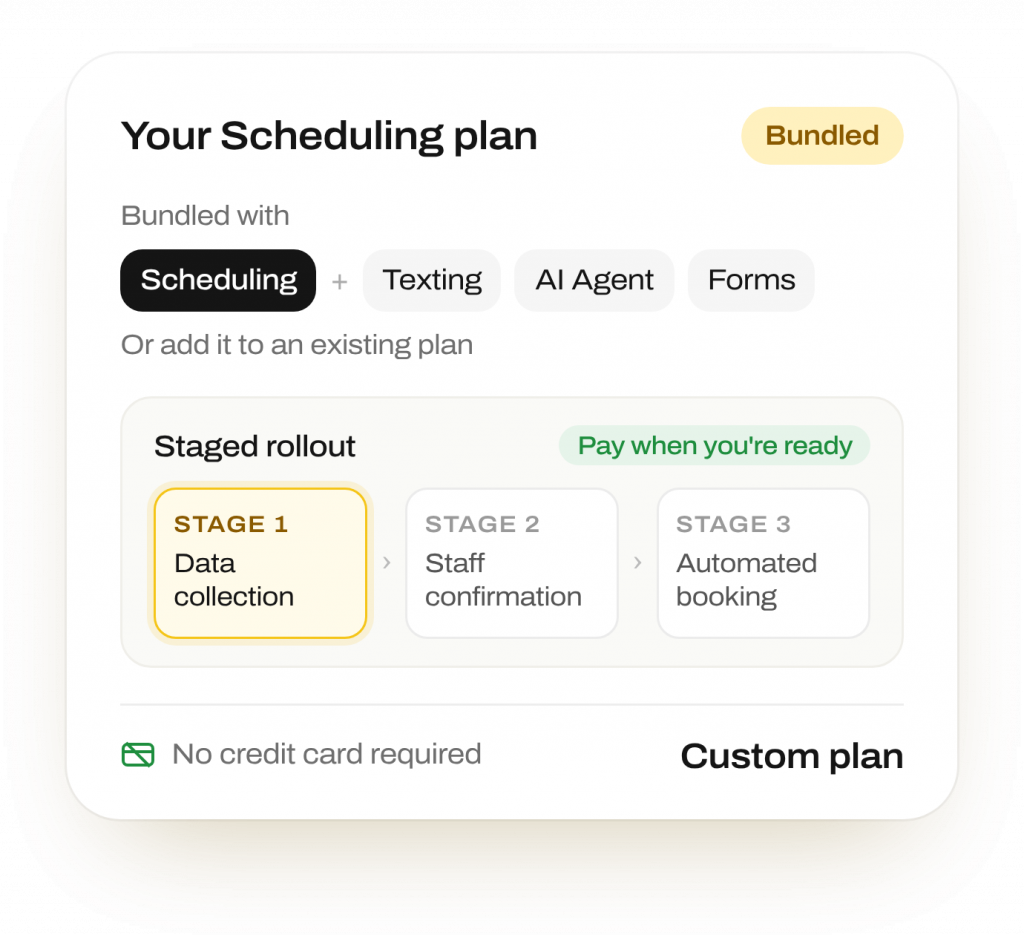
Bundle scheduling with texting, AI Agent, and forms products, or add it to an existing plan. Staged rollout lets you choose data collection, staff confirmation, or automated booking before paying for capabilities you are not ready to use.
Pilot and multi-location/MSO pricing pathways available · No credit card required to start
Frequently Asked Questions
Yes, where the EHR supports direct updates. Emitrr’s online appointment scheduling software creates bookings in supported systems. Otherwise, it creates a structured request for staff review and confirmation.
Yes. Patients can confirm, cancel, or ask questions by replying. Schedule updates depend on your EHR integration, and practice rules can require staff approval before a change is final.
Emitrr can notify selected waitlisted patients and send a link to book the opening. Filling the slot depends on a patient choosing the available time.
Yes, where EHR updates are supported. AI collects availability and intake details, then books, sends a link, or creates a tentative request for staff confirmation under your configured workflow.
No. Start with AI data collection and staff confirmation. Move to automated booking where supported, or keep staff review and links for appointments needing human approval.
Yes. Messages can be translated automatically. Voice and text workflows support language-specific routing, letting patients follow the configured booking process in supported languages.
Yes. Set approval rules around your policy. For example, requests inside a 24-hour window can require staff approval before a cancellation is finalized.
Yes. OTP-protected secure chat links are available for workflows collecting PHI. A BAA is available for healthcare customers, with encryption protecting data in transit and at rest.
Give Patients a Clear Path to Booking
Connect appointment requests and follow-up to the schedule your team already manages.