

Introduction
A patient decides to book a primary care appointment. They open your website. What happens next says a lot about whether that patient becomes a patient at your practice at all.
We audited 50 U.S. primary care practice websites to answer one question: can someone book an appointment without picking up the phone? We scored each website on a simple 0 to 2 scale: phone-only, a middle tier with things like forms or chat but that still needed a staff reply, or fully self-serve.
The result: 90% of the sites we reviewed still make a patient wait for a callback, or fill out a form and hope for a response, or dial in directly. Only 5 practices let a patient get help or book without any staff involvement.
We will walk you through what we found, what the gap looks like on a website, and what separates the handful of practices that got it right from the overwhelming majority that didn’t.
How We Audited the Websites
Our team reviewed 50 U.S. primary care practice websites, each one visited manually and scored against a fixed rubric. No assumptions, no benefit of the doubt for a page that “probably” has a chat option buried somewhere. If it wasn’t visible and usable during the visit, it didn’t count.
The scoring system:
0, Absent: The only path to an appointment is a phone call. No chat, no SMS, no form, nothing that lets a patient start the process on their own.
1, Gated: Some kind of self-service request exists (a form, a callback request, a chat widget, an SMS line), but a staff member still has to respond before anything is confirmed. The patient starts the process alone and finishes it with a human.
2, Self-serve: The patient can get an answer or book an appointment through online scheduling, AI chat, or SMS, without relying on a callback or manual follow-up from the practice. The patient can move from intent to action in a single, streamlined experience.
The Results: 92% Still Make Patients Wait or Call
Of the 50 sites audited:
- 26 sites (52%) scored Absent (Tier C). No self-service option of any kind. Phone only.
- 19 sites (38%) scored Gated (Tier B). Patients can start the process online, but completing the request still depends on a response from the practice.
- 5 sites (10%) scored Self-serve (Tier A). A patient can get help or book with zero staff involvement.
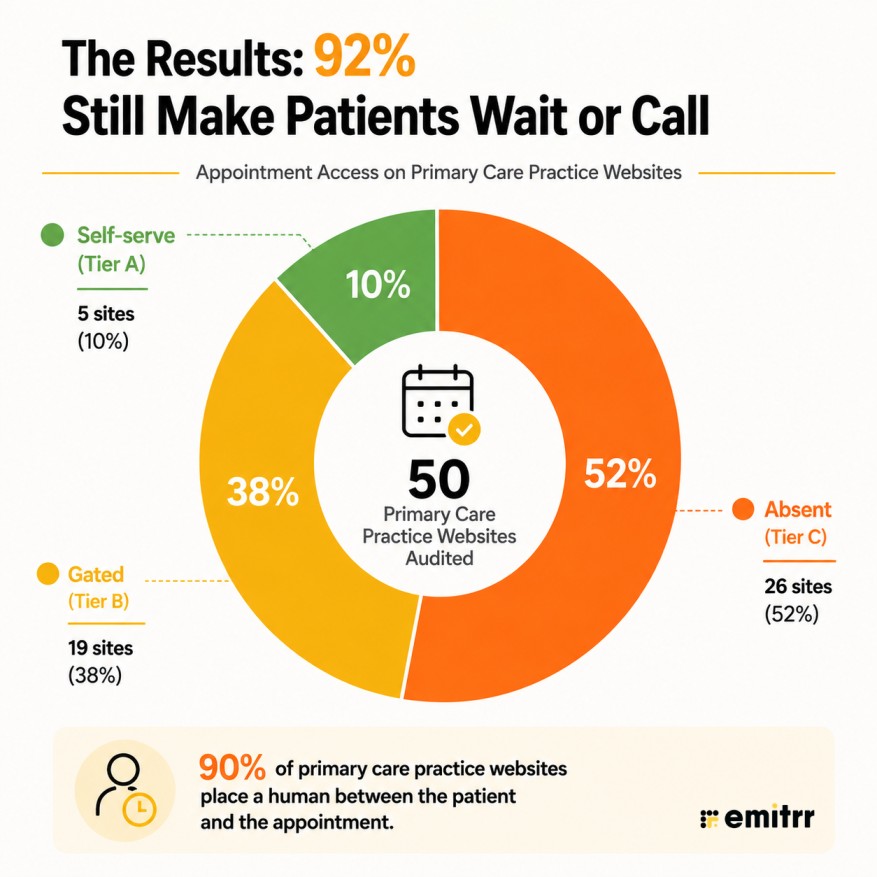
Taken together, the headline number is stark: 90% of primary care websites place a human between the patient and the appointment. It doesn’t matter if that human is answering a phone or reading a form submission. Only 1 in 10 remove that step entirely.
Tier C: What “Absent” Looks Like
An Absent score means the practice’s website offers nothing beyond a phone number. No chat, no SMS, no contact form, no way to start the appointment process without dialing in.
For a patient, that’s a real challenge, not just a mild inconvenience. It means booking only happens during business hours, when someone is there to answer. It means sitting on hold or leaving a voicemail and waiting for a callback.
It means a patient searching for a new doctor at 9 pm has nothing to do but write the number down and hope they remember to call the next day, by which point they may have already called someone else instead.
More than half the sites we reviewed, 26 of 50, landed here, and they got there a few different ways.
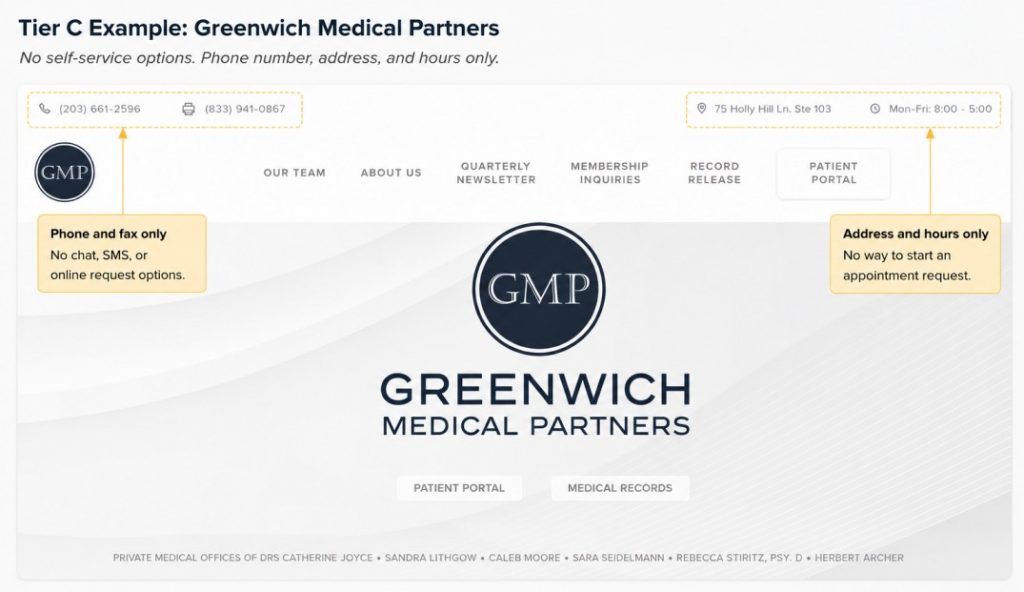
- Greenwich Medical Partners is the bare-minimum version: phone number, fax, address, and hours, and nothing more. No form, no chat, no path to start a request at all.
- Osler @ Home buries what little it has. The homepage offers a call option only. A form exists, but only after navigating to a separate “Contact Us” page, a step most patients won’t bother taking.
- MedNOW Clinics sets up a trap. There’s a “Book an Appointment” link on the page, which suggests a real booking flow. Clicking it just shows a list of locations, hours, and phone numbers. The button promises self-service and delivers a directory listing.
The common thread across websites like these: even when a site looks well put together, the actual mechanism for getting an appointment easily is still broken. A clean homepage and a working booking system are not the same thing, and patients find that out the moment they try to act on it.
Tier B: Why Gated Access Still Creates Friction
Some practices offer a form, a callback line, or a chat widget. A step up from phone-only websites, since the patient can start the process on their own time instead of waiting for business hours. But a staff member still has to act before anything is confirmed. The patient doesn’t know if or when they’ll actually get an appointment until someone on the other end responds. The wait just moves from the phone line to an inbox.
38% of the sites we reviewed, 19 of 50, scored here, and they tend to show up in a few different ways.
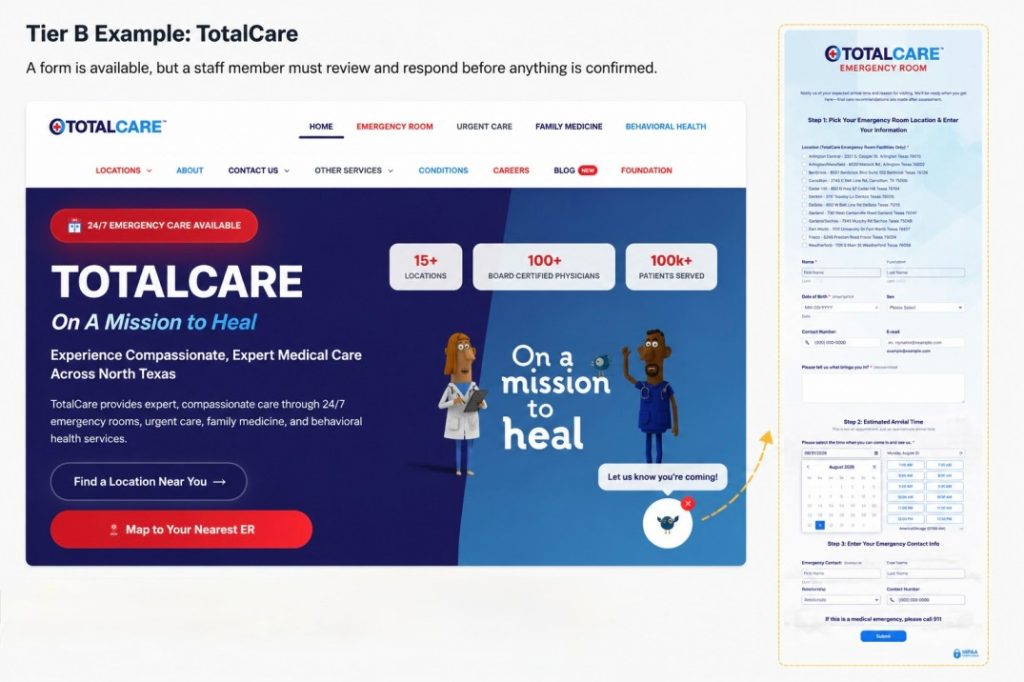
- TotalCare represents the classic version: a “Let us know you’re coming” flow through JotForm that asks for a location, personal details, an appointment time, and an emergency contact, all before anything is actually confirmed. It feels like booking. It’s really a detailed message left for staff to act on later.
- Evans Medical Group shows how a chat widget can look like progress and still not be one. There’s a widget in the corner of the page, but it isn’t live, so response time varies, and there’s no way to book an appointment through it at all.
- Blue Zones Health buries the one thing a Gated site should make easy. The phone number isn’t visible on the page. Finding it means opening the chat widget, clicking into FAQs, and locating it under a question about patient eligibility, several steps to reach the most basic piece of contact information.
- Prima Primary Care & Wellness shows what a redirect chain looks like in practice. “Book an appointment” leads to a portal, which offers “log in to patient portal” or “book an appointment,” and that second option redirects again to a different scheduling platform. Two redirects and a login prompt stand between the button and an actual open slot.
That last example points to the real distinction worth holding onto: a chat widget or a booking link is not the same thing as removing friction. If the patient still has to wait for a human, navigate multiple redirects, or create an account before they can see availability, the channel exists, but the barrier it was supposed to remove hasn’t moved.
What the 10% Self-Serve Websites Do Differently
A Self-serve score means the patient can get an answer or book an appointment without anyone on staff getting involved at all. No wait for a callback, no form sitting in a queue.
For a patient, this is the difference between finishing what they came to do in one sitting versus starting a process and hoping the request gets picked up.
Only 5 of the 50 sites we reviewed cleared that bar, and the pattern across them is something to learn from.
| Website | Tool Used | How It Handles Appointments |
|---|---|---|
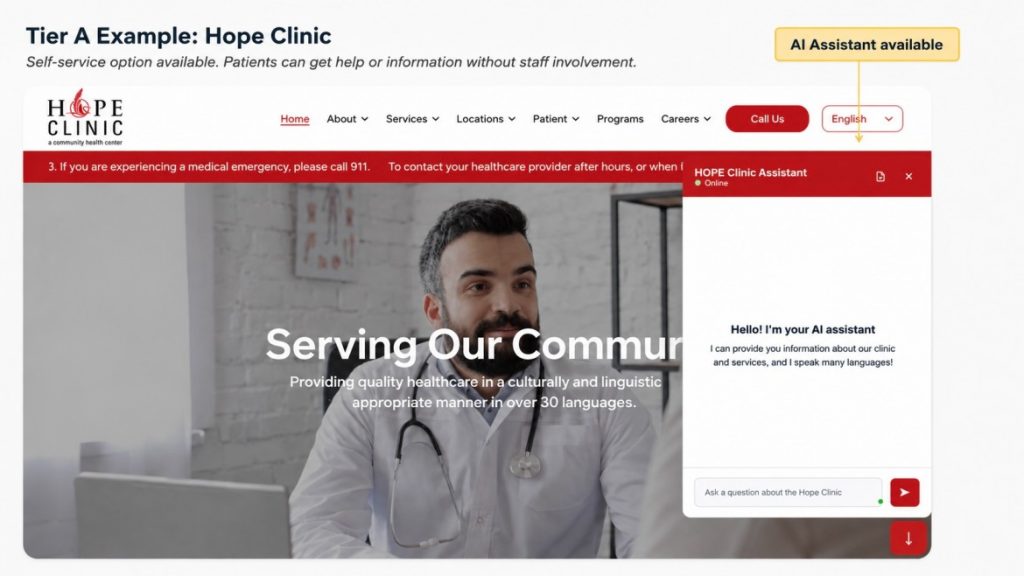
| HOPE Clinic | Custom AI agent (Wix-embedded) | The chat opens instantly in the corner of the page, no login required, and answers questions about services in multiple languages. A patient can ask what they need and get guided toward booking in the same conversation, without waiting on a callback. |
| Complete Health Partners | AI agent | Patients can book directly through the agent, alongside asking clinical or general questions, instead of being routed to a separate form. The scheduling and the Q&A happen in one place. |
| NIVA Health | AI assistant | The assistant can schedule an appointment directly once a patient shares basic contact details, or connect them to a real person if they’d rather talk to someone. Either way, the booking step doesn’t wait on staff to follow up later. |
| Valley Health Columbus | Virtual assistant | Booking happens through the assistant itself or through a dedicated texting line, so a patient can confirm an appointment by chat or SMS without ever picking up the phone. |
| Jaimes Medical Group | NexHealth integration | “Book appointment” opens real, available time slots immediately. The patient picks one and confirms it on the spot, with no login or account creation standing in the way. |
What ties these five together isn’t a single piece of software. It’s that each one collapses the distance between “I have a question” and “I have an answer” down to one interaction, with no wait and no handoff. The examples in this audit offer a useful benchmark for what self-serve appointment access can look like in practice. The same approach can extend beyond scheduling, giving patients easier ways to get answers, communicate through SMS, receive updates, and manage routine requests across the patient journey.
How a Primary Care Website Can Build a Frictionless Booking Experience
Hope our audit helped you see where appointment access breaks down for patients. Here’s a checklist to make the patient booking experience frictionless on your website.
Make appointment booking available around the clock. Give patients a way to start and complete the booking process even when the front desk is closed. This is especially important for patients searching for care outside regular business hours.
Make the booking experience easy to use on mobile. Patients should be able to find the appointment option, view availability, and complete the booking process easily from their phone without having to zoom, navigate multiple pages, or switch devices.
Keep the primary care appointment scheduling journey short. Reduce unnecessary redirects, logins, forms, and extra steps between a patient’s intent to book and a confirmed appointment. An AI-powered conversation can help patients find the right information and move through the booking process without having to navigate multiple pages.
Let patients reschedule and cancel appointments themselves. Give patients a simple way to manage routine appointment changes without having to call the practice.
Support patient self-scheduling beyond the first appointment. Self-scheduling should not stop once a patient books their first visit. Making follow-up appointments, rescheduling, and rebooking accessible can make the entire patient journey more convenient.
Send automated appointment confirmations and reminders. Keep patients informed about upcoming appointments while reducing the amount of manual follow-up required from staff.
Use SMS as part of the appointment experience. Two-way texting can give patients another convenient way to receive updates, ask questions, confirm appointments, or communicate with the practice. An AI SMS agent can also help handle routine appointment-related questions and requests through the channel patients already use.
Make common information easy to access. Patients should be able to quickly find answers about hours, locations, insurance, preparation, and appointment policies without waiting for someone to respond.
Build a stronger digital front door for primary care. Appointment scheduling is only one part of the digital patient experience. Chat, SMS, online medical forms, self-service tools, and other communication channels should work together rather than sending patients from one disconnected system to another.
Review your scheduling experience regularly. Test the journey yourself on both desktop and mobile. Try booking, rescheduling, cancelling, and finding answers to common questions to see where patients may encounter unnecessary friction.

 4.9 (400+
reviews)
4.9 (400+
reviews)