
Introduction
A therapy authorization request has everything somewhere: the patient’s insurance details in a phone note, the progress report in the chart, the submission receipt in a fax queue, and the payer’s response in another inbox. Yet the scheduler cannot tell whether the patient can book more visits. When ownership is unclear, teams repeat checks, miss requests for information, and leave patients waiting for an update.
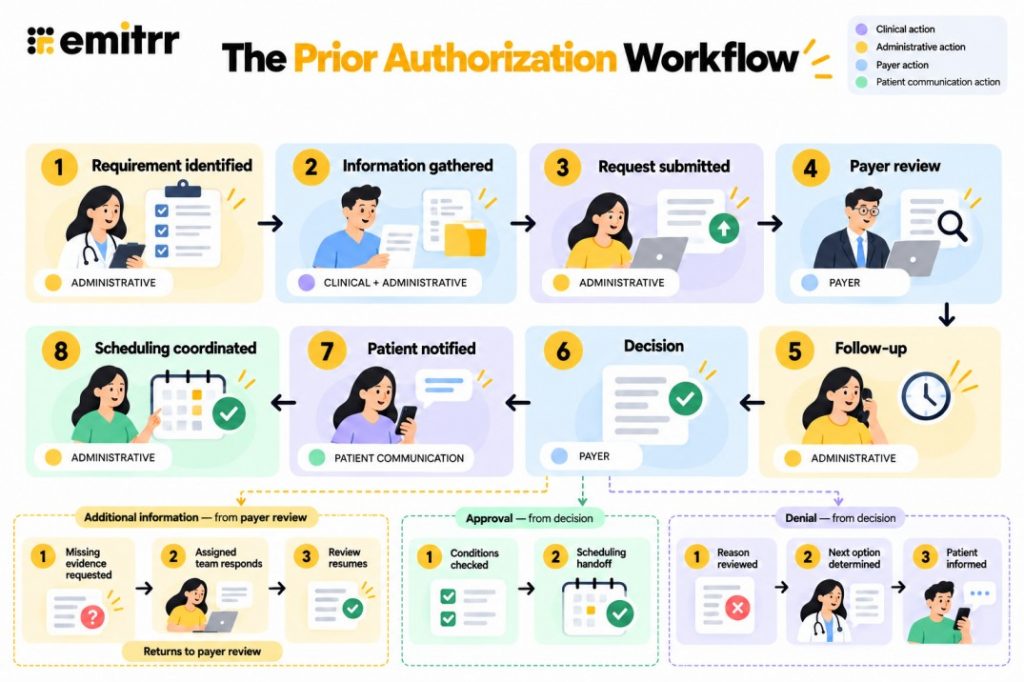
A prior authorization workflow connects those pieces to the people responsible for acting on them. Submission is one stage. The work continues through the payer’s decision, patient notification, and the next care action. This blog maps each stage, explains responsibilities and handoffs, compares manual handling with Emitrr-supported coordination, and shows what to look for in a workflow platform.
AI Summary
- The prior authorization workflow covers identification, information collection, submission, review, follow-up, decision, patient notification, and scheduling.
- Each request needs an owner, confirmed status, outstanding action, and next follow-up date.
- Patient details, clinical evidence, submission references, and payer responses must stay connected to the correct request.
- Additional-information requests return to the responsible team before review continues.
- Confirmed decisions lead to patient updates and scheduling or clinical-review handoffs.
- Emitrr supports collection, routing, reminders, notifications, and EHR-connected actions where integrations permit.
What is a Prior Authorization Workflow
A prior authorization (PA) workflow is the sequence of tasks and handoffs a practice uses to confirm an authorization requirement, prepare and submit the request, follow payer review, record the decision, notify the patient, and coordinate the next care action. It defines who acts, what information they need, where they record it, and what happens next.
For referred care, referral intake and referral management have different endpoints. Authorization may sit within that wider process, but it needs its own record and owner so a completed intake is not mistaken for approval.
- Ordering provider: Recommends care and supplies the clinical justification, including relevant evidence of medical necessity.
- Authorization coordinator or team: Checks requirements, organizes information, coordinates submission, and follows outstanding actions.
- Payer: Reviews the request under the applicable plan rules and issues a decision or requests more information.
- Patient: Confirms personal or insurance details where needed, receives updates, and responds to next-step instructions.
- Servicing provider or scheduling team: Checks the decision against the care to be delivered and coordinates the appropriate appointment or next action.
These responsibilities can sit with different organizations. A provider’s recommendation, the payer’s authorization decision, and the practice’s scheduling action are separate events. Receiving approval does not tell the patient where to go or create an appointment. Receiving a denial does not determine the clinical alternative.
How the Prior Authorization Workflow Works
The lifecycle moves from an identified requirement to a completed or actively owned care handoff. It is not always a straight path. Missing evidence sends work back to its source, and changes to the planned care can require another check. Keep the patient, request, owner, and next action connected throughout.
Stage 1: Identify the Authorization Requirement
The authorization coordinator checks the requirement for the patient’s actual plan and requested care. When a request arrives through a referral intake workflow for healthcare practices, the referral and the authorization task should have clearly identified owners.
- Record the clinician’s order, referral, or patient request. A patient inquiry may start collection, but it does not establish clinical need or confirm an authorization requirement.
- Check the applicable plan, benefit, service, provider, and location requirements through a current payer resource or supported connection.
- Identify the ordering provider and servicing provider where relevant. Confirm which organization will submit; responsibility can vary by payer and service.
- Open one request for the relevant care, link it to the patient record, and assign an initial owner and backup.
For example, a therapy practice receives an order for additional visits. The coordinator checks whether the patient’s plan requires authorization for those visits rather than relying on an earlier approval for the initial course.
Stage output: An identified requirement with a responsible owner, or a documented finding that authorization is not required for the checked care.
Stage 2: Gather Patient Information Plus Clinical Documentation
The coordinator separates information patients can provide from evidence the clinical team must supply. HIPAA-compliant online forms can support consistent collection. For referred requests, filtering complete vs incomplete referrals helps identify missing fields; completeness checks do not replace review of clinical evidence.
- Collect the patient’s name, date of birth, contact details, insurer, member ID, and relevant plan information, including policy group where needed.
- Record the requested service or medication, provider, location, relevant dates, and pharmacy where applicable. Clinical staff assess urgency; patients can confirm medication details, but discrepancies require review.
- Obtain diagnosis codes and applicable Current Procedural Terminology (CPT) or Healthcare Common Procedure Coding System (HCPCS) codes from records or qualified staff validation.
- Gather supporting clinical documentation, such as notes, results, treatment history, and the clinician’s explanation of medical necessity.
- List each missing item, its source, and the person responsible for obtaining it. Reuse current information where reliable rather than asking the patient to repeat it.
For the therapy request, the coordinator can confirm the patient’s insurance while the treating clinician supplies the progress note and proposed visit count. An insurance-card response should not be mistaken for completion of the clinical evidence.
Stage output: Reviewed information and documentation ready for request preparation, with unresolved items explicitly assigned.
Stage 3: Prepare the Request for Submission
Preparation brings the information together in the format accepted for the specific request. In practices using eClinicalWorks, the clinical team should confirm that clinical documentation includes the relevant treatment period and evidence before it is added to the packet.
- Match fields and attachments to the applicable payer requirements. Check that patient identifiers, requested care, provider details, and documents refer to the same request.
- Return missing or unclear clinical evidence to the care team. Administrative staff should not create clinical justification to fill a gap.
- Assemble the request in the practice’s authorization system or accepted form. Identify the submitting person and the destination.
- Keep the patient record, order, document source, and attachment versions connected. Mark the packet prepared only after the required check.
A progress report may exist in the chart but describe a different treatment period. The reviewer should resolve that mismatch before submission. Available attachments are not automatically the correct attachments.
Stage output: A prepared request assigned to the submitting team.
Missing or mismatched information can carry forward into submission. Watch this video to learn how to do collection checks your team can apply while preparing the request:
Stage 4: Submit the Prior Authorization Request
The submitting team sends the request through the route accepted by the payer. Preparation, transmission, and confirmed receipt are distinct stages. A fax confirmation page documents transmission activity; it does not establish approval or that the payer accepted a complete request.
- Submit through the payer portal, supported electronic connection, fax, or other permitted route.
- Record the submission date, channel, payer reference number, and submission confirmation where available.
- Check receipt through the applicable process. If submission fails or acknowledgment is missing, assign the correction or receipt check.
- Set the next action date and follow-up owner. Preserve the submitted version and relevant acknowledgment with the request.
An electronic prior authorization workflow may exchange requests and responses through a supported connection. A portal upload or digital form alone does not establish automated status exchange. When a request begins with fax-based referral intake, keep the incoming referral document separate from the outgoing authorization submission and its receipt.
Stage output: A submitted request with traceable confirmation and an assigned next check, or an owned submission problem requiring resolution.
Stage 5: Review Status Plus Follow Up
Payer review and practice follow-up run alongside each other. Prior authorization request tracking connects the owner, outstanding item, and next check. Prior authorization status tracking records the confirmed payer status, while the prior authorization follow-up process identifies who acts next. Shared status records can also reduce follow-up calls from referring practices when the referral and authorization teams are in different organizations.
- Record the status source and update date. Use a supported payer feed or a documented staff check rather than an assumption based on elapsed time.
- Identify the next responsible party: payer, administrative team, clinician, or patient. A pending authorization can still contain an unfinished practice task.
- Route an additional information request to its source, with the requested item, relevant reference, and applicable response deadline.
- Record the response, how it was sent, and the next follow-up date. Retain check history to prevent duplicate calls or portal checks.
- Escalate unresolved work to a named backup or supervisor according to applicable requirements and practice policy.
Suppose the payer requests a more recent therapy progress note. The coordinator assigns it to the treating clinician, records the response after submission, and checks whether review has progressed. The request should show the missing evidence, not only “pending.” For referred care, referral status notifications can keep the referring office informed without treating an information request as a final decision.
An information request does not automatically restart a decision deadline. Confirm the applicable rules before changing the expected follow-up. Internal task deadlines should remain separate from payer decision requirements.
Stage output: Review progressing with outstanding work actively owned.
Stage 6: Record the Authorization Decision
The person receiving the payer response records the actual decision and passes its conditions or review needs to the appropriate team. Keep that evidence accessible in the patient record; closing a referral queue entry must not break the connection between referral buckets and patient charts.
- Approval: Record the authorization number, authorized service, authorization validity period, and any provider or location conditions. Capture approved visits or units where applicable.
- Denial: Retain the denial reason and notice, identify available review information, and assign the appropriate reviewer.
- Route clinical questions, reconsideration assessment, and treatment alternatives to responsible staff. Keep any applicable review deadlines visible.
- Record who owns patient notification and the next scheduling or clinical-review task. Do not close the request simply because a decision arrived.
For an approval of additional therapy visits, the scheduler needs the permitted visit count and dates. For a denial, the clinician or designated reviewer determines the next option. A denial message should not imply that no further review is available, and approval does not guarantee claim payment.
Stage output: A confirmed decision with a defined next action.

Stage 7: Notify the Patient
Prior authorization communication should explain what is confirmed and what remains unresolved. Prior authorization patient notification connects the decision to what the patient should do next. Good patient communication gives the patient clear instructions and a contact for questions, rather than an unexplained status label.
- Explain the confirmed outcome in plain language. Say whether the patient should arrange an appointment, wait for a team call, supply information, or speak with the practice.
- Identify who will respond to questions and, where appropriate, when the patient should expect that response.
- Use suitable secure channels for sensitive clinical or insurance details. Follow the practice’s privacy procedures and communication preferences.
- Record the notification, delivery result where available, and any reply. Assign failed delivery or unanswered questions for follow-up.
For example: “Your insurer approved the additional visits listed in the decision. Our scheduling team will contact you to arrange them within the approved dates. Reply if you need help reaching the team.” The wording should reflect the actual approval and avoid promising coverage or payment beyond its terms.
A delivery record does not prove the patient understood the instructions. Two-way responses help surface confusion, while secure texting supports protected exchanges for details that should not appear in an ordinary text. Apply appropriate practice procedures under the Health Insurance Portability and Accountability Act (HIPAA).
Stage output: A patient update delivered with response ownership, or an assigned outreach task if delivery remains unresolved.
Stage 8: Coordinate Scheduling Plus Close the Handoff
Prior authorization scheduling requires more than passing along the word “approved.” The scheduler needs the conditions relevant to the planned care. For practices offering online scheduling for healthcare, booking rules should also account for those prerequisites.
- Check the planned service, date, provider, location, and visit or unit limits against the approval conditions.
- Send the scheduler the authorization details and a clear next action. Record acceptance of the scheduling handoff rather than assuming a forwarded message was acted on.
- Recheck applicability when dates, services, locations, or insurance coverage change. Confirm whether a modification or new request is needed.
- Observe required booking restrictions and configured “do not auto-reschedule” flags. After denial, coordinate only the next option determined by the responsible clinical team.
- Record closure when the defined handoff is completed. Keep remaining outreach, review, or scheduling work assigned if it is still unresolved.
A patient who moves a visit beyond the authorization validity period needs another check before the team relies on the approval. In NextGen practices, rescheduling workflows should route the changed date for that check before confirming care under an existing authorization.
Stage output: The patient is informed and the next care action is completed or actively owned. Authorization closure does not necessarily mean the treatment course or referral is complete.
After the approval conditions are checked, the next handoff is booking. Watch this video for scheduling options to evaluate against your practice’s rules and supported integrations:
What to Look for in a Prior Authorization System
A prior authorization system should make the request’s next action visible throughout the lifecycle. Evaluate a prior authorization platform against your mapped handoffs, including the records and communication tools that sit outside it. Prior authorization technology is useful when it connects those actions reliably, even if several systems share the work.
For EHR integration, verify each supported read or update separately. EHR-integrated communication should preserve the connection between the patient, incoming information, and responsible team. Access to demographics alone does not establish that the connection can create a task or retrieve payer status.
- Request visibility: Current stage, confirmed status and source, assigned owner, outstanding action, and next follow-up.
- Structured information: Patient details, requested care, and clinical evidence linked to the correct request.
- Document handling: Supporting records, missing-item requests, secure document exchange, and accessible submission references.
- Team handoffs: Assignment, backup ownership, routing, and shared context across locations or organizations.
- Patient communication: Two-way channels, protected exchanges, notification history, and a route for failed outreach.
- Scheduling connection: Approval conditions and next actions reach the team responsible for booking.
- Integration depth: Verified EHR and payer connections, known status sources, and confirmed write-back, meaning updates can be saved to the connected record.
- Traceability and reporting: Timestamps, outcomes, overdue actions, and turnaround-time reporting where reliable data is available.
Ask the vendor to demonstrate an additional-information branch and a changed appointment, not only a successful approval. Check where each owner sees the task and how completion is recorded. A HIPAA-compliant ticketing system may organize assigned requests, but its communication history should not be assumed to contain every payer decision and submission artifact.
Prior Authorization Workflow Without Emitrr vs With Emitrr
A manual prior authorization workflow and an automated prior authorization workflow follow the same underlying responsibilities. The difference is how information is collected, ownership stays visible, and updates reach the next team. Manual submission can remain in place while communication and selected handoffs are automated.
When referral intake in multi-location healthcare practices is handled centrally but appointments are booked locally, the authorization details need to reach the correct site. The comparison below shows how Emitrr can support that handoff, with connected actions verified separately.
| Workflow activity | Typical manual workflow | Emitrr-supported workflow |
| First contact | Staff collect information by phone or in person and call back for missing details. | Configured AI voice/SMS flows or forms collect patient-supplied fields for review. |
| Request record | Details may sit in notes, spreadsheets, and separate conversations. | Communication stays connected; supported integrations may create Patient Cases, Order Groups, or other work items. |
| Ownership | Staff pass responsibility verbally or through individual messages. | Assignment, routing, tags, and internal notes identify the responsible team. |
| Preparation | Staff gather documents and chase missing evidence separately. | Targeted requests and staff prompts support preparation; assembly and form population need verified integration support. |
| Submission | Staff use the accepted channel and separately record receipt. | Submission handoffs can be coordinated; integrated submission and generated packets require capability confirmation. |
| Status follow-up | Staff remember checks and may repeat another person’s work. | Configured reminders prompt checks; supported status data can inform later actions. |
| Escalation | Unresolved work may stay in individual queues. | Supported routing or escalation directs outstanding actions to designated staff. |
| Patient updates | Staff call individually or wait for patients to ask. | Configured messages use confirmed stages, with replies returning to the team. |
| Scheduling | Approval reaches the scheduler through a separate handoff. | Supported work items or booking requests connect the confirmed outcome to scheduling. |
| Closure | Staff reconcile communication and outcome records separately. | Relevant messages and artifacts support review; outcome logging and PA-specific reporting depend on available systems. |
- Consistency: Defined collection fields and request references help reduce repeated questions and mismatched information.
- Ownership: Assignment and shared context make the next responsible person easier to identify.
- Fewer duplicated actions: Check history and connected responses help teams avoid repeating completed work.
- Clearer patient updates: Confirmed information and a response path help patients understand what happens next.
These improvements support practice coordination. Payer review and clinical judgment stay with the responsible parties. When comparing manual vs AI-driven referral scheduling, distinguish supported coordination tasks from payer-dependent actions. Measure the authorization team’s results separately from referral or scheduling results.
How Emitrr Supports the Prior Authorization Workflow
Emitrr provides a communication layer across the request: first-contact collection, staff handoffs, follow-up, patient updates, and supported scheduling actions. Keep the authorization record connected to that communication so an incoming reply reaches the person responsible for the next step.
- Capture structured information at first contact: Emitrr’s AI voice agents and AI SMS agents, including its AI Information Collector, collect configured patient-supplied fields and confirm responses. Digital forms offer another structured collection route. Staff validate codes and clinical evidence; an AI agent should use approved knowledge and hand off questions outside its scope.
- Connect the conversation to an owned work item: Emitrr’s shared inbox and conversation assignment, AI tags, and internal notes preserve context for the receiving team. Supported EHR integrations may create or update Patient Cases, Order Groups, or other work items with timestamps and responsibility. Confirm those actions for the practice’s connection.
- Support request preparation: Digital intake forms, secure chat, and documentation outreach help teams collect outstanding information. Supported EHR access can connect available records or attachments. Prompts can show what remains missing; automatic attachment assembly and form population require verified support and appropriate review.
- Coordinate the submission handoff: Routing, internal notes, and supported EHR work items pass prepared context to the submitting team. Emitrr’s cloud faxing supports digital transmission and delivery tracking where fax is accepted. AI fax routing can support routing incoming documents when available in the configured workflow. Keep confirmation with the request. Attribute payer submission or generated packets only to a demonstrated connected capability.
- Keep pending requests actively owned: Automated reminders can support configured follow-ups, while Emitrr’s rule engine and supported workflow automations connect configured events with assignment, routing, and responses. Workflow triggers should use confirmed events. Establish whether status comes from an integration or staff entry, and verify deadline-based escalation and reminder stop conditions for the selected setup.
- Connect decisions to patient notification and scheduling: Two-way texting and configured messaging deliver confirmed updates and capture questions. AI SMS language translation can support multilingual exchanges, with staff review for sensitive or unclear responses. Route denials to the responsible reviewer; use supported scheduling integrations only after approval conditions and practice restrictions are checked.
- Preserve communication context through closure: Conversation history, transcripts, and AI summaries, alongside call recording, help staff review previous interactions. Supported EHR logging and reporting can connect relevant activity and outcomes. PA-specific decision and turnaround reporting need reliable authorization data beyond the communication record.
For a practical demonstration, bring a request that needed more evidence after submission. Ask how the clinical task, patient question, payer response, and scheduling handoff stay connected. That tests the communication layer across the lifecycle rather than just its ability to send a message.
Key Takeaways
- The workflow continues beyond submission and the payer decision.
- Every stage needs an owner, confirmed status, and next action.
- Information and supporting records must stay connected to the request.
- Additional-information requests need clear routing and follow-up.
- Patient notification and scheduling are separate handoffs.
- EHR and payer connectivity determine which actions can be automated.
Frequently Asked Questions
Confirm responsibility under the applicable payer and service rules, then name a coordinator for the request. Both organizations should know who submits, who supplies evidence, and who receives the decision. The servicing team should verify the relevant authorization before relying on it for planned care.
Record the specific item, deadline, and payer reference, then assign it to the source that can supply it. Retain the response and acknowledgment where available. If the request is unclear, the coordinator should clarify it rather than send unrelated records.
Yes. The submitting team can record confirmed receipt and later decisions, with supported messaging triggered from those entries. Keep prepared, transmitted, and received statuses separate so patients do not receive a premature “submitted” or “approved” update.
Provide the authorization number, authorized care, valid dates, and any applicable provider, location, visit, or unit limits. Include unresolved conditions and a contact for questions. The scheduler also needs to know whether the appointment is ready to book or still requires another check.
Use a defined closure rule that includes the recorded decision, appropriate patient outreach, and acceptance or completion of the next handoff. If the patient cannot be reached, retain an owned outreach task. An authorization record can close while treatment continues, provided remaining work stays visible elsewhere.
No. An EHR, payer-connected authorization tool, and communication platform may share the work. Agree which system holds the main request record and how identifiers, statuses, and tasks move between them. Check failed transfers and reconciliation as well as normal operation.
Conclusion
A prior authorization workflow is complete only when the decision connects to a clear patient update and an owned next care action. Keep the relevant information accessible, confirm responsibility at each handoff, and return missing evidence or changed care details to the appropriate team.
Emitrr supports those connections through information collection, shared conversations, reminders, routing, and supported EHR workflows. Book a demo with Emitrr to explore how your team can keep authorization communication connected from the first request through patient notification and scheduling.

 4.9 (400+
reviews)
4.9 (400+
reviews)