
Introduction
A canceled appointment is either a small administrative event or a real loss, and which one it becomes depends entirely on what happens in the next few minutes. If a front desk staffer notices the cancellation, pulls up a paper list or a spreadsheet, and starts calling down it one name at a time, the slot might get filled by the end of the day. If nobody notices until hours later, it usually doesn’t get filled at all.
Automated waitlist management removes that dependency on someone noticing and acting fast enough. Instead of a list that has to be worked by hand, the schedule itself triggers outreach the moment a slot opens, matches it to patients who actually qualify for it, and locks in a confirmation before staff have to get involved. What makes this possible is the combination of a scheduling system that can see the cancellation the instant it happens, a rules engine that knows who qualifies for that specific slot, and a communication channel fast enough for a patient to actually claim it before someone else does.
This guide walks through how that automated fill process actually works, from the trigger that starts it to what happens when nobody responds, and where a person still needs to be part of the process.
AI Summary
- Automated waitlist management triggers outreach directly from a cancellation, reschedule, or no-show in the live schedule, rather than depending on staff noticing and working a list manually.
- Matching patients to an opening requires filtering by provider, visit type, insurance, and availability, not blasting the entire waitlist for every slot.
- Confirmation has to run through two-way text or email with a one-tap response, since one-way reminder systems can’t accept a reply fast enough to claim a slot.
- When nobody responds, a working system escalates automatically instead of letting the slot sit open indefinitely.
- Complex cases, prioritization judgment calls, and patients without reliable text or email access still need a person in the loop.
What Automated Waitlist Management Does
Most practices already have some version of a waitlist. The difference between that and automated waitlist management usually comes down to what happens after a patient is added to it.
A traditional waitlist is static. It’s a name on a spreadsheet or in an EHR field, and filling a canceled slot from it still requires someone to remember it exists, check it, and start calling. That’s a digital list with a manual process behind it, not automation.
A genuinely automated system works differently. The moment a slot opens, the system checks the waitlist itself, filters it down to patients who qualify for that specific opening, and reaches out without anyone having to initiate the process. Setting up a patient waitlist automation means building that trigger-to-outreach chain so it runs on its own, not just digitizing the list staff already keep.
In practice, this means a canceled slot doesn’t just get logged, it kicks off a workflow: eligible patients get an automated message with the opening, and the first one to confirm is booked, all before a staff member has had a chance to open the schedule and notice anything changed. Front desk staff still see everything that happened, but they’re reviewing a completed fill instead of starting one from scratch.
The Trigger: What Starts the Automated Fill Process
Every automated fill starts with an event on the live schedule: a cancellation, a reschedule, or a no-show that’s been marked. That event carries specific details with it, including the provider, date, time, visit type, and location of the slot that just opened.
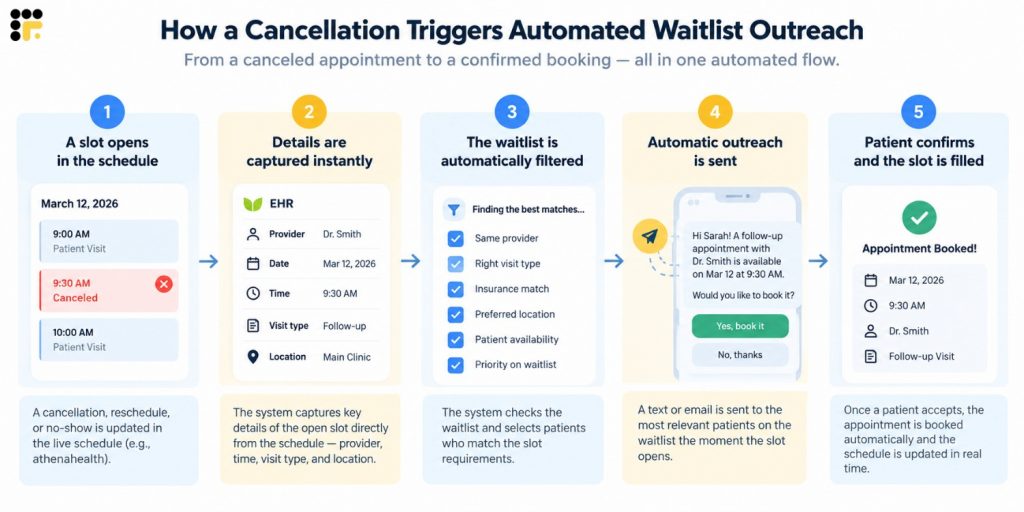
This has to come directly from the schedule itself, not from a step someone has to remember to run. If a cancellation only becomes visible to the waitlist system when a staff member manually flags it, the automation is only as fast as that person’s next available moment, which defeats most of the point.
Practices running on athenahealth or similar systems often hit this exact gap: the EHR shows the cancellation the instant it happens, but nothing downstream acts on it unless a separate workflow is watching. Enabling real-time online scheduling closes part of that gap by keeping the live schedule itself as the single source of truth the waitlist system reads from, rather than a delayed export or an end-of-day report. When that connection is built directly into the EHR rather than bolted on as a side process, the cancellation and the outreach effectively happen in the same motion, so there’s no window where a slot sits open and nobody, human or automated, has acted on it yet.

How Automated Patient Matching Works
Once a slot opens, the system has to decide who’s eligible for it, and this is where a lot of waitlist automation either earns trust or loses it fast.
Matching typically filters on:
- Provider, since a patient waiting on Dr. Smith usually doesn’t want Dr. Patel’s opening
- Visit type, so a follow-up slot doesn’t get offered to someone waiting for a new-patient evaluation
- Insurance or payer, particularly relevant for specialty visits with network restrictions
- Location, for practices with more than one site
- Availability window, matching the patient’s stated preferences for day or time
- Priority tier, where clinical urgency or how long someone has been waiting affects order
Messaging the entire waitlist for every single opening backfires quickly. Patients who get offered slots that clearly don’t fit them- wrong provider, wrong visit type, wrong location- tend to stop responding altogether, and some opt out of waitlist texts entirely after a few irrelevant offers.
The eligibility data driving all of this has to come from somewhere reliable, which usually means the EHR or practice management system rather than a separate spreadsheet that’s already out of date by the time it’s checked. Patient scheduling software that’s actually connected to that live data is what makes accurate matching possible instead of a best guess.
This is where a rules-based matching engine earns its keep. Instead of a staff member mentally cross-referencing a patient’s provider, visit type, and insurance against an opening, the same criteria get applied automatically and consistently to every cancellation, whether it’s the first one of the day or the fifteenth. That consistency is hard to maintain by hand once volume picks up, but it doesn’t waver when it’s built into the matching logic itself.
Patient matching is only one part of the patient experience. Watch this video to learn where intake can go wrong and how to prevent common gaps.
How the Outreach and Confirmation Process Works
Once eligible patients are identified, there are two common ways to reach out.
Batch outreach contacts several eligible patients at once and lets the first to confirm claim the slot. This fills openings fastest but requires a clean way to close out the offer for everyone else immediately.
Sequential outreach offers the slot to one patient at a time, usually the highest priority, and moves to the next only if there’s no response within a set window. This respects priority order more strictly but takes longer to fill a slot if early offers go unanswered.
Either approach depends on two-way communication with a fast, simple way to respond. Two-way texting is what makes this possible: a patient gets a message with the slot details and can confirm with a single reply or tap, rather than having to call the office back. A one-way reminder blast can’t do this on its own, since there’s no channel for the patient to claim the opening, which is exactly why native reminder tools built for outbound-only notifications hit a wall here.
For patients who’d rather talk than text, or simply don’t respond to the first message, an AI-driven call can follow up automatically and walk them through the same offer over the phone, so the outreach isn’t limited to whichever channel a patient happens to prefer. Either way, the confirmation gets logged back to the same place, so staff isn’t piecing together what happened across a phone log and a separate text thread.
There’s also a structural problem worth naming directly: what happens when two patients try to claim the same slot at nearly the same moment. This is the “race condition,” and it’s resolved through locking, where the first confirmed response wins and the slot is immediately marked unavailable to everyone else. Systems that don’t handle this cleanly are the same ones prone to the double-booking issues that scheduling integrations are built to prevent in the first place.
What Happens After a Patient Confirms
A confirmation isn’t the end of the process, it triggers a short sequence that has to complete correctly for the fill to work.
- Auto-booking and write-back. The confirmed patient is booked into the now-filled slot, and that booking writes back to the live schedule so it’s immediately visible to staff and providers. An AI scheduling assistant can carry this step through to completion on its own, matching the confirmation to the correct chart and slot so nobody has to manually re-enter what the patient just agreed to.
- Notifying everyone else who was offered. Any other patients who received the same offer, in a batch outreach model, get an automatic notice that the slot is gone, closing the loop instead of leaving them waiting on an offer that’s no longer live.
- Updating the patient’s original waitlist status. The confirmed patient is removed from the waitlist for that request so they don’t get contacted again for a slot that no longer exists.
This entire sequence is what patient self-scheduling depends on more broadly: a patient claiming a slot only works if the system can immediately and reliably reflect that claim everywhere it matters, not just in the message thread where the confirmation happened. Once the booking is in place, an automated confirmation and reminder sequence can pick up from there, which matters more than it might seem: a last-minute opening that patients scramble to grab is also more likely to be forgotten or missed if nothing follows up before the appointment itself.
What Happens When No One Responds
Sometimes nobody on the eligible list responds in time, and what happens next determines whether the slot gets filled at all or just quietly disappears.
A working system typically escalates in tiers:
- Widen the matching criteria. If the strict match doesn’t produce a response, the system can loosen filters, for example expanding the availability window or including patients slightly outside the original preference.
- Move to the next priority group. If a high-priority tier doesn’t respond, the offer extends further down the list.
- Hand off to staff for manual outreach. If automated attempts don’t produce a confirmation, the slot gets flagged for a person to call directly, rather than sitting unfilled indefinitely.
Offers are also typically time-boxed, expiring a set period before the appointment, often around 15 minutes prior, so a slot can’t sit in limbo where a patient technically still has an open offer, but there’s no longer enough time to get them in.
That handoff step is where automated routing matters as much as the outreach itself. Rather than a slot quietly falling through the cracks, it lands as a task in front of a specific staff member with the patient’s details already attached, so the person picking it up isn’t starting from zero. The automation doesn’t disappear at the point a human gets involved, it just changes from sending messages to organizing the work a person still needs to do.
Automated Follow-Ups and Waitlist Hygiene
A waitlist that only grows and never gets cleaned up eventually becomes useless, full of patients who’ve moved on, found care elsewhere, or simply stopped wanting the earlier appointment.
| Hygiene Task | What It Does | How Automation Handles It |
| Periodic check-ins | Confirms patients still waiting actually want to keep being notified of openings, rather than assuming indefinitely that they do | An automated message goes out on a set schedule asking the patient to confirm interest, without staff having to track who’s due for a check-in |
| Stale entry removal | Keeps the list from filling up with patients who’ve moved on, found care elsewhere, or stopped wanting the original appointment | Entries that don’t respond after a couple of automated attempts get archived automatically, so staff aren’t offering slots to patients who haven’t engaged in weeks |
This is a version of the same problem appointment reminder software solves on the other side of the visit: a system that reaches out proactively, on a schedule, instead of relying on staff to remember which patients need a check-in. An automated follow-up sequence can handle both tasks on its own timeline, texting patients who’ve been waiting a while to confirm they’re still interested and quietly archiving the ones who don’t respond, so the list staff is working from stays current without anyone auditing it by hand.
Where Human Involvement Is Still Needed
None of this automation is meant to remove judgment entirely, and the practices that get the most value from it are usually clear about where a person still needs to be involved.
- Complex or urgent clinical cases, where prioritization isn’t a simple rule but a judgment call about medical need
- Exceptions for patients without reliable text or email access, who need a phone call instead of an automated message
- Insurance edge cases, where a patient’s coverage doesn’t cleanly match the automated eligibility check
- Prioritization disputes, where two patients both feel they should be first and a person needs to make the call
Automation should be narrowing down what staff have to handle manually, not eliminating the need for a person. The goal is a much shorter list of genuine exceptions, not zero human involvement. A well-built system supports that by routing exceptions to a person automatically, flagging the case and surfacing why it didn’t clear automatically, rather than leaving staff to somehow notice it needed attention in the first place. For patients who need a phone call instead of a text, that same routing can trigger an outbound call rather than requiring someone to remember to dial the number manually.
What Practices Get Wrong When Automating Waitlist Management
A few recurring mistakes account for most of the frustration practices report with automated waitlist tools.
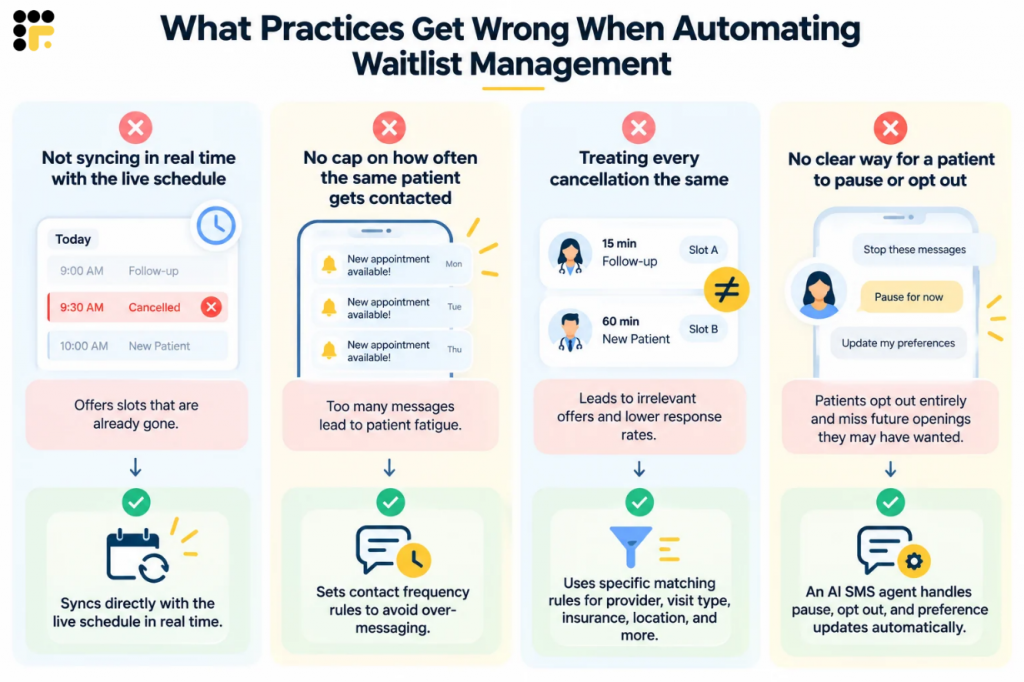
Not syncing in real time with the live schedule. If the waitlist system checks the schedule on a delay, it can offer slots that are already gone, which damages patient trust fast. This is the same failure mode addressed by fixing last-minute cancellations through proper scheduling integration, where the system reads the actual, current schedule rather than a periodic snapshot.
No cap on how often the same patient gets contacted. A patient who gets three offers in one week for slots that don’t work for them will often ignore the fourth, even if it’s the one they actually wanted. Contact frequency rules built into the outreach workflow can cap how often any one patient is messaged in a given window, which keeps the channel useful instead of turning into noise.
Treating every cancellation the same regardless of visit type or provider. A 15-minute follow-up and a 60-minute new-patient evaluation aren’t interchangeable, and matching logic that ignores this produces irrelevant offers. This is really a rules engine problem: the matching criteria need to be specific enough to reflect how the practice actually schedules, not a generic template applied to every opening.
No clear way for a patient to pause or opt out. Patients who feel like they can’t control the frequency or relevance of waitlist texts tend to opt out of the channel entirely, which removes them from future openings they might have genuinely wanted. An AI SMS chatbot can handle these responses conversationally, allowing patients to pause, update their preferences, or respond to an available slot without requiring a phone call or manual staff intervention.
Watch how an AI scheduling assistant can turn an open cancellation into a booked appointment
Key Takeaways
- Automated waitlist management is triggered by the live schedule itself, not by a staff member remembering to check a list.
- Accurate matching depends on filtering by provider, visit type, insurance, location, and priority, pulled from real EHR or practice management data.
- Two-way text or email with a fast confirmation path is what actually lets a patient claim a slot; one-way reminders can’t do this.
- A working system escalates automatically when nobody responds, rather than letting a slot go unfilled by default.
- Automation narrows down what staff have to handle manually to genuine exceptions, it doesn’t remove the need for human judgment entirely.
FAQs
A cancellation, reschedule, or no-show on the live schedule triggers the system to check the waitlist, filter it to eligible patients based on criteria such as provider and visit type, and automatically reach out via text, email, or an AI-driven call, with an option to confirm the opening immediately.
This varies by practice and how quickly patients respond, but because outreach starts the moment the schedule shows an opening rather than waiting for staff to notice, many slots get filled within minutes to a couple of hours instead of sitting open for a full day.
A properly built system prevents this through locking, where the first confirmed response closes the offer for everyone else immediately. Overbooking risk usually comes from a system that doesn’t handle this race condition cleanly, not from automation itself.
It needs to. The trigger, matching data, and write-back after a confirmation all depend on a real connection to the practice’s EHR or practice management system rather than a standalone list that isn’t actually synced to the live schedule.
At low volume, a manually worked list can be workable, since one staff member may have enough time to track and call down a short list. As cancellation volume grows, the same manual process typically starts missing openings simply because nobody can respond fast enough every time.
Conclusion
Filling a canceled appointment isn’t really a list problem, it’s a speed problem. The faster a practice can match an opening to the right patient and obtain a confirmed response, the more of that lost time is actually recovered. Automating the trigger, the matching, and the outreach is what makes that speed possible without adding more work to an already busy front desk, and connecting that same automation to scheduling, communication, and follow-up means the slot doesn’t just get filled, it gets filled by a patient who actually shows up.
Book a demo to see how automated waitlist management could work for your practice’s schedule.


 4.9 (400+
reviews)
4.9 (400+
reviews)