
Introduction
An optometry practice is really two businesses running on one chart: a medical exam workflow and a retail optical dispensary. An EMR for optometrists has to document refraction, visual fields, and OCT imaging findings while also handling lens orders, contact-lens fittings, and insurance for both the medical exam and the eyewear purchase. Generic ambulatory EHRs rarely handle this split well, and even eye-care-specific systems vary widely in how deeply they connect imaging devices, the optical dispensary, and patient communication.
Practices evaluating a new system often assume “eye care EHR” means the hard part is solved. In practice, the harder questions are narrower: does structured exam data actually write into the chart from your imaging devices, or does a technician retype findings? Does a contact-lens reorder trigger anything automatically, or does staff track it on a spreadsheet? This guide covers the blockers specific to optometry, the features that matter for both the exam and dispensary sides of the practice, and how to evaluate vendors before signing a contract.

AI Summary
- The core optometry requirement is a system that documents the medical exam (refraction, visual fields, imaging) and manages the optical dispensary (orders, contact lenses, insurance) without forcing staff into two disconnected tools.
- The most common blocker is shallow integration depth: many “integrations” only exchange PDFs or basic demographic data rather than writing structured exam findings or orders back into the chart.
- Imaging integration is the single most important feature category, since manual re-entry of device output (OCT, visual field, fundus imaging) is slow and introduces transcription risk.
- Secure image and document exchange (insurance cards, ID, prior records) matters as much as clinical integration, since optical and vision-insurance workflows depend heavily on document handling.
- Practices should prioritize vendors that can demonstrate live, structured data exchange with their specific imaging devices and communication tools rather than accepting a general claim of “integrates with everything.”
Which EMR for Optometrists Is Right for You? TL;DR
| EMR | Best For | Key Strength | What to Verify |
| RevolutionEHR | Optometry practices needing broad integrations | Optometry-specific EHR, imaging, scheduling, billing, optical inventory, and third-party integrations | Depth of imaging integrations, structured data write-back, and current certifications |
| Compulink Advantage | Practices needing highly customizable workflows | Deep customization across clinical documentation, workflows, and optical retail | Implementation time, configuration requirements, and training needs |
| Eyefinity | High-volume vision-insurance practices | Strong insurance processing, eye-care workflows, and optical point-of-sale | Current ownership, roadmap, claims processing, and integration options |
| MaximEyes | Optometry and ophthalmology practices wanting streamlined workflows | Clinical documentation combined with practice management and optical capabilities | Compatibility and depth of imaging-device integrations |
| Crystal PM/EHR | Budget-conscious practices and flexible IT setups | Core EHR and practice management with cloud or local hosting options | Included features, paid add-ons, and diagnostic equipment integrations |
| Barti | Practices looking for an optometry-focused EMR option | — | Clinical workflows, integrations, pricing, and optical capabilities |
| iTRUST | Optometry practices seeking an integrated practice-management solution | — | EHR capabilities, imaging integrations, billing, optical workflows, and support |
Key Challenges for Optometrists
Limited or shallow EMR integrations that only move demographic data, not clinical or order data
Many optometry EHR vendors advertise integrations with imaging devices, practice management add-ons, or communication tools, but the depth varies enormously. Some only exchange basic demographic data; others claim device integration but actually require manual export and import of files. This matters because staff time saved on paper is lost again if every “integration” still requires a manual step. Verify exactly what data moves automatically before assuming an integration eliminates manual work.
Structured intake and history form data landing as a PDF instead of writing into discrete chart fields
Digital intake and history forms are common in optometry, but structured answers (medication history, ocular history, symptoms) do not always populate discrete chart fields. In many cases, they arrive as a static PDF attached to the record, which a technician then has to read and manually transcribe into the exam note. Ask specifically whether form answers populate structured fields or only attach as a document.
Dispensary and contact-lens order scheduling that falls outside standard exam booking logic
Optometry scheduling is not just about booking exam slots. It includes dispensary pickup appointments, contact-lens fitting follow-ups, and reorder reminders tied to lens replacement schedules (for example, a 90-day or annual contact-lens supply). If the scheduling and communication tools cannot track and trigger these order-based touchpoints, staff must track them manually, which is where reorder revenue quietly leaks.
Imaging devices that do not write structured findings back into the EHR chart
Imaging equipment (OCT, fundus cameras, visual field analyzers) often produces its own proprietary output. Whether that output writes back into the EHR chart as structured findings, or simply sits in a separate imaging viewer that staff has to open alongside the chart, depends entirely on the specific integration between the EHR and the device manufacturer. Practices should verify current, device-specific integration status directly with both vendors rather than assuming generic imaging support covers their specific equipment.
Secure exchange of insurance cards, IDs, and prior records, plus 10DLC and group-texting limits
Vision insurance verification, medical insurance verification, and identification documentation are a significant part of optometry front-desk work, and handling images of insurance cards or IDs securely requires a genuinely protected channel, not an unencrypted text thread or email. Any texting workflow that sends SMS from a business number in the U.S. also generally requires 10DLC (10-digit long code) registration with carriers, and consumer-grade group texting behaves differently from individual, list-based messaging in terms of delivery reliability. Practices should confirm secure file-handling capability and current registration requirements before go-live.
Must-have EMR Features for Optometrists
- AI-Powered Clinical Scribing: Automatically converts patient encounters into structured, specialty-specific notes, reducing after-hours charting. Look for direct write-back into the EMR to eliminate copying and pasting.
- Customized Workflows and Documentation: Customizable exam templates should support different optometry visit types with quick-entry fields, dropdowns, free-text options, and keyboard-friendly navigation.
- Comprehensive Exam View: The EMR should display key exam information such as visual acuity, refraction, medications, history, and clinical findings in one organized view to minimize clicks and navigation.
- Automated Coding and Pre-Populated Data: Pre-populated patient information and automated coding based on documented findings reduce repetitive data entry and help ensure accurate billing and medical necessity.
- AI-Powered Billing and Revenue Cycle Automation: Automated eligibility checks, claim scrubbing, payment posting, and denial management can reduce billing workload and help prevent revenue leakage.
- Integrated Payment Processing: Payments made in-office, online, or through text-to-pay should automatically post to the patient ledger, eliminating duplicate entry and simplifying reconciliation.
- AI-Powered Virtual Assistant: An integrated virtual assistant can handle routine administrative requests, route calls, answer common questions, and assist with appointment scheduling to reduce front-desk interruptions.
- Two-Way E-Prescribing: Two-way e-prescribing provides access to medication histories while supporting prescription transmission, interaction checks, and allergy alerts, reducing manual medication entry.
- Patient Engagement and Communication: The EMR should support two-way messaging, digital intake, consent forms, automated appointment reminders, patient recalls, and post-visit communication to keep patients engaged and reduce no-shows.
- Secure Cloud Access and Data Protection: Cloud-based access lets authorized users securely access patient information from supported devices while maintaining continuity across the practice. Look for encryption, automated backups, audit logs, role-based access controls, and multi-factor authentication.
Best EMRs for Optometrists – A Detailed Analysis
| EMR | Specialty Support | Documentation | Scheduling | Billing | Integrations | AI/Automation |
| RevolutionEHR | Optometry-specific | Exam templates for refraction, visual fields, OCT | Cloud-based scheduling with optometry workflow support | Vision and medical billing, POS integration | Positioned as having one of the broadest third-party integration ecosystems in the space; verify current device list | Verify current AI-assisted charting capabilities with vendor |
| Compulink Advantage | Optometry and ophthalmology | Strong customization of documentation and workflows | Configurable scheduling | Vision and medical billing | Emphasizes workflow customization; verify integration scope for specific devices | Verify current automation features with vendor |
| Eyefinity | Optometry and ophthalmology | Exam documentation with insurance-processing focus | Practice management scheduling | Integrated insurance processing, optical POS | Backed by VSP Vision Care ecosystem; verify current integration list | Verify current AI capabilities with vendor |
| MaximEyes | Optometry and ophthalmology | Exam documentation aimed at streamlining clinical workflow | Scheduling integrated with practice management | Billing and claims support | Verify current third-party integration list with vendor | Verify current automation features with vendor |
| Crystal PM/EHR | Optometry | Core charting, scheduling, and billing functions | Scheduling with cloud or local hosting options | Core billing functionality | Supports integration with common diagnostic equipment; verify current device compatibility | Verify current automation features with vendor |
1. RevolutionEHR
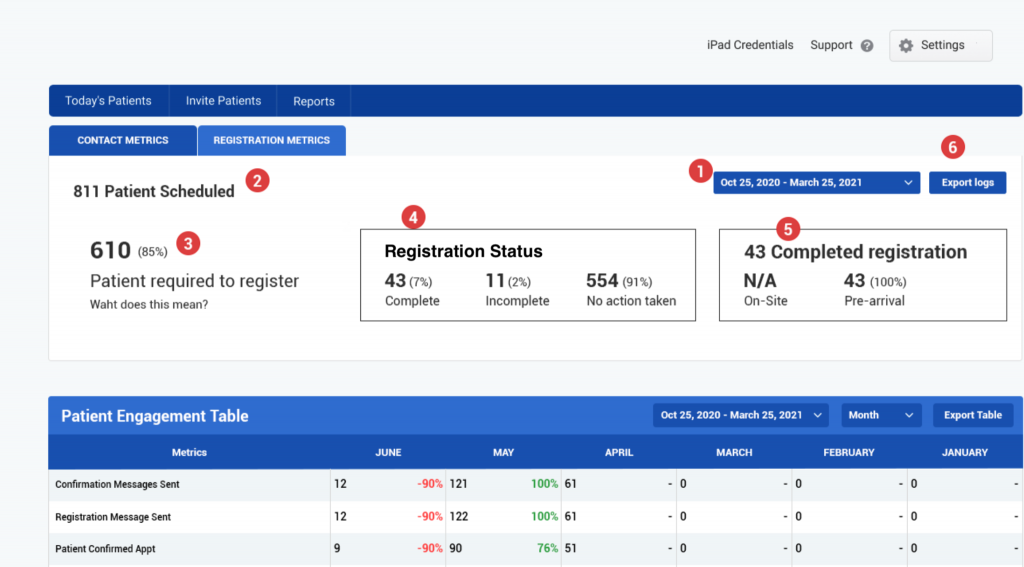
RevolutionEHR is a cloud-based EHR and practice management software built specifically for optometry, with exam templates covering refraction, visual fields, and OCT imaging alongside scheduling, billing, and optical inventory. It is frequently cited as having one of the broader third-party integration ecosystems among optometry-specific platforms, which matters for practices running multiple imaging devices or wanting to connect communication tools. Because “broad integration ecosystem” can still mean shallow, PDF-level exchange for some connections, practices should ask RevolutionEHR directly which specific imaging devices support structured data write-back versus file-level import, and confirm current certification status if that matters for their reporting requirements.
2. Compulink Advantage
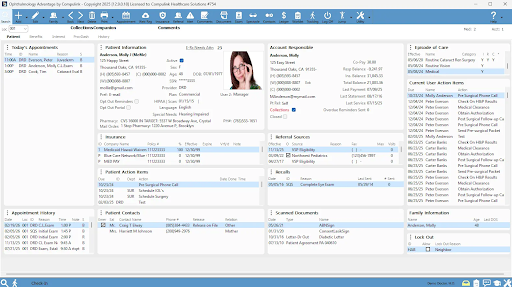
Compulink Advantage serves both optometry and ophthalmology and is generally positioned around deep customization: practices can tailor documentation templates, workflows, and optical retail features to their specific setup. This flexibility is useful for practices with a nonstandard workflow or a strong medical-model focus, but it also means more configuration work during implementation. Practices should ask for a realistic view of how much configuration time is required to reach a usable state, since highly customizable systems often trade a longer setup phase for a better long-term fit.
3. Eyefinity
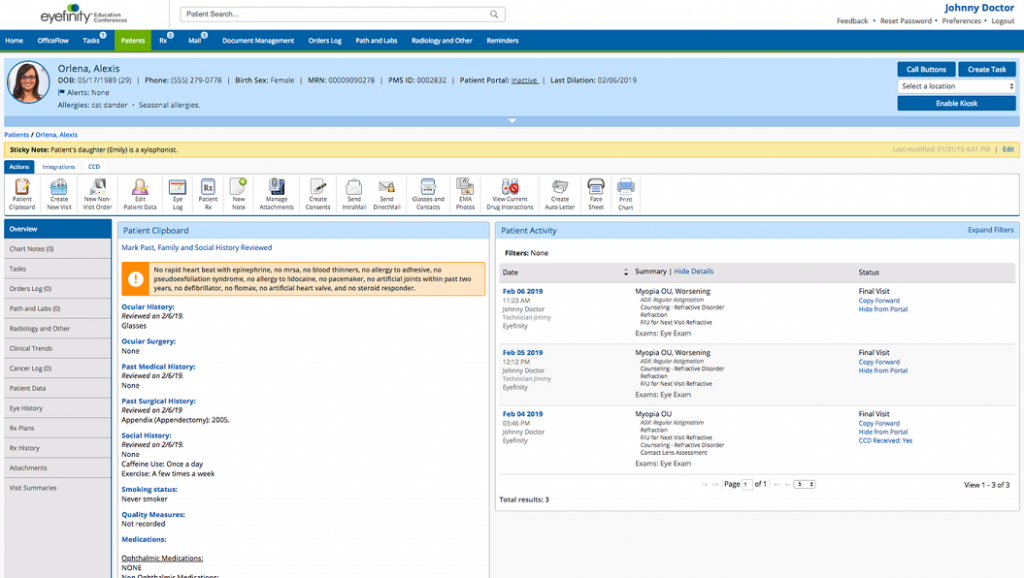
Eyefinity is an EHR and practice management platform for eye care, historically connected to VSP Vision Care’s broader ecosystem, with a documented emphasis on insurance processing alongside exam documentation and optical point-of-sale. For practices with a high volume of vision-insurance claims, this insurance-processing focus can reduce administrative friction. Practices should verify current ownership, product roadmap, and integration options directly, since eye-care software ecosystems tied to insurance networks can have unique implications for claims routing and network participation.
4. MaximEyes
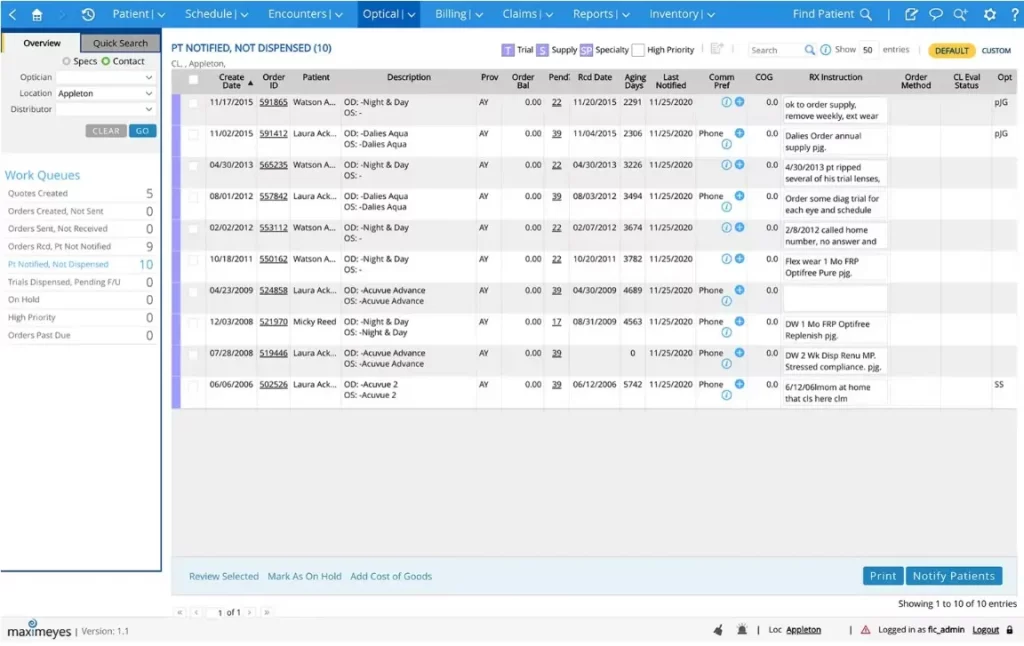
MaximEyes, developed by First Insight, is positioned for both ophthalmology and optometry practices seeking a streamlined clinical workflow alongside practice management. As with other mid-tier optometry EHRs, the specific depth of imaging device integration and third-party connectivity should be confirmed directly with the vendor for the practice’s exact equipment list rather than assumed from general marketing claims.
5. Crystal PM/EHR
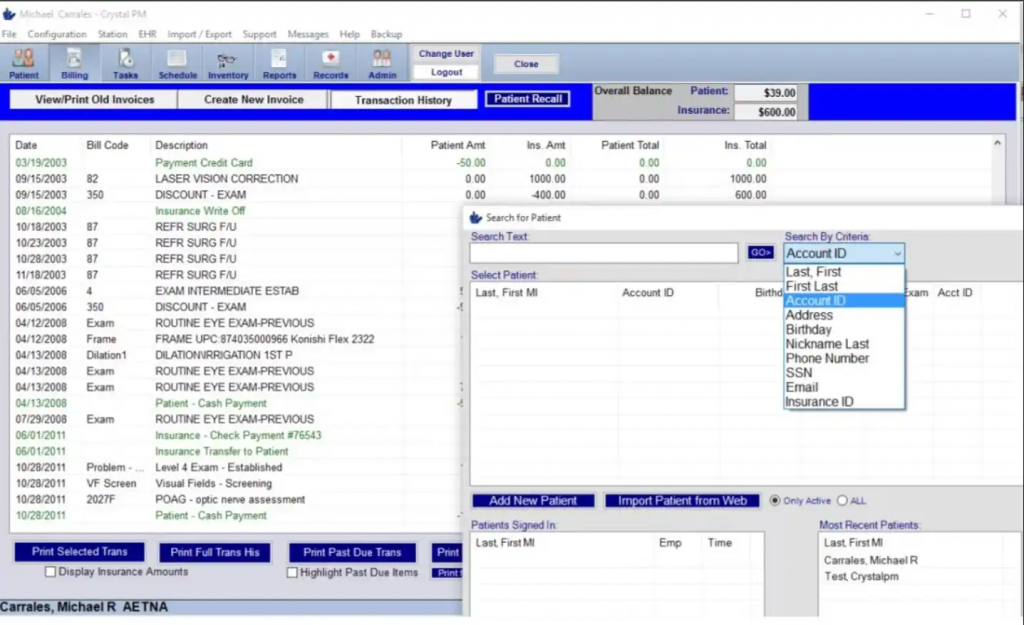
Crystal provides core EHR and office management functionality for optometry practices, with the option for cloud or local hosting, which can matter for practices in areas with less reliable internet connectivity or specific IT preferences. It covers charting, scheduling, and billing, and is described as supporting integration with common diagnostic equipment. Because Crystal is often positioned as a leaner, more budget-conscious option relative to platforms like RevolutionEHR or Compulink, practices should confirm which specific features are included by default versus offered as paid add-ons before comparing pricing across vendors.
6. Barti
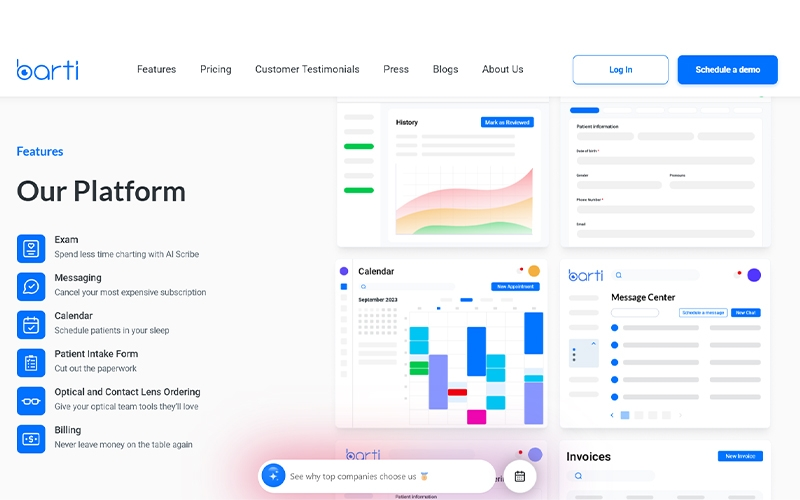
Barti is an AI-powered, cloud-based EHR and practice management platform built specifically for eye care, combining exam documentation, AI scribing, scheduling, messaging, optical and contact-lens ordering, billing, and patient intake in one system. It also supports machine integration and specialty workflows such as myopia management, making it a strong option for practices looking to reduce clicks and consolidate clinical and administrative tools.
7. iTRUST
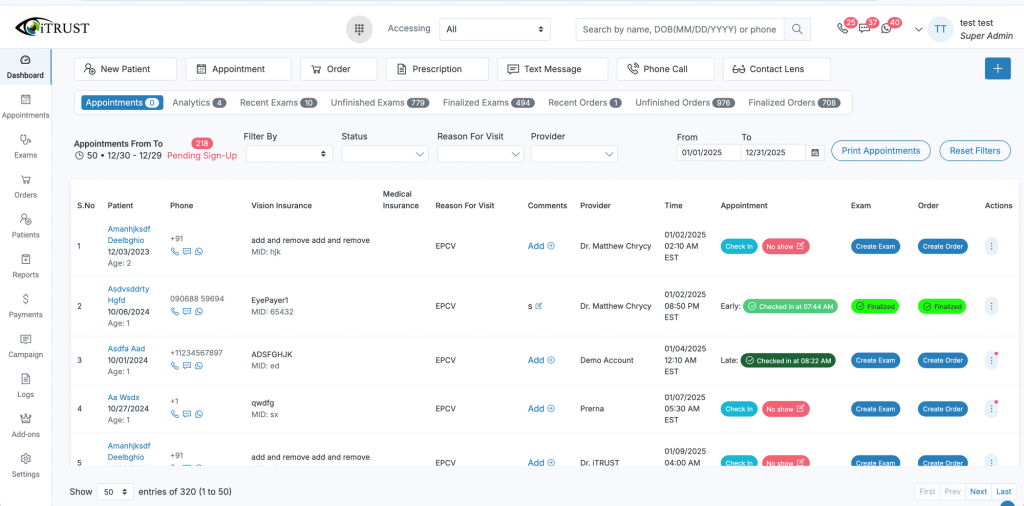
iTRUST is a cloud-based eye-care platform that combines EHR, optical POS, billing, inventory, scheduling, patient communication, and practice management in one system. Its AI features include exam-finding suggestions and automated patient text and voice responses, while integrated vision-insurance workflows support claims for plans such as EyeMed, VSP, Spectera, and Davis without requiring separate portals
How Emitrr Works Alongside Your Optometry EMR
Optometry practices often need communication and workflow automation beyond what their EMR handles natively. Emitrr can work alongside an optometry EMR to help practices manage patient communication, forms, reminders, and follow-ups without replacing the core clinical record.
- Secure patient texting: Communicate with patients through secure two-way texting for appointment questions, prescription pickup updates, follow-ups, and routine administrative needs.
- Digital forms: Send intake, consent, insurance, and other forms digitally before visits to reduce paperwork and front-desk data entry.
- Structured field mapping where supported: Where the EMR integration supports it, relevant form responses can be mapped into designated fields, reducing repetitive transcription.
- Form-to-record workflows: Connect completed forms with patient workflows where supported, helping staff prepare charts before appointments without assuming every form field can write back automatically.
- Order reminders: Send timely reminders for pending pickups, reorders, or other patient actions to reduce manual follow-up by optical staff.
- Contact-lens workflows: Automate communication around contact-lens orders, pickup notifications, reorder reminders, and follow-ups while keeping the actual order record in the appropriate optical or EMR system.
- Two-way communication: Let patients reply directly to messages instead of forcing staff to manage every interaction through phone calls.
- Secure image/file exchange: Patients can securely share relevant documents, insurance information, or images when needed instead of relying on unsecured messaging channels.
- MMS workflows: Send and receive images and files through MMS-enabled workflows when appropriate for the practice’s communication needs.
- Appointment reminders: Automate confirmations and reminders for eye exams, follow-ups, specialty visits, and other scheduled appointments to reduce no-shows.
- EHR-triggered workflows: Where supported by the integration, patient or appointment data can trigger automated messages and follow-up workflows, reducing repetitive staff work.
- 10DLC support: Supports compliant application-to-person SMS registration requirements for businesses sending text messages from local numbers.
- Number porting support: Practices can port existing business numbers where supported, helping maintain continuity for patients who already know and use the practice’s number.
The operational value: Emitrr adds a communication and automation layer around the optometry EMR, helping staff reduce phone volume, automate repetitive follow-ups, and keep patients informed without requiring the EMR itself to handle every communication workflow. It should not be assumed that optical orders, prescriptions, or arbitrary EMR fields automatically synchronize; practices should confirm the exact capabilities of their specific EMR integration.
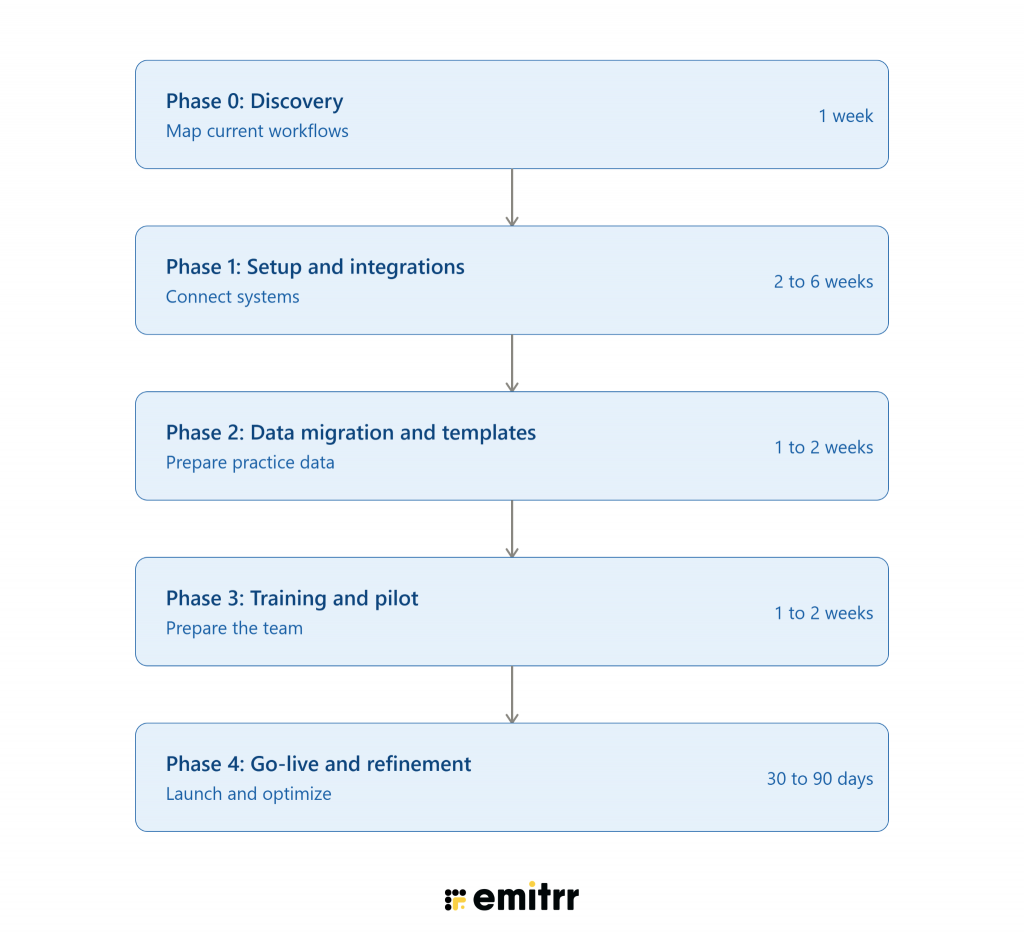
EMR Implementation Roadmap
Key Takeaways
- Optometry EMR selection depends on the balance between medical exam documentation needs and optical dispensary workflow, not just clinical charting alone.
- Shallow integrations that only exchange PDFs or basic demographic data are the most common source of hidden manual work in optometry practices.
- Imaging device integration should be verified device by device, since “imaging integration” as a marketing claim does not guarantee structured data write-back for a specific OCT or visual field machine.
- Reorder and follow-up automation for contact lenses and eyewear is a meaningful revenue lever that depends on whether the EHR or a connected tool can trigger reminders based on order or visit data.
- Secure handling of insurance cards, IDs, and images matters as much as clinical documentation quality in day-to-day optometry operations.
FAQs
An EMR for optometrists is a specialized electronic medical record system designed to manage eye exams, patient histories, prescriptions, imaging, contact lens records, scheduling, billing, and other optometry workflows.
Key features include optometry-specific exam templates, prescription management, diagnostic imaging integration, contact lens workflows, digital intake forms, scheduling, billing, secure document management, and patient communication capabilities.
There is no single best EMR for every practice. RevolutionEHR, Compulink Advantage, Eyefinity, and other optometry-focused platforms offer different strengths, so practices should evaluate workflows, integrations, usability, and scalability before choosing a system.
Yes. Many EMRs can work with communication platforms through integrations, APIs, or workflow triggers. This can help practices automate appointment reminders, follow-ups, recalls, and other patient communications without relying entirely on manual outreach.
An EMR centralizes patient and appointment information, while connected communication tools can use that information to trigger reminders, recalls, follow-ups, and other messages at the appropriate time.
Yes. Practices can use EMR-connected communication workflows to send automated appointment reminders, confirmation requests, recall messages, and follow-ups. Two-way texting can also allow patients to respond without calling the practice.
Emitrr can connect with supported EMR workflows to help optometry practices automate patient communication, including appointment reminders, confirmations, recalls, follow-ups, and two-way texting. The exact capabilities depend on the EMR and integration available.
Conclusion
Choosing the right EMR for optometrists is about more than finding a system with strong clinical documentation. The best fit should connect exam workflows, diagnostic imaging, billing, optical operations, and patient communication without creating unnecessary manual work.
Before making a decision, evaluate each system using your actual equipment, insurance mix, dispensary workflow, and communication requirements. Once you have shortlisted your EMRs, see how Emitrr can work alongside your existing system to automate patient communication, reminders, forms, and follow-ups. Book a demo now to see how it can fit into your optometry workflow.

 4.9 (400+
reviews)
4.9 (400+
reviews)