

Introduction
Chiropractic care is built around a recurring treatment plan, not a single visit. A patient starts with a consultation and assessment, moves into a defined course of care (often two to three visits a week for several weeks), gets reassessed, and continues or discharges based on progress. An EMR for chiropractors has to support that rhythm: recurring scheduling tied to a treatment plan, fast SOAP documentation across many short visits, and billing that holds up under insurance scrutiny for a specialty payers often audit closely.
Many chiropractic practices, particularly smaller and solo offices, still run on niche or closed EHR systems with limited public APIs, which makes connecting scheduling, billing, and patient communication harder than it should be. Choosing the right system means understanding not just what a platform documents, but how open it is to the other tools a growing practice needs, and what pricing model (per-text, per-user, or subscription) actually fits the practice’s patient volume. This guide walks through the blockers specific to chiropractic practices, the features that matter, how leading systems compare, and how to plan an implementation that does not disrupt active treatment plans.

AI Summary
- The central chiropractic EMR requirement is fast, defensible SOAP documentation that connects directly to a recurring treatment plan and drives scheduling, not a generic single-visit note structure.
- The most common blocker is a closed or niche EHR with no public API, which limits how well scheduling and communication tools can connect without manual workarounds.
- Billing and claims functionality is a critical feature category in chiropractic, given how frequently the specialty faces documentation-related insurance audits and denials.
- Integration diligence should focus on whether appointment scheduling and treatment-plan-driven recurring visits can write back automatically, since chiropractic pricing models (per-text, per-user, credit-based) can make workaround tools expensive at volume.
- Small and growing chiropractic practices should prioritize systems with clear API access and transparent pricing over flashy AI claims that are hard to verify during a sales demo.
Which EMR for Chiropractors Is Right for You? TL;DR
| EMR | Best suited for | Key strengths | Potential consideration |
| ChiroTouch | Established chiropractic practices | Chiropractic-focused charting, scheduling, billing, and practice management | Some users report performance or usability issues |
| ChiroFusion | Practices wanting a simple cloud EMR | Cloud-based access, SOAP notes, billing, and ease of use | May feel less comprehensive for complex workflows |
| zHealth | Chiropractors focused on streamlined workflows | Online scheduling, customizable SOAP notes, voice dictation, and billing | Best fit for practices prioritizing speed and simplicity |
| ClinicSense | Solo chiropractors and smaller clinics | Simple charting, scheduling, online booking, and billing | May be less suitable for larger or more complex practices |
| ChiroSpring | Multi-location chiropractic practices | Visual dashboard, multi-location support, imaging, document management, and claims | Broader feature set may require more setup |
| SpryPT | Chiropractic and rehabilitation-focused practices | Digital documentation, scheduling, billing, templates, and analytics | Primarily designed around physical therapy and rehabilitation workflows |
| PatientNow | Practices needing combined clinical and business management | EMR, scheduling, billing, patient records, and practice management | Primarily oriented toward aesthetic/elective healthcare rather than chiropractic |
Key Challenges for Chiropractors
Closed or niche EHRs with no public API limiting outside scheduling and communication tools
A significant share of chiropractic-specific EHRs were built as closed systems, meaning they were not designed with a public, documented API for outside tools to connect to. This matters because it limits what scheduling, billing, and communication automation is actually possible without manual data entry or costly custom integration work. Before buying, ask directly whether the vendor has a public API, a partner-only API, or no API at all, and get this in writing rather than relying on a sales conversation.
Treatment plans that do not drive recurring scheduling automatically, forcing manual rebooking
Recurring chiropractic treatment plans depend on consistent, predictable scheduling. If the plan of care does not directly generate a recurring appointment series, or a separate booking tool cannot write appointment creation, cancellation, and rescheduling back into the EHR automatically, front-desk staff ends up managing two calendars and reconciling them manually, which is where double-bookings and missed follow-ups happen.
Reliance on personal cell phones or Google Voice due to limited native reminder capability
Some legacy chiropractic EHRs have limited or no native automated appointment reminder capability, pushing practices toward consumer tools like Google Voice or personal cell phones for patient communication. This creates compliance risk, since personal numbers are not designed for HIPAA-conscious patient communication, and it makes it difficult to maintain a consistent communication record tied to the patient chart.
Number porting, 10DLC registration, and legacy PBX transitions
Practices that have used the same phone number for years, sometimes tied to a legacy PBX or an older answering service, face real friction when moving to a modern communication system. Number porting requires specific documentation and does not happen instantly, and any SMS-based reminder workflow generally requires 10DLC (10-digit long code) registration with mobile carriers, along with a visible consent process and privacy policy on the practice’s website. Practices should plan for this as part of implementation, not as an afterthought.
Intake forms and treatment-plan documentation that only export as PDFs, requiring manual transcription
Chiropractic patient intake forms (health history, pain diagrams, informed consent) are frequently digitized, but many EHRs still only accept these as PDF uploads rather than mapping structured answers into discrete chart fields. This means front-desk or clinical staff still manually transcribe key patient intake details into the SOAP note or treatment plan.
Must-Have EMR Features for Chiropractors
Chiropractic-Specific SOAP Notes and Templates
A chiropractic EMR should include customizable SOAP note templates designed around spinal care, musculoskeletal conditions, adjustments, range-of-motion assessments, pain levels, and neurological or orthopedic findings. Templates should make documentation faster while still giving chiropractors flexibility to adapt notes to different treatment approaches.
Treatment and Care Plan Management
The EMR should help chiropractors create, document, and track individualized treatment plans. Providers should be able to record treatment goals, recommended visit frequency, duration of care, adjustments, and patient progress across multiple visits.
Digital Patient Intake and Forms
Digital intake allows patients to complete medical history, chiropractic history, consent forms, pain assessments, and insurance information before arriving. Ideally, completed forms should automatically flow into the patient’s record so staff do not have to manually enter information.
Scheduling and Online Booking
Scheduling tools should support online booking, recurring appointments, provider calendars, cancellations, rescheduling, and waitlists. This is particularly important for chiropractic practices because patients often have recurring visits as part of a treatment plan.
Appointment Reminders and Two-Way Communication
Automated reminders through SMS, email, or voice can help reduce missed appointments and keep patients informed. Two-way communication is even more useful because patients can confirm, cancel, reschedule, or respond to appointment-related messages without requiring staff to make individual calls.
Imaging and Document Management
Chiropractic practices may need to manage X-rays, diagnostic images, referrals, reports, and other patient documents alongside clinical records. The EMR should provide secure storage and easy access to these files, with imaging or annotation capabilities where appropriate.
Billing, Claims, and Insurance Management
Billing functionality should connect documentation with the financial side of the practice. The system should support claims creation and submission, coding, eligibility verification, payment processing, patient statements, claim tracking, and denial management to reduce administrative work.
Chiropractic Coding Support
The EMR should support the coding and documentation requirements associated with chiropractic services. Connecting diagnoses, procedures, and clinical documentation within the same workflow can help reduce billing errors and incomplete claims.
Progress Tracking and Outcome Assessments
Chiropractors need to demonstrate how patients respond to treatment over time. An EMR should make it easy to track pain levels, range of motion, functional improvements, outcome assessments, and progress toward care-plan goals across visits.
Patient Portal
A patient portal gives patients access to important administrative and clinical information without requiring staff assistance. Patients should be able to manage appointments, complete forms, update information, review statements, and communicate with the practice through the portal.
Automated Recall and Follow-Up
Chiropractic practices frequently need to re-engage patients who have completed a treatment plan, missed an appointment, or have not returned for care. Automated patient recall and follow-up workflows can help practices consistently reach these patients without relying on manual call lists.
Reporting and Practice Analytics
Reporting tools should provide visibility into appointment volume, no-shows, cancellations, patient retention, provider productivity, revenue, collections, and treatment-plan completion. These insights help practice owners identify operational issues and make better decisions.
HIPAA-Compliant Security
Since chiropractic EMRs contain protected health information, strong security controls are essential. The system should provide appropriate access controls, encryption, audit logs, backups, authentication, and secure communication capabilities to help practices protect patient information.
Integrations and Open APIs
An EMR should connect easily with other systems used by the practice, including communication platforms, payment solutions, accounting tools, imaging systems, and scheduling applications. Open APIs and integration capabilities reduce manual data entry and allow practices to build workflows around their existing technology.
Multi-Location Support
Chiropractic groups with multiple offices need centralized visibility into patients, providers, appointments, billing, and performance. Multi-location functionality allows each clinic to manage its operations while giving owners and administrators a unified view across the organization.
Cloud and Mobile Access
Cloud-based access allows authorized providers and staff to securely access patient records, schedules, and documentation from different workstations or locations. A mobile-friendly interface can also make it easier for chiropractors to review records and complete documentation while moving between treatment rooms.
Best EMRs for Chiropractors – A Detailed Analysis
- ChiroTouch
- ChiroFusion
- zHealth
- ClinicSense
- ChiroSpring
- Spry PT
- PatientNow
| EMR | Specialty Support | Documentation | Scheduling | Billing | Integrations | AI/Automation |
| ChiroTouch | Chiropractic-specific | Chiropractic SOAP notes, treatment documentation, customizable templates | Chiropractic-focused scheduling, recurring appointments, and patient management | Chiropractic billing, claims, and payment workflows | Supports integrations with practice and communication tools; verify current integration list | Automation for administrative workflows; verify current AI-assisted documentation capabilities |
| ChiroFusion | Chiropractic-specific | SOAP notes, customizable templates, and streamlined clinical documentation | Cloud-based scheduling with online booking and appointment management | Integrated billing and claims management | Cloud-based platform with third-party integrations; verify current integration scope | Workflow automation and administrative tools; verify current AI capabilities |
| zHealth | Chiropractic and wellness-focused | Customizable SOAP notes, voice dictation, and digital patient records | Online booking, automated scheduling, and appointment management | Claims, billing, and payment management | Integrates with practice-management and business tools; verify current third-party integration list | Automation for scheduling, reminders, and practice workflows; verify current AI features |
| ClinicSense | Chiropractic, massage, and wellness practices | Digital charting, treatment notes, customizable forms, and patient records | Online booking, recurring appointments, and calendar management | Billing and payment processing | Integrates with selected business and payment tools; verify current integration availability | Automated reminders and administrative workflows; verify current AI capabilities |
| ChiroSpring | Chiropractic-specific | Customizable clinical documentation, patient histories, imaging, and document management | Scheduling across providers and locations with multi-location support | Claims management, billing, and payment workflows | Supports integrations across practice-management and clinical workflows; verify current integration list | Workflow automation and practice-management tools; verify current AI-assisted features |
| SpryPT | Physical therapy and rehabilitation; applicable to chiropractic and MSK workflows | Customizable clinical templates, digital documentation, treatment plans, and progress tracking | Online scheduling, appointment management, and patient engagement tools | Billing, claims, and revenue-cycle workflows | Integrations with healthcare and practice-management systems; verify current chiropractic-specific integrations | Automation for documentation and administrative workflows; verify current AI features |
| PatientNow | Primarily aesthetic and elective healthcare; adaptable to some chiropractic workflows | Electronic medical records, treatment documentation, patient histories, and customizable forms | Appointment scheduling, online booking, and practice management | Integrated billing, payments, and financial management | Integrates with selected healthcare, payment, and business systems; verify current integration list | Automated patient communication and administrative workflows; verify current AI capabilities |
1. ChiroTouch
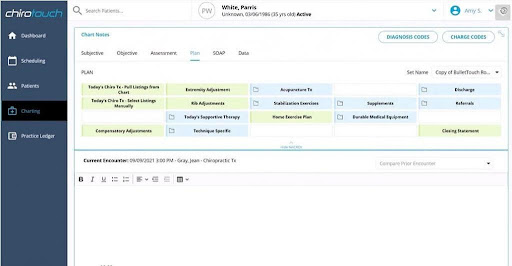
ChiroTouch has been around long enough to understand how a chiropractic clinic runs day-to-day. This EMR for chiropractors combines charting, scheduling, billing, and patient interaction. Users often mention it pulls daily tasks together, which helps practices with busy schedules stay coordinated. Some clinics report that the interface allows tweaks to match how their office works. Be aware that performance issues such as slowdowns and glitches can occur during high activity times.
If you integrate ChiroTouch with Emitrr, you can send automatic appointment reminders, confirm bookings in real time, and collect patient feedback with minimal effort. Text responses and review requests can be managed from the same screen you already use for charting and scheduling. This helps maintain an organized calendar, timely communication, and consistent follow-ups while you focus on patients.
2. ChiroFusion
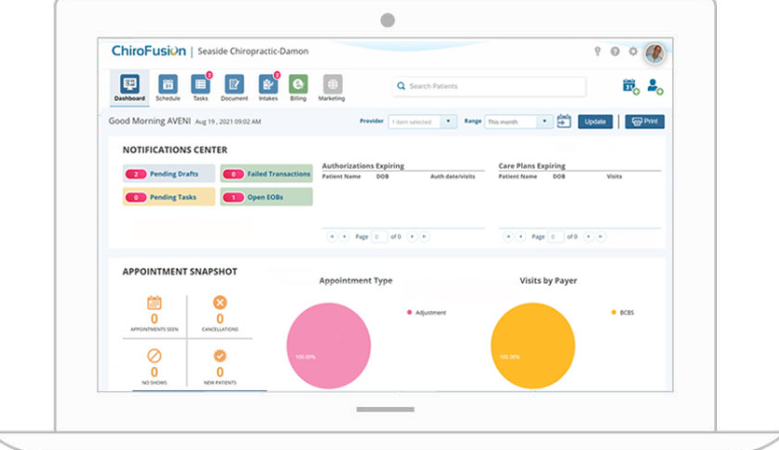
ChiroFusion works entirely on the cloud, so you access patient files, schedules, and billing from anywhere using a browser. Documentation is quick, including SOAP notes; it takes about 30 seconds, and claims are submitted at the same time in this Chiropractic EMR. That simplicity earns high marks from users who say it is easy to learn and cuts setup time.
Emitrr adds on by weaving in reminders, confirming visits instantly, and gathering patient feedback in an organized way. Messaging and review requests can be handled alongside your scheduling and charting, so every chiropractic patient interaction stays organized, and nothing gets overlooked during the day. This integration makes ChiroFusion a more effective chiropractic EMR!
3. zHealth
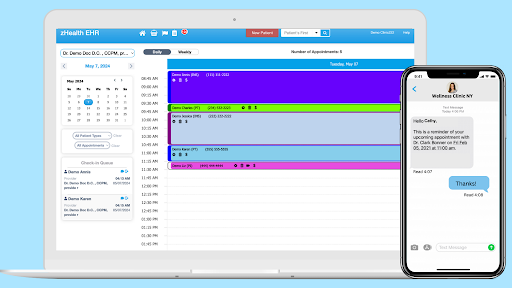
zHealth delivers a streamlined experience focused on speed and ease of use for chiropractic practices. Its appointment system simplifies scheduling by allowing patients to book online quickly, reducing front-desk workload. The SOAP note interface adapts to different treatment styles and supports voice dictation, helping chiropractors document faster and more accurately. Billing features help process claims efficiently, minimizing delays in payments.
When combined with Emitrr, zHealth automates reminders and confirmations, reducing no-shows and improving patient follow-up. Feedback collection is also simplified, allowing practices to monitor patient satisfaction regularly. This combination makes zHealth a smart choice for chiropractic clinics aiming to keep workflows moving smoothly and patients connected.
4. ClinicSense
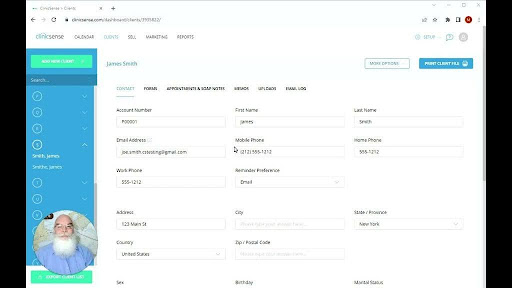
ClinicSense focuses on simplicity and reliability, making it a solid option for smaller clinics or solo chiropractors who need straightforward tools. It provides clear, easy-to-use charting that fits everyday clinical routines, along with secure data storage that meets privacy requirements. Scheduling is made around patient convenience, offering online booking that reduces calls and scheduling errors. Billing processes integrate smoothly, keeping administrative tasks manageable.
Integrating ClinicSense with Emitrr elevates the chiropractic practice’s communication by automating appointment reminders and follow-ups, which lightens the staff’s workload and helps maintain steady patient flow. Collecting patient reviews through Emitrr becomes hassle-free, enabling clinics to build trust and manage online review reputation for chiropractic practices effectively. ClinicSense and Emitrr together create a dependable system for managing both care and communication.
5. ChiroSpring
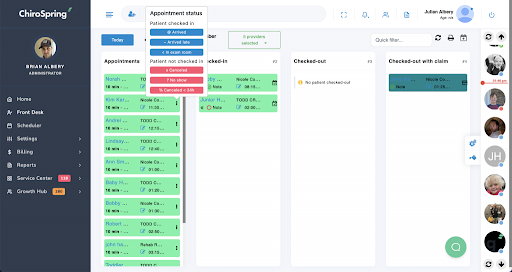
ChiroSpring stands out for its flexible and visual approach to chiropractic EMR. The dashboard gives a quick overview of patient history, upcoming appointments, and recent treatments, which helps chiropractic practitioners make informed decisions faster. Its multi-location support works well for clinics managing several offices, providing a unified view of schedules and billing. Image and document uploads, including X-rays, come with annotation tools that improve clarity during patient reviews. The claims management system reduces errors and speeds up reimbursement by running checks before submission.
Integration with Emitrr brings seamless patient communication to the forefront by automating appointment alerts, confirmations, and feedback requests. This integration supports keeping patients engaged while reducing administrative interruptions. You can make the most of your chiropractic EMR, ChiroSpring, by combining it with Emitrr to create a comprehensive experience that balances efficiency with a focus on patient care.
6. SpryPT
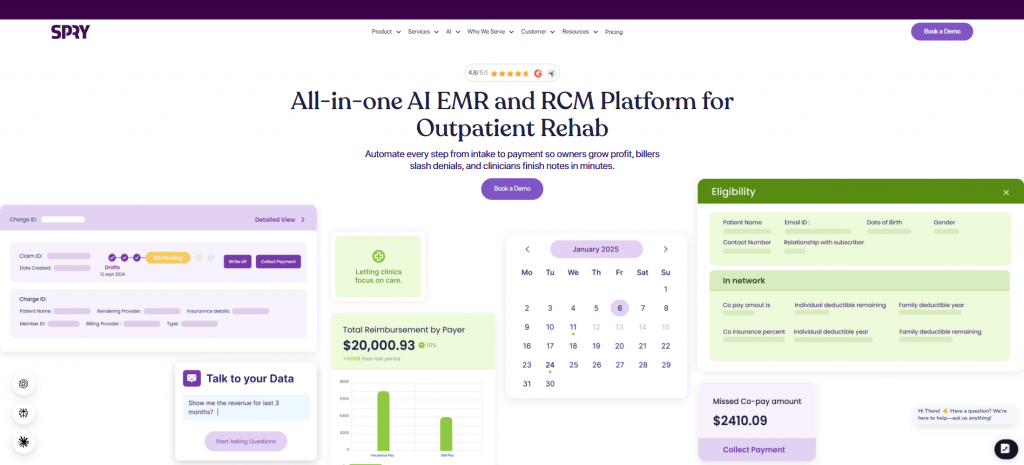
SpryPT is a cloud-based EMR and practice management software primarily built for rehabilitation practices, including clinics that provide chiropractic or closely related musculoskeletal care. It combines documentation, scheduling, billing, patient management, and practice analytics in one system. Its customizable clinical templates and digital documentation tools can help practitioners spend less time on repetitive charting while keeping treatment records organized. Online scheduling and patient engagement features can also reduce front-desk workload.
When paired with Emitrr, SpryPT can support the communication layer around the EMR by automating appointment reminders, confirmations, follow-ups, and review requests. Two-way texting gives staff a way to respond to patients without relying on manual calls for every appointment change or question. This can help chiropractic practices keep schedules organized, reduce missed appointments, and maintain consistent patient communication.
7. PatientNow
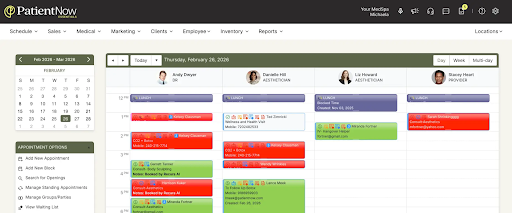
PatientNow is a cloud-based practice management and EMR platform designed primarily for aesthetic and elective healthcare practices, but its scheduling, documentation, billing, and patient communication capabilities can also be relevant to chiropractic practices with similar operational needs. It provides tools for managing patient records, appointments, treatment documentation, payments, and practice operations from a centralized platform. Its focus on streamlined administrative workflows makes it more suitable for practices that want clinical and business operations managed together.
With Emitrr, PatientNow can be complemented with automated patient communication workflows such as appointment reminders, confirmations, follow-ups, and review requests. Practices can use two-way messaging to handle responses and keep patients informed without adding more manual work for front-desk staff. Together, the platforms can help chiropractic practices maintain smoother scheduling and more consistent patient engagement.
How Emitrr Works Alongside Your Chiropractic EMR
Two-Way Patient Communication
Emitrr adds two-way texting to the communication workflows around your chiropractic EMR. Patients can receive appointment reminders, confirmations, treatment follow-ups, and reactivation messages and respond directly. Staff can manage these conversations from a shared inbox instead of relying on individual phones or manually tracking responses.
Appointment Reminders and Confirmations
Practices can automate appointment reminders and confirmation requests to keep patients informed before scheduled visits. When patients respond, staff can manage the conversation from Emitrr, helping reduce manual calls and making it easier to identify appointment changes or cancellations.
Patient Reactivation and Treatment Follow-Up
Emitrr can help practices reconnect with patients who are overdue for care or have stopped attending appointments. Practices can also create follow-up workflows after treatment to check in with patients and encourage the next appropriate step in their care journey.
Digital Forms
Digital forms can be sent to patients through text before appointments, helping practices collect intake information, consent forms, or other required details without relying entirely on paperwork at the front desk.
Shared Inbox and Missed-Call Text Back
A shared inbox gives staff a centralized place to manage patient conversations and ensures messages are not tied to one employee’s phone. If a call goes unanswered, missed-call text back can automatically send a message to the patient, helping the practice respond even when staff are busy or the office is closed.
Automation With Limited EHR APIs
Not every chiropractic EMR provides an open API or supports the data access required for a direct integration. In these cases, Emitrr can support alternative workflows such as CSV-based campaigns, supported Chrome extension workflows, or other available data-transfer methods.
For example, a practice can export a list of patients who are overdue for care from its EMR, upload the CSV to Emitrr, and send a reactivation campaign without requiring a direct API connection. Where supported, browser-based workflows can provide another way to initiate communication without manually switching between systems.
AI Voice and Workflow Automation
Beyond texting, AI voice can help automate selected phone-based interactions, while workflow automation can connect multiple communication steps into a repeatable process. A chiropractic practice could create a workflow that sends a reminder, captures the patient’s response, follows up when necessary, and routes conversations to staff when human assistance is required.
Limitations of Workaround-Based Integrations
These alternatives are useful when native integration is unavailable, but they are not equivalent to real-time EHR synchronization. CSV workflows may require staff to export and upload data manually, browser-based workflows can depend on changes to the EMR interface, and information sent through Emitrr may not automatically write back into the chiropractic EMR.
Implementation Roadmap
Key Takeaways
- Chiropractic EMR selection should be judged primarily on how well the system supports treatment-plan-driven recurring scheduling and fast, defensible SOAP documentation.
- Closed or niche EHRs with no public API are the most significant structural blocker to communication and scheduling automation in chiropractic practices.
- Billing and claims strength matters more in chiropractic than in many other specialties, given how frequently the field faces documentation-related audits.
- Pricing models for communication and VoIP tools vary widely (per-text, per-user, credit-based), and practices should model their actual volume before committing to any one structure.
- Number porting, 10DLC registration, and legacy phone system transitions should be planned as part of implementation, not treated as afterthoughts.
Frequently Asked Questions
Pricing varies by vendor, number of providers, locations, and features. Some chiropractic EMRs use monthly subscription pricing, while others may charge separately for billing, additional users, or other services. Compare the total cost of ownership, including implementation, data migration, payment processing, integrations, and communication tools, rather than comparing subscription prices alone.
Treatment-plan and recurring-appointment capabilities vary across ChiroTouch, ChiroFusion, zHealth, ClinicSense, and ChiroSpring. Practices should confirm whether the system can create recurring visits from a care plan, track recommended versus completed visits, and identify patients who are overdue for care. Ask vendors to demonstrate the complete workflow during a product demo.
Some EMRs provide APIs or integrations that allow appointment and patient data to connect with external communication platforms. Others have limited API access and may require alternatives such as CSV uploads, browser-based workflows, or supported extensions. Before purchasing, confirm exactly what data can be accessed, whether information can be written back to the EMR, and whether the integration operates in real time.
Communication automation may still be possible through CSV-based workflows, supported Chrome extension workflows, or other available methods. However, these are not equivalent to a native integration. CSV workflows can require manual exports and uploads, while browser-based approaches may depend on the EMR’s interface and generally do not provide complete two-way synchronization. Practices should understand these limitations before assuming that all communication workflows can be fully automated.
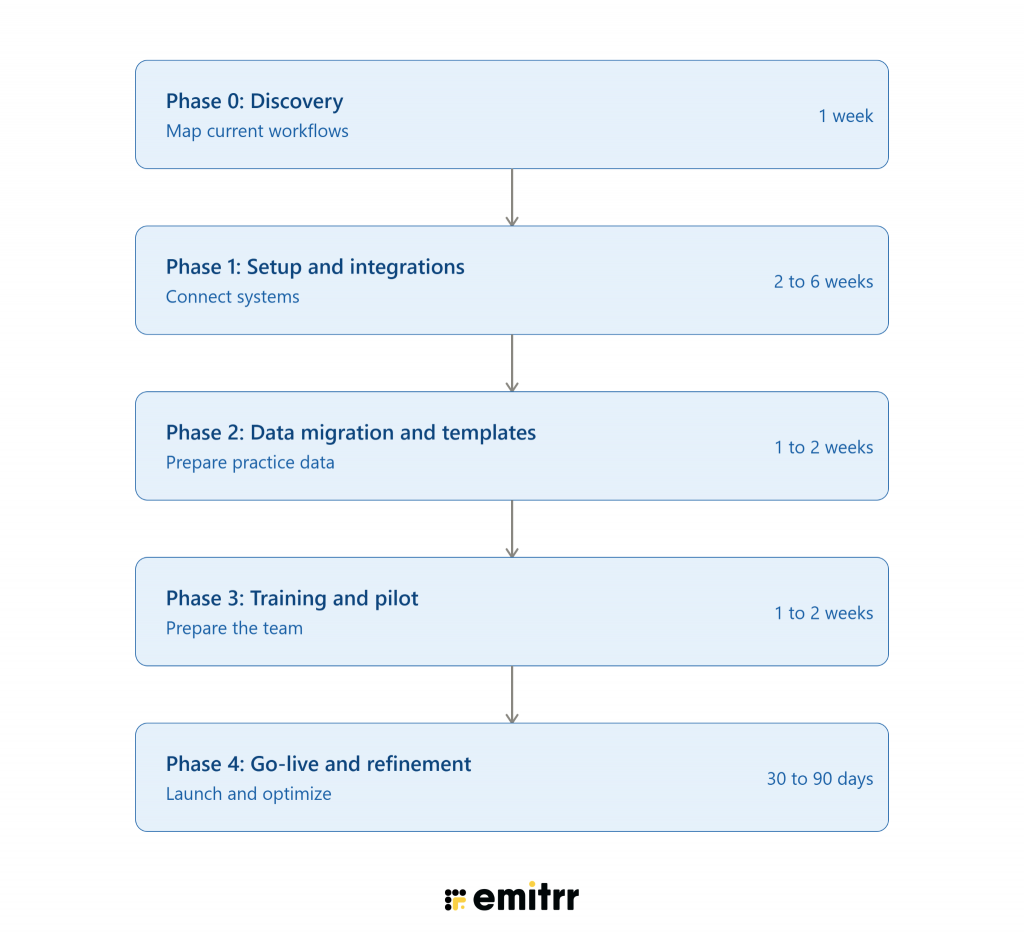
Implementation depends on the number of providers and locations, data migration requirements, existing treatment plans, integrations, staff training, and phone-number porting. A practice should also account for 10DLC registration if it plans to use business SMS. Rather than relying on a standard timeline, ask each vendor for an implementation plan based on your practice’s specific setup.
An EMR can help by providing appointment reminders, online scheduling, recurring appointments, and patient management tools. However, reducing no-shows depends heavily on the communication workflow around the EMR. Two-way reminders, confirmations, rescheduling options, and follow-up messages can make the process more effective than relying on one-way reminders alone.
Conclusion
The right EMR for chiropractors should support the realities of chiropractic care, from fast SOAP documentation and treatment plans to recurring scheduling, billing, and patient management. When comparing ChiroTouch, ChiroFusion, zHealth, ClinicSense, ChiroSpring, SpryPT, and PatientNow, look beyond the feature checklist and evaluate how well each system fits your actual workflows, integration requirements, and growth plans.
Communication is another important part of the decision. Emitrr can add two-way texting, appointment reminders, patient reactivation, treatment follow-ups, digital forms, missed-call text back, AI voice, and workflow automation alongside your existing EMR.
Want to see how it could work with your chiropractic workflow? Book an Emitrr demo to explore the communication and automation workflows for your practice.

 4.9 (400+
reviews)
4.9 (400+
reviews)