
Introduction
The fax inbox opens to forty-three documents. The filenames read like “scan_0912.pdf,” “Fax from 555-0142,” and “document(7).pdf.” Somewhere in the pile is a referral marked urgent, a prior authorization approval that expires Friday, two lab reports, a records request, and at least one fax that has nothing to do with the practice at all. Nothing in the list says which is which.
That is what makes medical fax triage different from sorting an ordinary inbox. A text message usually tells you what the patient wants in the first line. A fax is a document, and the information needed to decide where it goes and how fast it matters is inside it: the sender, the patient, the document type, the date, the urgency. Someone has to open it, read it, and decide.
Medical fax triage is the workflow that makes that decision consistent. This guide covers the five steps from receipt to resolution, how to handle difficult faxes, how to track outgoing faxes, how to reduce volume without breaking referral workflows, and the metrics that show whether the process is working.
What Is Medical Fax Triage?
Medical fax triage is the process of reviewing, identifying, prioritising, and routing incoming faxes. It answers four questions about every document: what is it, who is it for, how urgent is it, and who owns the next step.
It helps to separate two kinds of review:
- Document triage is administrative. It decides what type of document arrived, which patient it belongs to, which team should handle it, and how quickly.
- Clinical review is a judgement about what the content means for the patient’s care. A clinician reviews lab values, imaging reports, and discharge instructions.
Document triage gets the fax to the right person at the right time. It does not replace the clinician’s read of the content.
The outcome to aim for is simple: every fax has a clear destination, priority, owner, and status. A fax without all four is a fax that can disappear. This helps reduce manual fax processing in a medical office and makes fax handling more efficient.
What Types of Documents Arrive as Medical Faxes?
Most practices receive a predictable mix:
- Referrals and consult requests from other offices
- Prior authorization and payer correspondence, including approvals, denials, and requests for more information
- Lab and imaging results
- Hospital discharge summaries
- Records requests from patients, other providers, or attorneys
- Prescription-related documents, such as refill requests from pharmacies and prior authorization forms for medications
- Forms and signed documents, such as consent forms or school and work forms
- Administrative correspondence, including vendor and insurance notices
- Junk or unsolicited faxes
Here is the trap: you cannot reliably identify any of these from the filename or the cover sheet. Filenames are generated by the fax machine or scanner. Cover sheets are optional, often missing, sometimes filled out wrong, and occasionally describe only the first of several documents in the packet. A fax labelled “Referral” may contain a records request, and a fax with no cover sheet at all may hold the most urgent item of the day. Triage has to be based on what is inside the document.
Why Medical Fax Triage Is Difficult to Manage Manually
A manual fax process breaks down in a few predictable ways:
- Shared fax inboxes make ownership unclear. When everyone can see every fax, everyone assumes someone else has it.
- Multi-page documents can contain multiple pieces of information. A 12-page fax may include a referral, a lab report, and an insurance card copy for the same patient, or documents for different patients.
- Urgent documents look identical to routine ones. A STAT referral and a vendor flyer both arrive as a PDF with a generic name.
- Staff handles documents manually. The typical sequence is download, open, read, rename, identify the patient, route to the right person, and upload to the chart. Each step is a place where a document can stall.
The result is both delay and unnecessary administrative work. Urgent items wait behind routine ones, and staff spend time on renaming and refiling that adds no clinical value, contributing to the hidden costs of fax machines in medical offices.
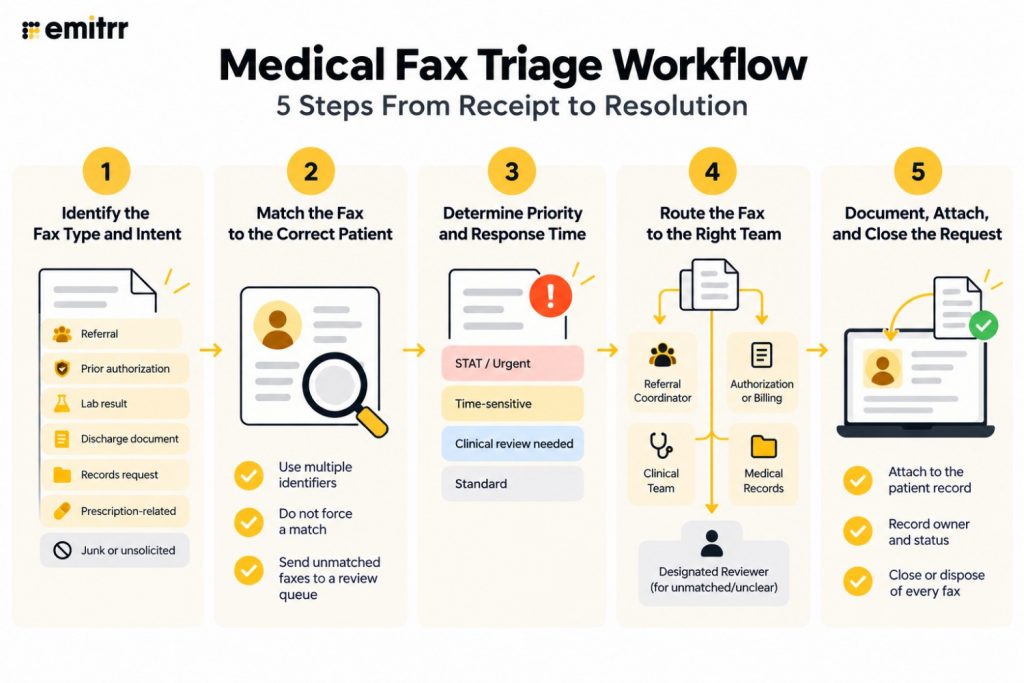
Medical Fax Triage Workflow: 5 Steps From Receipt to Resolution
Step 1: Identify the Fax Type and Intent
The first job is to determine what the document is. Staff and automation both rely on a mix of signals: the sender (a known referring office, a payer, a lab), the header or letterhead, keywords in the text, and form identifiers such as a standard referral form or authorization request number.
| Fax Type | Identification Cues | Typical Destination | Priority Considerations |
| Referral | Referring provider’s name, “referral,” reason for visit, diagnosis codes | Referral coordinator | Urgent or STAT marking, requested appointment window |
| Prior authorization | Payer name, authorization number, “approved,” “denied,” “additional information requested” | Authorization or billing team | Expiration dates, response deadlines |
| Lab or imaging result | Lab or facility header, test names, result values | Clinical team | Critical or abnormal flags; clinician review required |
| Discharge document | Hospital name, admission and discharge dates, discharge instructions | Care coordination or clinical team | Recent discharge; follow-up window |
| Records request | “Request for records,” authorization to release, requester information | Medical records | Legal or regulatory response deadlines |
| Prescription-related | Pharmacy name, medication names, “refill request,” “prior authorization” | Medication or refill workflow | Patient running out; pending expiration |
| Junk or unsolicited | No patient or practice link, promotional language | Review folder; no routing | Check for false positives before discarding |
Use the table as a starting point. A practice that sees many workers’ compensation forms or school forms will want rows for those too, and the destinations should match your own team structure.
Step 2: Match the Fax to the Correct Patient
Identifying the document does not tell you whose chart it belongs in. Matching the fax to the right patient is where careless handling creates real harm, because a document attached to the wrong record is both a privacy problem and a clinical one.
- Use more than one identifier. Name alone is not enough, especially for common names. Combine the name with the date of birth, and add the phone number, address, or member ID when available.
- Do not force a match. If the identifiers do not agree or are missing, the fax is unmatched, and that is an acceptable status.
- Create a temporary review queue. Unmatched faxes go into a named queue with a named owner, not into the general inbox where they can sit.
- Set a target time to resolve. An unmatched fax should be worked on promptly, since it could be a referral or a result someone is waiting for.
- Handle bundled faxes. When a single fax contains multiple patients or document types, split it or flag it for separate handling so each document is routed and attached on its own.
Step 3: Determine Priority and Required Response Time
Priority comes from three sources: the type of document, signals from the sender about urgency, and the rules the practice has defined. Examples that commonly move a fax to the top:
- STAT or urgent referrals, where a specialist appointment needs to be arranged quickly
- Hospital discharge documents, where follow-up outreach is time-sensitive
- Time-sensitive authorization requests, such as an approval that expires or a payer asking for information by a deadline
- Results that require clinical review, particularly those flagged critical or abnormal by the lab
Keep administrative priority separate from clinical decision-making. Front-office staff can move a result to the clinician’s queue quickly, but they should not interpret it. The practice’s clinical leaders should define which document types and flags require same-day clinician review, and the triage process should enforce those rules.
Step 4: Route the Fax to the Right Team
Once the type and patient are clear, route by function:
- Referral goes to the referral coordinator.
- Prior authorization goes to the authorization or billing team.
- Results go to the clinical team.
- Records request goes to medical records.
- Prescription-related goes to the appropriate medication or refill workflow.
- Unmatched or unclear goes to a designated reviewer.
Every one of those paths needs a fallback owner. If the referral coordinator is out sick, or a fax does not fit any category, someone must still be responsible for it. Without a fallback, routing rules fail exactly when they are needed most: during absences, on busy days, and for the faxes that do not look like the others. AI fax routing and intelligent document processing can help reduce the manual effort involved in identifying and directing incoming faxes.
Step 5: Document, Attach, and Close the Request
Routing is not the end. The fax needs to end up where it will be found later, and its status needs to reflect what happened.
- Associate the document with the patient record where your system and EHR integration support it. Not every setup links automatically, so confirm what yours does.
- Record the owner and status. Who worked on it, what was done, when.
- Close or dispose of every fax. Mark it as completed, forwarded, rejected, or filed. This is what lets staff tell the finished work from the outstanding work. An inbox full of faxes with no status cannot be audited, and no one can tell at a glance what is still open.
Practices can also connect fax workflows with the patient chart, as explained in how EHR fax integration improves clinical workflow, so documents move more efficiently from the fax inbox into the broader care process.

How to Handle Difficult or Misrouted Medical Faxes
Not every fax arrives clean. A standard response for each common problem keeps staff from improvising:
- Illegible fax. Request a clearer resend from the sender. Do not guess at unreadable values.
- Missing pages. Request the missing pages before processing. A partial referral or result can lead to incomplete work.
- Duplicate fax. Check whether it was already processed before taking action, so the same referral is not scheduled twice.
- Wrong patient. Move it to the appropriate review process instead of attaching it to a record you are unsure about.
- Misdirected fax. If the fax was meant for another organisation, follow your practice’s privacy and incident-handling procedures. Do not simply discard it, and do not forward it without guidance.
A written procedure for these cases, with a clearly assigned owner, helps prevent difficult faxes from being overlooked because staff are unsure how to handle them. Practices reviewing their privacy exposure can also assess what constitutes a HIPAA fax violation.
Outgoing Medical Faxes: Tracking Delivery and Failed Sends
Triage covers what comes in, but outgoing faxes need the same discipline. A referral sent to a specialist that never arrived is a patient who never gets seen. Triage covers what comes in, but outgoing faxes need the same discipline. A referral sent to a specialist that never arrived is a patient who never gets seen, making HIPAA-compliant faxing an important part of a reliable fax workflow.
- Delivery status. Know whether each outgoing fax succeeded, failed, or is still in progress. “Sent” from the sender’s side is not the same as delivered.
- Failure handling. Failed faxes should surface to a person quickly, with the reason where available, such as a busy line or wrong number.
- Retry without rebuilding. The best systems let staff retry a failed fax without recreating the entire document package. Rebuilding a 15-page packet because of a busy signal wastes time and risks leaving something out.
- Delivery records. Keeping a record of what was sent, when, and with what result supports operational tracking and audit needs.
Reduce Incoming Fax Volume Without Disrupting Referral Workflows
The best fax triage process still benefits from fewer faxes. Look at the recurring types and ask which could be replaced with a structured digital alternative:
- Referrals can be collected through an online form with required fields, so the information arrives standardised and complete.
- Patient-originated documents, such as intake paperwork, can be handled through digital forms rather than faxed copies.
- Standard cover sheets help where fax remains necessary. A consistent cover sheet with the patient’s name, date of birth, document type, and urgency gives triage a head start. A HIPAA-compliant fax cover sheet can include these essential details.
One caution: reducing fax volume should complement a reliable triage process, not replace it. Many referring offices will keep faxing for years, and the practice cannot control that. Build the triage workflow first, then use forms to shrink the stream where partners are willing to change. For referrals that still come in by fax, fax-based referral intake can be part of that structured workflow.
Medical Fax Compliance and Audit Considerations
Faxes contain protected health information, so the triage process needs to hold up to scrutiny. Areas to build into the design:
- Access controls. Only staff who need to see faxes should be able to open them, and role-based access limits exposure.
- PHI handling. Define how documents are stored, shared, and disposed of, including what happens to unmatched or misdirected faxes.
- Patient matching. A wrong match is a privacy event as well as an operational error, so require multiple identifiers.
- Retention. Keep documents for the period your organization’s policy and applicable rules require.
- Document history. Record what was received, when, and what happened to it.
- User and activity records. Know who opened, assigned, edited, or closed each item.
Specific compliance requirements can vary by organization and state, so review your process with your compliance and privacy team rather than relying on general guidance. Understanding whether fax is HIPAA compliant can also help when reviewing your faxing process.
Medical Fax Triage Metrics to Track
Measure the workflow, not just the volume:
- Time to first review: how long a fax sits before anyone looks at it.
- Time from receipt to routing: how long until it reaches the right owner.
- Time from receipt to chart: how long until it is attached to the patient record.
- Unmatched faxes past target: items stuck in the review queue.
- STAT faxes handled within target: whether the urgent ones actually moved fast.
- First-pass routing accuracy: the share was routed the first time correctly, found through a weekly sample.
- Faxes remaining open at the end of the day: a simple backlog check.
Review the numbers on a regular schedule. Where misroutes cluster, adjust the identification cues or the routing rules. Where unmatched items accumulate, check whether the matching process or the reviewer’s capacity is the constraint.
How Emitrr Supports Medical Fax Triage
The workflow above does not require a particular product, but it does require a place where faxes can be seen, sorted, assigned, and tracked. Emitrr’s digital fax capability puts incoming and outgoing faxes inside the same communication environment as calls and SMS, with fax-specific organization and handling. Teams that need to confirm compliance posture can review the details on the HIPAA-compliant virtual fax page.
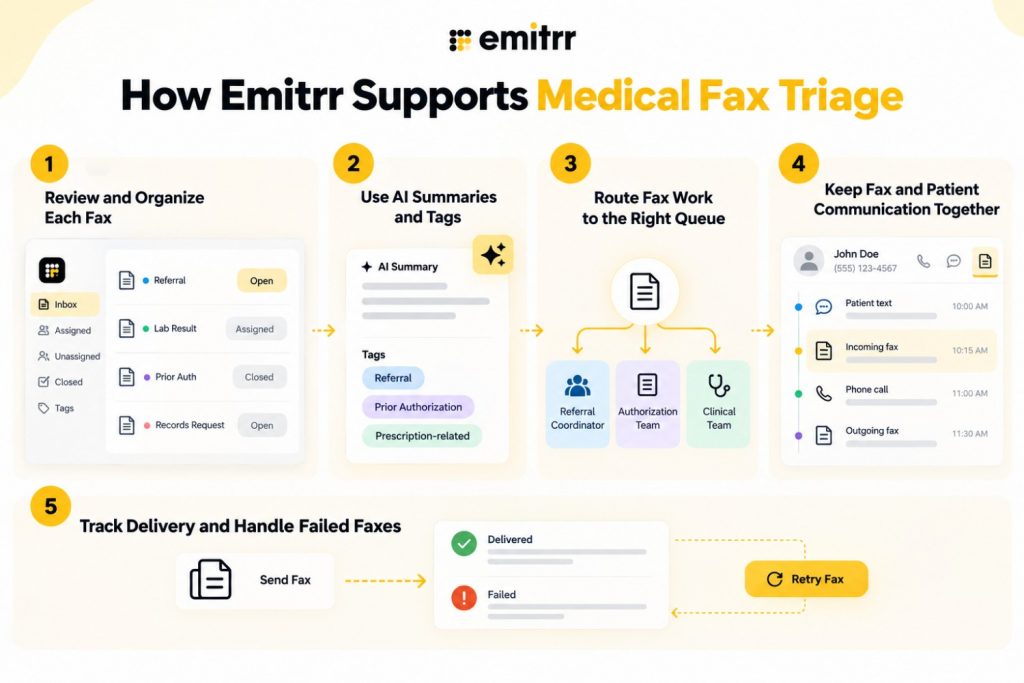
Review and Organize Each Fax as an Individual Item
Incoming faxes can be handled as individual items, each with its own status, assignment, tags, and document information. That differs from treating the fax inbox as one undifferentiated queue, where the only way to know what has been handled is to remember it. Each fax can be marked as open or closed, read or unread, assigned to a person or team, and given a disposition that maps directly to the closing step above. Filters and folders help staff view the faxes that matter to them, such as unassigned items or a specific tag.
Use AI Summaries and Tags to Speed Up First Review
AI summaries can give staff an initial understanding of a document before they open and read the full fax. AI tagging can categorize documents such as referrals, prior authorization, and prescription-related faxes, and default fax tags and attributes give the team a starting set.
Be clear about what this does. AI categorization supports review. It does not replace patient matching or clinical review. A summary helps a staff member decide where the fax should go. A person still verifies the patient and the content. AI tag availability depends on plan, so confirm what your account includes.
Route Fax Work to the Right Queue
Tags can be connected to assignment rules, so a fax tagged as a referral goes to the referral coordinator and one tagged as prior authorization goes to the authorization team. Assignment can go to a team or an individual, depending on the workflow. Round-robin distribution spreads high-volume fax work across a team, which helps when several people share the same kind of task. Urgent categories can be connected to alerts or follow-up workflows, so a STAT referral does not wait for someone to notice it.
Keep Fax and Patient Communication Context Together
Incoming and outgoing faxes can appear alongside calls and texts in the same contact thread. That matters when a fax is part of a larger sequence: a patient texts about an appointment, the referring office faxes records, and the patient then calls with a question. Staff see all three together instead of reconstructing the history from separate systems. The team messaging inbox is built around this contact-level view.
One note on scope: not every fax is automatically matched to an EHR record. Record linkage depends on the integration in place, so confirm how documents are attached to charts in your setup.
Track Delivery and Handle Failed Faxes
For outgoing faxes, delivery status shows whether a send succeeded or failed. Failed faxes can be retried without rebuilding the entire job, and the documents remain available for review and recordkeeping. That closes the loop on the outgoing side as the closing step does on the incoming side.
See what happens when routine patient communication stops overwhelming the front desk and how Emitrr helps move requests to the right place, faster.
Key Takeaways
- Medical fax triage means reviewing, identifying, prioritizing, and routing incoming faxes so each has a destination, priority, owner, and status.
- Document triage is administrative. Clinical review of content stays with clinicians.
- Filenames and cover sheets are unreliable, so identify faxes by reading the document.
- Match patients with multiple identifiers, and send unmatched faxes to a named reviewer instead of forcing a match.
- Set priority from document type, sender urgency, and practice rules, and give every route a fallback owner.
- Close or disposition every fax so completed work is distinguishable from outstanding work.
- Write a standard response for illegible, incomplete, duplicate, wrong-patient, and misdirected faxes.
- Reduce fax volume with forms and cover sheets, but keep a reliable triage process in place.
- AI summaries and tags speed up first review without replacing patient matching or clinical review.
FAQs
Medical fax triage is the process of reviewing, identifying, prioritizing, and routing incoming faxes so each document reaches the right team with a clear priority, owner, and status. It is an administrative workflow and does not replace clinical review of the content.
Identify the document type, match it to the correct patient, set priority, and route it by function: referrals to the referral coordinator, prior authorizations to the authorization or billing team, results to the clinical team, records requests to medical records, and prescription-related faxes to the medication workflow. Assign a fallback owner for anything unclear.
Do not force a match. Send the fax to a temporary review queue with a named owner and a target time for resolution. The reviewer uses multiple identifiers to find the patient, or contacts the sender for clarification, and the fax stays flagged until it is matched or dispositioned.
Yes. AI can summarize a fax and suggest tags such as referral, prior authorization, or prescription-related, which helps staff decide where it should go before reading the full document. Staff still verify the patient match and clinicians still review clinical content.
Treating each fax as an individual item with status, assignment, and tags removes the download, rename, and re-file cycle. AI summaries speed up first review, assignment rules route work automatically, and forms replace recurring fax types with structured digital intake.
Limit access to staff who need it, require multiple patient identifiers, keep document history and activity records, follow retention policy, and have written procedures for misdirected faxes. Review your process with your compliance and privacy team, since requirements vary by organization and state.
Conclusion
A fax inbox does not need to be a pile. It needs a process: identify the document, match the patient, set the priority, route it to the right team, and close it out. The details that make it work are unglamorous ones, such as a named owner for unmatched faxes, a fallback for every route, and a status on every item.
Start by mapping your top fax types and where each should go. Then fix the unmatched queue, add a few metrics, and bring in automation where manual steps repeat most. The goal is that no fax, including the urgent referral buried at number thirty-one, depends on someone happening to open it.
Book a demo to see how Emitrr handles fax triage. Bring incoming and outgoing faxes into one workflow with your calls and texts.

 4.9 (400+
reviews)
4.9 (400+
reviews)