

Introduction
A referral can arrive complete, clean, and clinically appropriate and still lose a week. Nobody decided how urgent it was, two coordinators each assumed the other had it, and by the time someone called the patient, the appointment they wanted had been booked somewhere else. The problem wasn’t the referral. It was the missing decision between “received” and “scheduled.”
That decision is referral triage: sorting each referral by urgency, appropriateness, and requirements, then putting a named owner on it. Done well, it keeps urgent cases from waiting behind routine ones and keeps referrals from bouncing between desks. Done informally, it depends on whoever happens to open the inbox first.
This guide covers the referral triage process step by step, how to handle referral prioritization, the routing criteria and assignment models that decide where a referral goes, who should make which call, how to handle exceptions, and where automation can take repetitive routing work off your team without taking clinical judgment away from your clinicians.
What Is Referral Triage?
Referral triage is the review step within the referral intake process that decides four things about an incoming referral: whether it fits your practice, how urgently the patient needs to be seen, what has to happen before scheduling (records, insurance, authorization), and who owns the next step. The output isn’t an appointment. It’s a decision: this referral goes to this team, at this priority, by this deadline.
Triage has two layers, and keeping them separate prevents most role confusion:
- Clinical triage judges urgency and appropriateness. Is there a red flag? Does the clinical information support the requested service? Does the referral belong in this specialty? A clinician or clinical reviewer makes these calls, following the practice’s own protocol.
- Administrative triage sorts by non-clinical requirements: completeness, payer and network, location, provider panel, and capacity. Coordinators handle this by following written rules.
When the layers blur, one of two things happens. Clinicians spend time sorting that doesn’t need them, or non-clinical staff ends up making urgency judgments they shouldn’t.
| Referral Intake | Referral Triage | Referral Scheduling | |
| Purpose | Receive, log, and confirm the referral and capture its data | Decide urgency, fit, requirements, and ownership | Book the visit with the right provider and time |
| Who owns it | Front desk and intake staff | Referral coordinator, with a clinical reviewer for urgency | Scheduler or coordinator |
| Output | A complete, logged referral record | A prioritized referral with an assigned owner and deadline | A confirmed appointment |
Intake and triage are often described together, but they are separate jobs with separate failure modes.
Where Triage Fits in the Referral Management Workflow
In a referral management workflow, triage sits between patient intake and scheduling. Intake hands over a logged referral; triage turns it into a prioritized, owned task; scheduling books the visit. When intake passes along incomplete data, triage turns into data cleanup, and the decision it exists to make gets delayed.
Triage needs a minimum data set before it can start:
| Data Needed | Why Triage Needs It |
| Patient name, date of birth, best contact method | To identify the patient and reach them |
| Referring provider and contact information | To ask questions and send status updates |
| Reason for referral or diagnosis | To judge fit and urgency |
| Urgency noted by the referrer | To set an initial priority flag |
| Insurance payer and member ID | To check network and authorization requirements |
| Supporting documents (notes, imaging, labs) as the specialty requires | To support clinical review |
When that data is missing, triage has to stop. Someone must contact the patient or referring office, wait for a response, and then pick the referral back up. That adds a handoff and another chance for the referral to age in a queue. Two habits help:
- Triage what you can. Even an incomplete referral can usually be assigned a destination and a provisional urgency flag.
- Use an explicit “awaiting information” status with a deadline, so incomplete referrals don’t disappear into a general backlog.
Catching gaps at the door is easier when completeness is checked automatically, which is the idea behind filtering complete vs incomplete referrals using AI.
Referral triage can break down when basic intake details are missed upfront. Watch this video to see how common intake gaps can create downstream delays in referral triage.
Steps For The Referral Triage Process
A repeatable referral triage process answers seven questions in order. Each one has a decision, a typical owner, and a defined outcome if the answer is no.
| Step | Question Answered | Typical Owner | If the Answer Is No |
| 1. Confirm completeness | Do we have the minimum data set? | Intake staff or coordinator | Mark “awaiting information,” contact referrer or patient, set a deadline |
| 2. Check appropriateness and specialty fit | Does this referral belong with us? | Coordinator, clinical reviewer if unclear | Redirect or decline with a reason, notify the referrer |
| 3. Assess clinical urgency | How soon does the patient need to be seen? | Triage nurse or clinical reviewer | Default to the tier set by your written criteria |
| 4. Check payer, network, and authorization | Can we see this patient, and does anything need approval first? | Coordinator or billing | Flag the requirement, start authorization, hold scheduling per policy |
| 5. Decide destination and assign an owner | Which team, provider, and location? | Coordinator | Escalate to manager if no provider or location qualifies |
| 6. Set a response deadline | By when must the patient be contacted? | Coordinator | Apply the default deadline for the urgency tier |
| 7. Notify referrer and patient | Do both know the referral is in motion? | Coordinator or automated message | Send confirmation immediately and log it |
A few notes on getting each step right:
- Step 2 is easy to skip and expensive to skip. A referral for a service you don’t provide, discovered a week later, costs the patient time and the referrer’s trust.
- Step 4 belongs inside triage, not after scheduling. Learning about an authorization requirement after the patient has been booked results in a cancellation and a rebooking.
- Step 6 is what separates triage from sorting. A referral without a deadline has an owner on paper and no pressure to move.
- Step 7 matters more than it looks. Referring offices that don’t hear back call to ask, and each call interrupts the team. Practices looking to reduce follow-up calls from referring practices usually start by confirming receipt and status without anyone having to ask.
How to Prioritize Referrals: Urgency Tiers and Time Targets
Referral prioritization turns “this one seems urgent” into a rule. A simple tier system gives every referral a priority and every priority a clock.
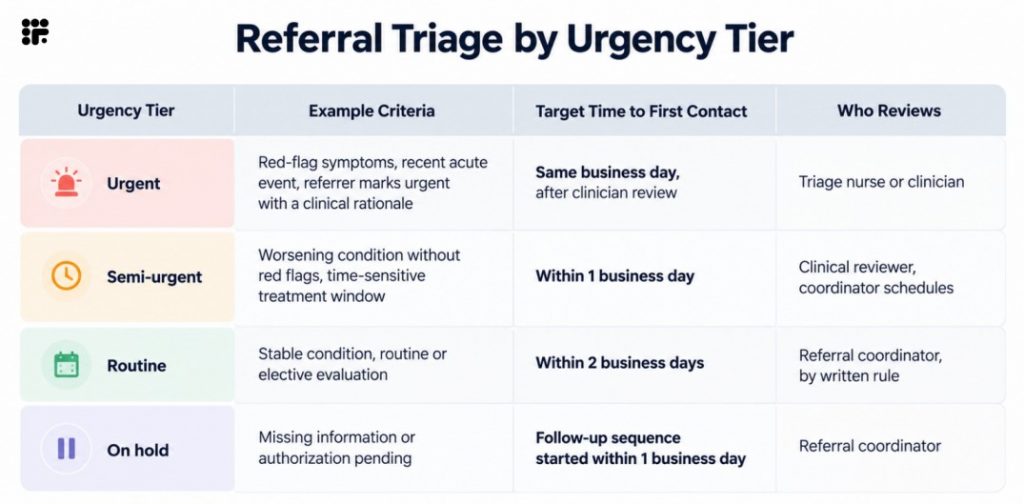
These time targets are examples, not standards. Set yours with clinical leadership for each specialty, because what counts as urgent in cardiology differs from orthopedics or behavioral health.
Larger health systems often formalize this into published criteria. Queensland Health’s clinical prioritisation criteria, for example, sort outpatient referrals into three categories with target seen-by windows of one month, three months, and one year. Independent practices rarely need that level of formality, but the principle carries over: define the categories, define the clock, and define who decides.
Why first-come, first-served fails for urgent cases. A queue ordered only by arrival time puts a patient with a time-sensitive condition behind every routine referral that arrived earlier. A better rule is to sort by tier first, then by age within the tier, and to move any referral up automatically when it crosses its target. Speed also pays off beyond urgency: faster referral scheduling increases appointment show rates, because a patient reached quickly is still motivated to book.
What Determines Where a Referral Goes: Referral Routing Criteria
Referral routing is the step that connects a triaged referral to a team. It works best when each decision criterion is explicit, and when the data behind it lives somewhere other than one coordinator’s head.
| Criteria | What It Decides | Where the Data Comes From |
| Specialty and subspecialty | Which clinical team can accept the referral | Referral reason, diagnosis, referrer’s request |
| Provider panel status | Which providers are accepting new patients or this type of case | Provider roster maintained by the practice |
| Location | Which site is closest or best suited | Patient ZIP code, referrer preference, site services |
| Payer and network | Which providers and sites the patient’s plan allows | Eligibility check, payer contracts |
| Capacity and availability | Who can see the patient within the target window | Provider schedules, capacity limits, blocked time |
| Patient age and complexity | Whether the case needs a specific provider or visit length | Referral clinical details, clinical review |
| Language or access needs | Whether an interpreter, accessible site, or specific clinician is required | Patient information, referrer notes |
Write each rule as an if-then statement (“if orthopedics and sports injury and location A, route to the sports queue at location A”) and keep a short list of known exceptions. Review the rules quarterly, since provider panels and capacity change.
Referral Assignment Models Compared
Routing decides the destination. Referral assignment decides who picks the referral up once it gets there. Five models cover most practices.
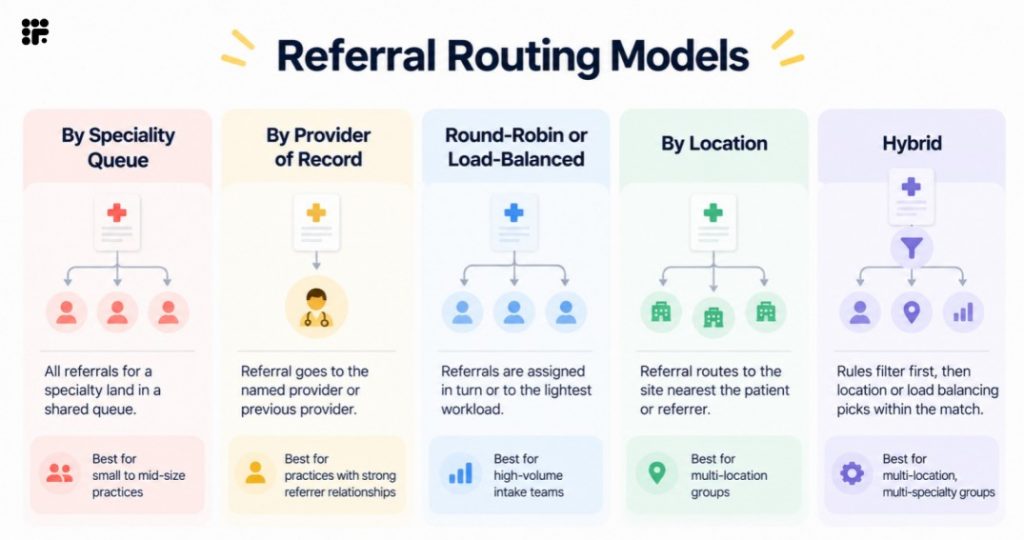
For a single-location practice, a specialty queue or provider-of-record model is usually enough. As the number of locations and specialties grows, a hybrid assignment model becomes more useful because it combines qualification, or who can see the patient, with capacity, or who can see them soonest. This approach is particularly relevant when AI assigns providers based on location and availability, while practices managing multiple sites also need to account for the operational challenges of referral intake in multi-location healthcare practices.
Who Does What: Roles in Triage and Assignment
Clear decision rights keep referral coordination from turning into a series of “I thought you had it” moments.
Clear decision rights keep referral coordination from turning into a series of “I thought you had it” moments.
- Intake staff
- Receive and log referrals
- Confirm receipt
- Capture the minimum required information
- Decide whether a referral is complete
- Escalate incomplete referrals to the referral coordinator
- Referral coordinator
- Run administrative triage
- Apply routing rules and assign owners
- Set deadlines
- Follow up on missing information
- Make routing and priority decisions based on written rules
- Escalate clinical urgency to a clinical reviewer and capacity issues to a manager
- Triage nurse or clinical reviewer
- Review clinical information
- Determine urgency
- Accept or redirect referrals based on clinical appropriateness
- Decide the appropriate service required
- Escalate to a physician or medical director when needed
- Scheduler
- Book the visit based on the referral assignment
- Confirm the appointment with the patient
- Select an appropriate slot within established rules
- Escalate scheduling issues to the referral coordinator
- Manager
- Maintain referral triage and routing rules
- Monitor aging referrals and escalations
- Resolve capacity conflicts
- Approve rule changes and policy exceptions
- Escalate broader issues to practice leadership
What must stay with a clinician:
- Setting urgency for any referral with possible red flags
- Accepting or redirecting a referral on clinical grounds
- Changing the requested service or visit type
- Clarifying clinical information with the referring provider
Formalizing these roles also helps distribute workload. When one coordinator becomes the only person who knows how referrals should be routed, that person can quickly become a bottleneck and face increasing workload pressure, contributing to the challenges of referral coordinator burnout and what actually helps.
Handling Referral Triage Exceptions
Most referrals follow the standard path. The ones that don’t need a defined response, or each exception gets solved differently by whoever happens to pick it up.
- Incomplete referral: Triage what is possible, mark the referral as “awaiting information,” contact the referrer or patient through the fastest available channel, and set a follow-up deadline.
Owner: Referral coordinator. - Misdirected or inappropriate referral: Have a clinical reviewer confirm the issue, notify the referrer promptly with a suggested alternative, and close the referral with a reason code.
Owner: Clinical reviewer and coordinator. - Red-flag urgency: Escalate to a clinician the same day, bypass the normal queue, and contact the referrer if needed.
Owner: Triage nurse or clinician. - No capacity: Offer the next available provider or location, add the patient to a waitlist, or redirect the referral while keeping the referrer informed.
Owner: Coordinator and manager. - Out-of-network: Check payer requirements, explain the available options to the patient, and confirm coverage before scheduling.
Owner: Coordinator or billing team. - Duplicate referral: Merge the records, confirm any differences with the referrer, and document the merge.
Owner: Intake staff or coordinator. - Referrer unreachable: Document contact attempts, use a secondary contact when available, and escalate after the defined number of attempts.
Owner: Coordinator, then manager.

Example: One Referral, From Receipt to Assignment
Here is an illustrative walkthrough of one referral in a three-location orthopedic group. The details are hypothetical, but the stall points are common.
A fax arrives Monday at 4:40 p.m. for a knee injury. The referrer wrote “soon” in the urgency field and left the insurance section blank.
| Time | Event | Without Written Rules | With Written Rules |
| Mon 4:40 p.m. | Fax arrives | Sits in a shared fax queue overnight | Logged and timestamped, tagged orthopedics and sports injury, flagged incomplete (no payer) |
| Tue 9:00 a.m. | First review | One coordinator assumes another owns the fax queue | Already assigned by rule to the orthopedic queue at the location nearest the patient’s ZIP code |
| Tue 10:00 a.m. | Urgency | Nobody sets one; “soon” is ignored | Clinical reviewer reads “soon” alongside the injury, sets semi-urgent the same morning |
| Tue 11:00 a.m. | Missing information | Patient called twice, voicemail both times | Text and digital form sent to collect insurance; referrer notified the referral was received |
| Wed | Authorization | Requirement discovered when scheduling is attempted | Authorization check runs as soon as the payer is known |
| Thu | Patient contact | Patient finally reached; earliest slot is next Wednesday | Patient already booked inside the semi-urgent window |
The referral was the same in both columns. The difference was whether decisions about ownership, urgency, and missing information were defined upfront by clear rules or determined inconsistently as the referral moved through the process. The same distinction applies to fax-first referrals vs digital-first referral workflows.
Common Referral Triage Mistakes
- Triaging before the data is complete. The coordinator ends up guessing at urgency or payer rules, then re-triaging when the real information arrives.
- No written routing rules. Every referral becomes a judgment call, and two coordinators route the same referral differently.
- One coordinator as the single point of failure. When that person is out, referrals sit, because nobody else knows the rules.
- No response deadlines. An owner with no clock treats every referral as equally flexible.
- Reassigning without tracking. A referral that moves between owners with no log is easy to lose and impossible to analyze.
- Treating every referral as equally urgent. If everything is a priority, nothing is, and genuinely time-sensitive cases lose their edge.
Three signals show whether triage is working: how long referrals wait before triage, how long before the patient is first contacted, and how often referrals get reassigned after the first assignment. Rising numbers on any of the three usually point to a rule gap, not a people problem.
Create a More Efficient Referral Routing Process with Emitrr
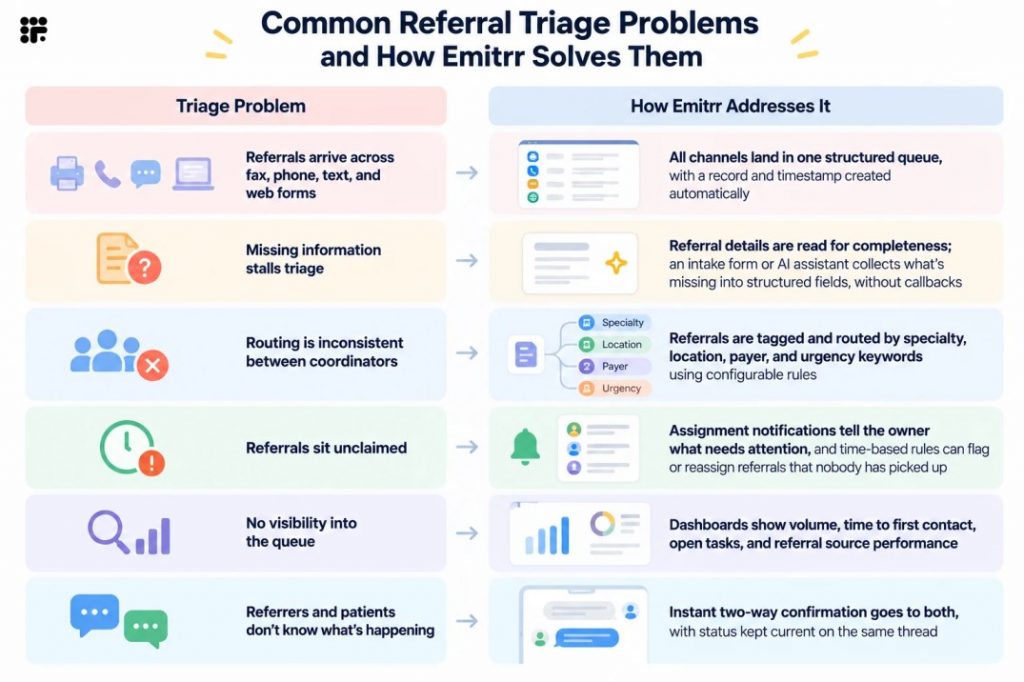
Written triage rules only help if they’re applied the same way, every time, at the speed referrals arrive. That is the part a communication and workflow automation platform can carry: pulling referrals into one place, applying routing rules consistently, collecting missing information, and keeping every owner and deadline visible, while clinicians keep control of the clinical decisions.
Emitrr turns the triage steps above into a referral automation workflow that runs without anyone having to remember each one. In practice, it looks like this:
One inbox, one record. Referrals from fax, web form, email, and phone land together, a pattern described in more depth in omnichannel referral intake. A referral record and timestamp are created the moment each one arrives.
Instant confirmation. A branded text or email confirmation goes to the referring provider and the patient right away. With two-way texting, either one can reply to clarify a detail immediately instead of waiting for a callback.
Automatic tagging and routing. Emitrr reads referral details such as location, specialty, urgency, payer, and keywords, tags the referral, and sends it to the right queue at the right priority, so no one has to look up where it belongs.
Gaps collected in structured fields. When something is missing, an intake form or AI assistant asks the patient or referrer for it, using digital medical forms and surveys so answers land as data instead of free text someone has to retype.
Eligibility and authorization flagged early. Insurance and authorization status is checked as part of the workflow. If something is missing, a task goes to the right staff member with exactly what’s needed.
Clinical review with the full packet. Referrals that need clinical eyes are assigned to the right clinician or nurse with the intake packet attached, so the reviewer doesn’t have to re-ask questions. Assignments and notifications, along with shared notes and @mentions on the same thread, keep everyone looking at the same referral.
Scheduling that fits the rules. Provider attributes such as specialty, location, accepted panels, and capacity limits act as routing rules, so a referral is only offered providers it qualifies for. The patient receives a self-scheduling link showing valid options, or AI appointment scheduling books the visit directly where the system can write to the schedule. Where it can’t, staff get a one-click booking request to confirm.
Follow-up that doesn’t depend on memory. Non-responders get reminders on a set cadence, including AI calls and texts. After a few attempts, the referral escalates to a person for manual outreach.
Visibility. Dashboards track referral volume, time to first contact, conversion, authorization delays, and which referral sources perform best.
A few details are worth being clear about. Clinical urgency decisions, exceptions, and edge cases stay with your clinicians and coordinators, and the workflow surfaces them for review instead of resolving them on its own. Write-back to the EHR and real-time availability depend on the integration in place and on what the connected system can write to. Where write-back isn’t supported, intake data and outcomes can attach as structured PDFs instead.
Key Takeaways
- Referral triage is the decision between “received” and “scheduled”: urgency, fit, requirements, and a named owner with a deadline.
- Triage needs a minimum data set. When data is missing, triage what you can and use an explicit “awaiting information” status.
- Referral prioritization works best with a small number of urgency tiers, each with a target time to first contact, set with clinical leadership.
- Referral routing rules should be written as if-then statements, reviewed regularly, and kept out of any one coordinator’s memory.
- Hybrid assignment, combining qualification rules with capacity-based balancing, tends to suit multi-location groups best.
- Clinicians own urgency and clinical appropriateness. Coordinators own routing, deadlines, and follow-through.
- Automation can handle collection, tagging, routing, notifications, and escalation, leaving clinical decisions and exceptions with people.
Frequently Asked Questions
Referral triage is the process of reviewing each incoming referral to decide whether it fits the practice, how urgently the patient needs to be seen, what requirements must be met before scheduling, and who owns the next step. Its output is a prioritized referral with an assigned owner and a response deadline, not an appointment.
Referral intake receives, logs, and confirms the referral and captures its data. Referral triage uses that data to decide urgency, appropriateness, and routing. Intake answers “did we get it and is it complete?” while triage answers “what is it, how urgent is it, and who handles it?”
It depends on the type of decision. Referral coordinators typically handle administrative triage using written rules, such as completeness, payer, location, and capacity. A triage nurse, clinical reviewer, or physician handles clinical urgency and appropriateness. Keeping those responsibilities separate prevents clinicians from doing clerical sorting and non-clinical staff from making clinical judgments.
Define a small set of urgency tiers, such as urgent, semi-urgent, and routine, with example criteria, a target time to first contact, and a named reviewer for each. Sort the queue by tier first and by age within the tier, and set the rules with clinical leadership because urgency criteria vary by specialty.
Match the model to your size. Single-location practices often do well with a specialty queue or provider-of-record assignment. Multi-location and multi-specialty groups usually benefit from a hybrid model that filters by specialty, payer, and urgency first, then balances by location and capacity.
The administrative parts can be. Tagging, completeness checks, routing by written rules, assignment notifications, confirmations, and follow-up cadences can all run automatically. Clinical urgency decisions, appropriateness calls, and exceptions should stay with a clinician or coordinator, with automation surfacing them for review instead of deciding them.
Conclusion
Referral triage isn’t glamorous work, but it decides whether a referral turns into a visit quickly or drifts. The practices that handle it well have a few things in common: a minimum data set, urgency tiers with clocks, written routing rules, clear decision rights, and a defined response to exceptions. None of that requires a large team, only agreement on the rules and a way to apply them consistently.
Once the rules exist, automating the repetitive parts of referral triage and assignment frees coordinators to spend their time on the referrals that need judgment.
Book a free demo and see how Emitrr routes, assigns, and tracks referrals from receipt to appointment.

 4.9 (400+
reviews)
4.9 (400+
reviews)