
Introduction
A physical therapy practice receives a referral, books an evaluation, and sends the patient their forms. Then the patient texts to reschedule. The request reaches the messaging inbox, but the team checking forms still works from the original appointment date. The patient receives a reminder for a visit they thought had changed.
Each task may have been automated. The steps between them were not connected.
Patient journey automation works when a change in one place affects what happens next. A booked visit starts preparation. A completed form stops its reminder. A request to reschedule reaches someone who can confirm a new time. After the visit, a recommended return appointment has an owner until it is addressed.
This blog explains how to connect one care episode from its first request to a completed next step. The method links events, current patient status, communication, staff ownership, and recorded outcomes. A practice can test it with one visit type and adapt it to others. The broader patient journey includes touchpoints beyond the care episode covered here.
AI Summary
- Patient journey automation uses changes in patient or appointment status to start the next appropriate communication, system action, or staff task.
- Start with one care episode and define what a completed patient outcome looks like.
- Identify the events that start, change, pause, and end its workflows.
- Use current patient and appointment information to decide what should happen next.
- Give replies, cancellations, rescheduling requests, missing information, and clinical questions distinct paths.
- Keep unresolved requests visible to an assigned employee until there is an outcome.
- Check what an electronic health record (EHR) integration can read or update. Assign staff a visible handoff where an update cannot happen automatically.
- Test the full episode and its common changes before expanding automation.
Quick Steps to Automate the Patient Journey
- Choose one patient group and care episode with a clear start and completed outcome.
- Identify the events that start, change, and close the workflow.
- Confirm where current patient and appointment information lives.
- Set rules for the next action at each meaningful status.
- Connect the calls, messages, forms, scheduling actions, and teams involved.
- Give patient replies and unresolved requests an assigned path.
- Test the usual journey and common changes, especially rescheduling.
- Review completed patient actions before expanding to other visit types.
These steps give you the sequence. The sections below explain what each step needs to accomplish.
What is Patient Journey Automation
Patient journey automation connects an event in a patient’s care episode to the right next communication, system action, or staff task, then tracks whether that action is completed.
A useful model is event → current status → rule → next action → recorded outcome. If a patient books an evaluation, the practice checks the appointment details, sends the right preparation, and records what still needs attention.
A patient journey includes many stages and touchpoints, but automation begins with the events that move one care episode forward. An automated reminder handles one task. A connected journey also responds when the appointment changes: it stops messages tied to the old time, confirms the new one, adjusts preparation, and gives staff any unresolved request.
Artificial intelligence (AI) may help answer common questions or collect information, but patient journey workflow automation also needs accurate records, clear rules, working integrations, and staff ownership.
Most practices use that kind of AI through a communication or scheduling platform they already have, set up for their own visit types and rules. Larger groups and health systems sometimes hit a different limit. Their referrals may arrive as faxed PDFs, key details may sit in free-text clinical notes, and their EHR connection may not turn either into a status the workflow can act on. Some of these organizations commission custom AI solutions for healthcare, such as models that pull patient and insurance details from intake documents and write structured updates back to the EHR through HL7 or FHIR. The trade-off is time and responsibility. A configured platform can usually be tested with one visit type fairly quickly, while a custom build needs clinical validation, PHI access controls, and ongoing monitoring before staff can rely on it. Either way, the AI is only useful when it reads the current status and hands unresolved work to a named owner.

How to Automate the Patient Journey in 8 Steps
Start with one defined care episode. The setup depends on your specialty, scheduling system, EHR, patient population, and available integrations. The example throughout these steps is a new physical therapy patient referred for an initial evaluation.
Step 1: Choose the Care Episode and Define a Completed Outcome
Select the patient group, visit type, and location. Mark the beginning and end of the workflow. For a new physical therapy patient, that could be referral received → evaluation completed and recommended return visit addressed.
Choose the handoff you most need to improve. Perhaps referrals arrive but never become booking requests. Perhaps patients book but arrive with incomplete preparation. Or perhaps an evaluation ends without anyone following up on the recommended return appointment.
Define success in patient terms. “Evaluation booked with required preparation completed” describes an outcome. “Reminder delivered” describes an activity. Name the workflow owner and the team responsible for requests that cannot take the usual path. If the handoff is unclear, patient journey mapping helps a practice locate where patients get stuck before it sets up the workflow.
Step 2: Identify the Events That Start or Change the Workflow
List the events relevant to the episode: referral received, patient call, appointment booked, form submitted, patient reply, appointment changed, visit completed, and follow-up due. Record where each event originates, whether that is a fax inbox, phone system, messaging inbox, scheduler, forms tool, or EHR. In fax-based referral intake, for example, the incoming document must become an owned booking request rather than remain an unassigned fax.
Separate an event that starts a workflow from one that changes or stops it. Booking starts visit preparation. Cancellation ends reminders for that appointment. A new date changes which instructions and reminders apply.
Check when each update becomes available. Some arrive immediately; others depend on a scheduled sync or staff entry. Plan for duplicate referrals, repeat calls, and several changes to one appointment so they do not create competing messages or tasks. Before acting, the workflow should check the latest known status.
Step 3: Establish the Current Patient Status and Source of Truth
Identify where staff check the current appointment time, visit type, provider, location, referral status, form completion, communication preferences, and open follow-up requests. Decide which record controls each action when the scheduler, inbox, and forms tool disagree. The scheduler might control the appointment time while the forms tool controls whether a signature is complete.
Specify the minimum information needed for each action. A booking request needs enough details to reach the right scheduler. A reminder needs a confirmed time and location. A form follow-up needs the status of the specific required item.
Ask what the EHR or scheduler integration can read and write. Reading appointments, changing a booking, attaching a document, and updating a status are separate capabilities. If a change cannot sync automatically, create a visible task for staff to reconcile the records before an old appointment or incomplete referral drives patient communication. The same source-of-truth decision matters for EHR-integrated communication in referral intake, where a booking update must match the referral being worked.
Step 4: Define the Next Action at Each Meaningful Status
Write rules for the states the episode actually uses: referral received, booking pending, appointment confirmed, preparation incomplete, visit changed, visit completed, and follow-up due.
At each status, specify what the patient receives, what staff can see, and what action moves the request forward. A booking-pending referral may prompt outreach and remain assigned to a scheduler. A confirmed appointment may start visit preparation. An incomplete form may prompt a reminder and appear on a staff list before the visit.
Decide when to wait, remind, stop, or assign work. Stop booking outreach when an appropriate visit is booked. Stop reminders about a required form once that item is complete. Stop messages for an old appointment when the visit is canceled or replaced. Automated appointment reminders must therefore use the current booking, not merely the date captured when the sequence began. Use provider, visit type, location, duration, and preparation requirements to select suitable booking options and messages.
Step 5: Connect the Channels and People Involved
Patients may enter through a referral fax, phone call, missed call, web inquiry, text, email, form, or conversation at the front desk. Missed-call text back can provide a route for someone whose call was not answered, but their reply still needs a team or workflow to own it. Record the reason for contact and make the available context accessible to the person handling the next action.
Give patients a way to reply when a message could raise a question or change their plans. If someone calls about a referral and later texts about scheduling, the second interaction should reach a team member who can see the first request.
Name the owner of each cross-team handoff. A referral coordinator may pass a complete request to a scheduler. Check-in staff may need to see an incomplete form. Define what information travels with the request and how the receiving team knows it is theirs. Respect communication preferences, consent and opt-outs, language needs, and patients who need phone or staff assistance. Use an appropriately secure route for sensitive information.
An unanswered call can be the first sign that a patient needs to book or change a visit. Watch this video to see how a missed inquiry can become a conversation the team can act on:
Step 6: Connect Booking, Appointment Changes, and Visit Preparation
Once the appointment is recorded, use its current details to send the forms, instructions, location information, and reminders relevant to that visit. Track preparation by requirement. A submitted health history form does not mean a missing signature or referral document has been resolved.
Treat a confirmation, cancellation, and rescheduling request differently. A cancellation should stop future reminders for that booking. A request to reschedule needs a new agreed time before the practice tells the patient the change is complete.
When the visit moves, check the full chain: Does the schedule show the new time? Has the patient received confirmation? Do preparation deadlines still make sense? Have reminders for the old date stopped? If the system cannot make one of those updates, assign it to staff and keep the request open. Surface incomplete items before the visit so staff can help. The form collection, delivery, and incomplete-item steps are part of patient intake automation. In this care episode, preparation must also follow the actual appointment when its date changes.
Step 7: Carry the Completed Visit Into Its Next Action
Visit completion does not always finish the episode. A clinician may recommend a return appointment, approve instructions for staff to share, request referral coordination, or identify a callback.
Decide which recorded outcomes start an administrative message or assigned task. Give the next step an owner and a status such as pending, contacted, booked, declined, or completed. A recommendation left only in visit notes or an unassigned inbox message is easy to miss.
Offer an appropriate route for questions or booking. If outreach is due later, use an approved due date or list, and stop messages when the patient books, declines, or opts out. A patient recall workflow can then use that due date to contact the patient without continuing outreach after they have booked. The workflow can capture and route symptoms, results questions, or prescription refill requests to qualified staff. It should not make clinical decisions.
Step 8: Pilot the Episode and Check Whether Patients Move Forward
Run the usual path from its first event to the completed outcome. Then test the changes most likely to disrupt it: duplicate referral, unanswered inquiry, missing form, cancellation, rescheduling request, failed delivery, unclear reply, and post-visit question.
Check three views: what the patient received, what staff could see and act on, and what the scheduler or EHR recorded. A successful message send does not prove that an appointment changed or a request was resolved.
Review whether referrals become owned booking requests, patients arrive prepared, appointment changes reach the next workflow, and recommended follow-ups are completed or remain visibly open. Ask staff about manual workarounds and note patient confusion. Pilot one visit type or location, then expand once the team can consistently find and resolve unfinished requests.
What Does an Automated Patient Journey Look Like in Practice
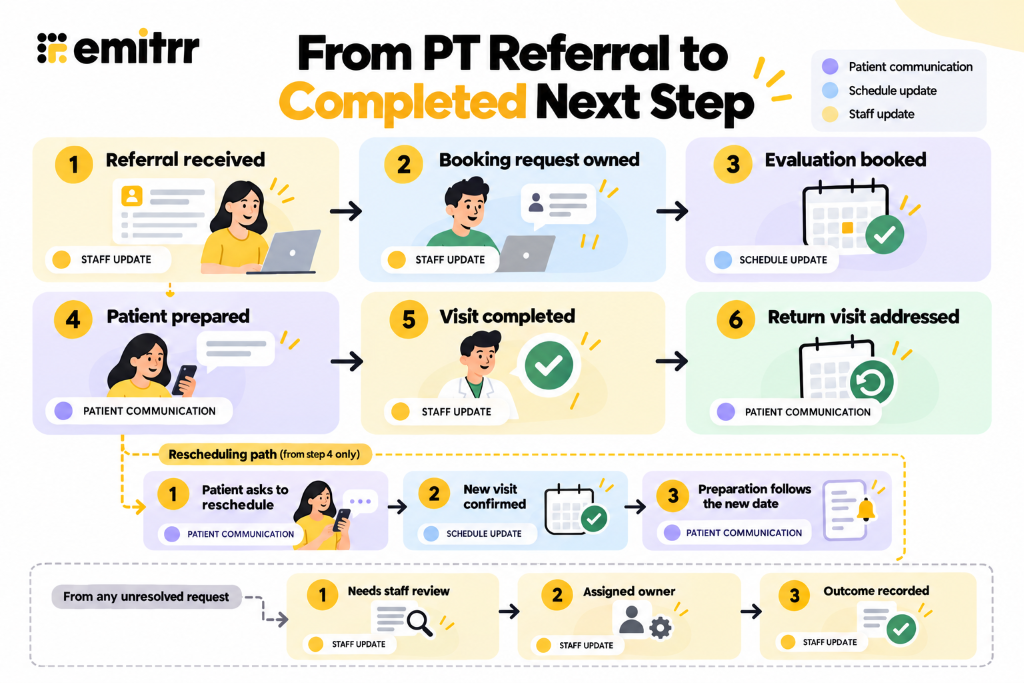
Consider an illustrative physical therapy referral. A referral arrives and becomes a booking request with an owner. The patient schedules an evaluation and receives the right preparation. Then they reply that they cannot attend on the booked date. A staff member or supported scheduling workflow confirms a new time, old reminders stop, and preparation follows the new appointment. After the evaluation, a recommended return visit becomes a visible next step.
The changed appointment and return-booking handoff deserve particular attention. At either point, the patient may need staff help. Their request should carry the available context and remain open until an outcome is recorded. The journey is connected when a change in patient status changes subsequent communication and the next team can see what remains to be done.
Booking an appointment is only part of the outcome. The practice also needs to know whether patients confirm, prepare, and attend. Watch this video to find out ways to address the gaps between booking and the visit:
How Emitrr Helps Connect Patient Journey Workflows
Emitrr can help practices connect patient communication with the staff handoffs in this process. The exact workflow depends on the practice’s configuration and its connected systems.
- From an unanswered inquiry to an owned request: Missed-call text back, web chat, and configured AI voice conversations can capture why someone contacted the practice during busy periods or after hours. Those details can support an appropriate booking path or give staff context for a request they need to handle.
- From separate channels to a usable conversation: A shared inbox can help staff work from supported calls, texts, voicemails, and web inquiries. Assignments, notes, and available conversation records help the next person see what the patient asked and what remains open. Available channels and records depend on configuration.
- From referral or booking to preparation: Supported virtual fax, digital forms, document collection, and appointment reminders help request information before a visit and follow up on incomplete items. Document attachment or structured EHR updates depend on the integration.
- From a reply to the right next action: Two-way patient texting and configured scheduling conversations help distinguish a confirmation from a question, cancellation, or rescheduling request. Appointment actions must follow provider, visit type, and availability rules. If the connected system cannot update the schedule, staff need a visible task.
- From a completed visit to follow-up: Post-visit questions can remain visible to the responsible team. Patient recall software supports outreach to patients due for an appropriate next visit and gives them a way to respond. Qualified staff handle clinical questions and decisions.
- From activity to a visible outcome: Available EHR integrations can use patient and appointment information to support communication triggers and, where supported, update connected records. Reporting can help staff review calls, responses, and outreach while looking for requests that still need action. A sent message alone is not a completed patient outcome.
- Across channels and patient needs: Secure patient communication, contact preferences, opt-out handling, and supported multilingual options help a practice choose a suitable route. Patients who cannot complete a digital step still need a staff-assisted path.
Key Takeaways
- Patient journey automation connects one completed patient action to the next across channels, teams, and systems.
- Start with one care episode and a clear patient outcome.
- Use current patient and appointment status to decide what starts, changes, or stops.
- Carry context and ownership through referral, booking, preparation, visit, and follow-up handoffs.
- Give questions and unresolved requests an assigned path and a visible outcome.
- Test the usual path and common changes before expanding to other visits or locations.
FAQs
It uses patient and appointment events to start the right communication, system action, or staff task, while tracking whether the patient’s next step was completed.
A reminder sends a message at a set time. A connected workflow also responds to a canceled visit, completed form, or request for help so subsequent actions stay relevant.
Choose a frequent care episode with a clear start, a completed outcome you can check, and a handoff that causes problems today. A new referral through an initial visit is one example.
Give the referral an owner, carry the information needed for booking into the scheduling request, and use the confirmed appointment details to start preparation. Keep missing information visible to staff.
Confirm the new appointment, stop messages for the old one, adjust preparation and reminders, and assign any unfinished update to staff.
Yes. Document what the integration can read or update, and give tasks that cannot sync automatically an owner and a way to reconcile records.
Check completed patient actions and unresolved requests, not just messages sent. Review whether patients book, arrive prepared, receive confirmed appointment changes, and have recommended next steps addressed.
Conclusion
A patient should not have to repeat their request when it moves from a call to a booking, form, visit, or follow-up. That takes more than sending messages automatically. Each change must reach the right person, update the next action, and stay visible until the request is resolved.
Begin with one care episode. Check what happens when the patient follows the expected path and when they need to change plans. Once staff can reliably see and resolve unfinished work, extend the workflow to other visit types or locations.
Emitrr can help connect those patient conversations with supported scheduling, intake, and follow-up workflows. If your team wants to see how that would work with its current systems and handoffs, book a demo with Emitrr.

 4.9 (400+
reviews)
4.9 (400+
reviews)