

Introduction
Ophthalmology documentation is built around findings that are easier to see than to describe. An OCT scan, a corneal topography map, or a fundus photo carries more diagnostic information than a paragraph of free text ever could, yet many general EHRs still force ophthalmologists to type out what a device already captured visually. An EMR for ophthalmologists has to bring imaging directly into the chart, support refraction and vision documentation with the right structured fields, and handle a scheduling reality that most ambulatory specialties never face: a single patient’s care might involve an office exam, a same-day imaging study, and eventually a surgical procedure requiring an entirely different scheduling logic, resource block, and pre- and post-op sequence.
That surgical layer is where generic EMR requirements fall apart fastest. A cataract or LASIK procedure needs OR or resource scheduling, multi-slot appointment blocks, and coordinated pre-op and post-op communication, none of which a standard single-provider, single-slot appointment calendar was designed to represent. Add optical dispensary and contact-lens workflows for practices that also sell eyewear, and insurance or ID image exchange for front-desk staff, and it becomes clear why ophthalmology needs a dedicated evaluation framework. This guide covers the blockers specific to ophthalmology, the features that matter across clinical, imaging, and surgical workflows, how leading systems compare, and how to evaluate vendors before committing.

AI Summary
- The defining ophthalmology EMR requirement is native imaging integration, bringing OCT, visual field, fundus, and topography data directly into the structured chart rather than treating it as a separate file to open alongside the record.
- The most significant blocker is surgical scheduling that most EHRs were not built to represent: multi-slot appointments, OR or resource synchronization, and pre-op/post-op sequencing require functionality well beyond a standard office-visit calendar.
- Structured field mapping for refraction, vision, and intake data is the most important documentation-adjacent feature category, since free-text or PDF-only capture slows charting and undermines reporting.
- Integration diligence should focus on whether imaging devices actually write structured findings back into the chart versus requiring a separate viewer, and whether appointment write-back supports true two-way scheduling for both office and surgical visits.
- Practices should weigh imaging-device compatibility and surgical scheduling depth more heavily than general feature lists, since these two areas cause the most operational friction after go-live.
Which EMR for Ophthalmologists Is Right for You? TL;DR
| EMR | Best suited for | Key strengths | Potential consideration |
| EyeMD EMR | Ophthalmology practices | Ophthalmology-specific templates, diagnostic device integration, built-in PACS | Best suited to practices that want a highly specialized ophthalmology EMR |
| ModMed | Tech-forward ophthalmology practices | iPad-based charting, adaptive learning, MIPS tracking, ASC workflows | May be better suited to practices comfortable with a technology-focused workflow |
| CureMD | Small and mid-sized eye care practices | Customizable templates, imaging, e-prescribing, optical inventory | May require customization to match highly specialized ophthalmology workflows |
| Medflow | Complex and procedure-heavy ophthalmology practices | Surgical scheduling, image management, visual drawing tools, subspecialty workflows | Its depth may be more than smaller practices need |
| Compulink Eyecare Advantage | Growing and multi-location eye care groups | Optical retail, ASC operations, billing, telehealth, multi-location management | Broader functionality can mean a more complex implementation |
| Nextech | Specialty and ophthalmology practices | Specialty-specific workflows, imaging, scheduling, surgical workflows, billing | Best value for practices that need broad specialty and operational capabilities |
| AdvancedMD | Growing medical practices | EHR and practice management, scheduling, billing, reporting | Less ophthalmology-specific than dedicated eye care platforms |
Challenges for Ophthalmology Clinincs
Imaging devices that do not write structured findings back into the EHR chart
OCT machines, visual field analyzers, fundus cameras, and topographers each produce their own proprietary output, and whether that output writes back into the EHR as structured, chartable data or simply opens in a separate device viewer depends entirely on the specific integration between the EHR and the device manufacturer. This matters because a chart that only references an image file, without structured measurements a physician can trend over time, makes longitudinal disease tracking (glaucoma progression, macular degeneration) far more manual. Practices should verify current, device-specific integration status directly with both the EHR and device vendors, not assume that “imaging integration” as a marketing phrase covers their specific equipment.
Surgical booking and multi-slot appointments that a standard scheduling calendar cannot represent
Surgical cases in ophthalmology are not single time-slot events. A cataract procedure involves pre-op testing, the surgical block itself (often tied to a specific OR or ASC resource), and a defined post-op visit sequence, each of which may need to be scheduled together or in a coordinated series. Standard office-visit scheduling logic, built around uniform appointment slots, generally cannot represent this without significant workaround. Practices should ask vendors to demonstrate, not describe, how a full cataract episode (pre-op through post-op) is actually scheduled in the system.
Resource and provider mapping gaps that create OR or equipment conflicts
Beyond the surgeon’s own calendar, surgical scheduling depends on synchronizing OR or ASC time, specific equipment, and sometimes an anesthesia provider. If the EHR’s scheduling module cannot map these resources alongside the provider calendar, staff end up cross-checking multiple systems manually to confirm a surgical slot is actually available, which is a common source of double-booking in growing surgical practices.
Patient ID mapping issues that create duplicate records or misrouted communication
Ophthalmology practices frequently see patients referred from optometrists or other specialists, sometimes with incomplete or inconsistently formatted demographic data. Weak patient-matching logic in the EHR increases the risk of duplicate patient records, which can fragment a patient’s imaging and exam history across two charts, or misroute communication (a reminder or a form) to the wrong contact. Practices should verify what patient-matching logic the EHR uses and how duplicate records are detected and merged.
Insurance and ID image exchange without a secure, chart-integrated channel
Verifying vision and medical insurance, along with patient identification, is a routine front-desk task in ophthalmology, and it frequently involves collecting images of insurance cards or IDs. If this happens over unsecured email or a personal messaging app rather than a secure, chart-integrated channel, it creates real privacy risk and leaves the information disconnected from the patient’s actual record. Practices should confirm how the EHR or a connected communication tool handles secure image exchange and where those images ultimately land in the patient file.
Must-Have EMR Features for Ophthalmologists
- Eye Examination Templates: The best ophthalmology EMR should provide specialty-specific templates for comprehensive eye exams, glaucoma, retina, cataract, and other common workflows. Structured templates help an ophthalmology EMR capture clinical findings consistently and reduce documentation time.
- Native Imaging Integration: An ophthalmology EHR should connect directly with diagnostic devices so OCT, fundus photography, visual fields, and other images flow into the patient record. Native integration reduces duplicate entry and eliminates the need to switch between separate imaging systems.
- Surgical and Resource Scheduling: The best EHR for ophthalmology should support procedure-specific scheduling, operating-room resources, surgeon preferences, and ASC block time. This helps practices coordinate pre-op visits, surgeries, equipment, and follow-ups from one workflow.
- Prescription and Contact-Lens Workflow: Ophthalmology electronic health records should support structured prescription management for glasses and contact lenses. This makes it easier to update prescriptions, maintain accurate patient records, and share relevant information across clinical and optical workflows.
- Optical Dispensary and Order Management: Software for ophthalmology practice should connect optical inventory, product orders, prescriptions, and patient records where optical services are offered. This helps practices manage the clinical and retail sides of the business without relying on disconnected systems.
- Structured Field Mapping for Intake and History Forms: The best ophthalmology EHR should map digital patient intake and history forms directly to structured clinical fields. This prevents staff from manually re-entering information and makes patient data easier to search, review, and use during documentation.
- Secure Image and Document Handling: An ophthalmology EHR should securely store clinical images, surgical documents, referrals, and other patient information with appropriate access controls. Secure document and image handling helps protect PHI while keeping critical information accessible to authorized staff.
- Medical and Optical Insurance Billing: The best practice management software for ophthalmology should support medical billing and, where applicable, optical or vision insurance workflows. This helps practices manage different payer requirements while reducing duplicate billing processes.
- Patient Portal: An EMR for ophthalmology should provide a patient portal for accessing records, completing forms, reviewing information, and managing appointments. A connected portal can also reduce administrative workload by moving routine patient interactions online.
- Interoperability With Referring and Co-Managing Providers: The best ophthalmology EMR should make it easy to exchange relevant patient and referral information with optometrists, specialists, and co-managing providers. Interoperability supports continuity of care and reduces manual communication between practices.
- ASC and Surgical Billing: The best EHR for ophthalmology should distinguish physician fees from facility fees and natively support ASC modifiers, supply charges, and surgical billing. This reduces manual work and avoids relying on spreadsheets or billing workarounds.
- E-Prescribing for Eye Medications: Choose an EMR system that supports e-prescriptions for eye-specific drugs and integrates with national databases for allergy checks, interactions, and formulary compliance. This speeds up medication management and helps you stay aligned with MIPS and eRx mandates.
- Reporting and Analytics: Ophthalmology EHR systems should provide reporting on surgical volume, imaging utilization, referrals, and billing performance. Built-in analytics give practices actionable visibility into clinical and operational performance without depending on manual spreadsheet exports.
Best EMRs for Ophthalmologists: Detailed Analysis
- EyeMD EMR
- ModMed
- CureMD
- Medflow
- Compulink Eyecare Advantage
- Nextech
- Advanced MD
| EMR | Ophthalmology capabilities | Workflow & practice management | Patient communication & automation | Best fit |
| EyeMD EMR | Specialized ophthalmology templates, diagnostic device integration, built-in PACS, and support for retina, glaucoma, and surgical workflows | Focused on reducing documentation time and eliminating the need for separate imaging tools | Emitrr can automate appointment reminders, confirmations, recalls, follow-ups, and HIPAA-compliant two-way messaging | Practices looking for a highly specialized ophthalmology EMR |
| ModMed | Ophthalmology-specific content across subspecialties, touch-optimized charting, and ASC support | iPad-based interface, adaptive learning, and MIPS tracking help streamline clinical workflows | Emitrr can trigger automated reminders and follow-ups from appointment activity and support no-show re-engagement | Tech-forward ophthalmology practices |
| CureMD | Ophthalmology modules covering imaging, optical inventory, lens prescriptions, and e-prescribing | Customizable templates and flexible workflows make it suitable for smaller practices | Emitrr can automate confirmations, recall campaigns, feedback requests, and routine patient outreach | Small and mid-sized practices seeking flexibility |
| Medflow | Surgical scheduling, image management, visual drawing tools, and support for retina, glaucoma, and corneal care | Designed for complex ophthalmology and procedure-heavy workflows | Emitrr can automate surgical reminders, patient reactivation, education, and follow-up communication | Practices with complex or subspecialty workflows |
| Compulink Eyecare Advantage | Comprehensive eye care functionality spanning clinical care, optical retail, and ASC operations | Billing, telehealth, and multi-location management support growing eye care organizations | Emitrr can automate reminders, review requests, no-show prevention, recalls, and follow-ups | Growing and multi-location eye care groups |
| Nextech | Specialty-focused clinical documentation, diagnostic imaging, surgical workflows, and ophthalmology support | Combines EHR and practice management capabilities including scheduling, billing, and patient management | Emitrr can automate confirmations, reminders, recalls, follow-ups, and two-way HIPAA-compliant messaging | Specialty and ophthalmology practices needing broad clinical and operational workflows |
| AdvancedMD | Supports general medical workflows rather than being exclusively ophthalmology-focused | Cloud-based EHR and practice management with scheduling, billing, reporting, and revenue cycle management | Emitrr can automate appointment reminders, confirmations, recalls, review requests, and follow-ups | Growing practices that prioritize integrated clinical and administrative management |
1. EyeMD EMR
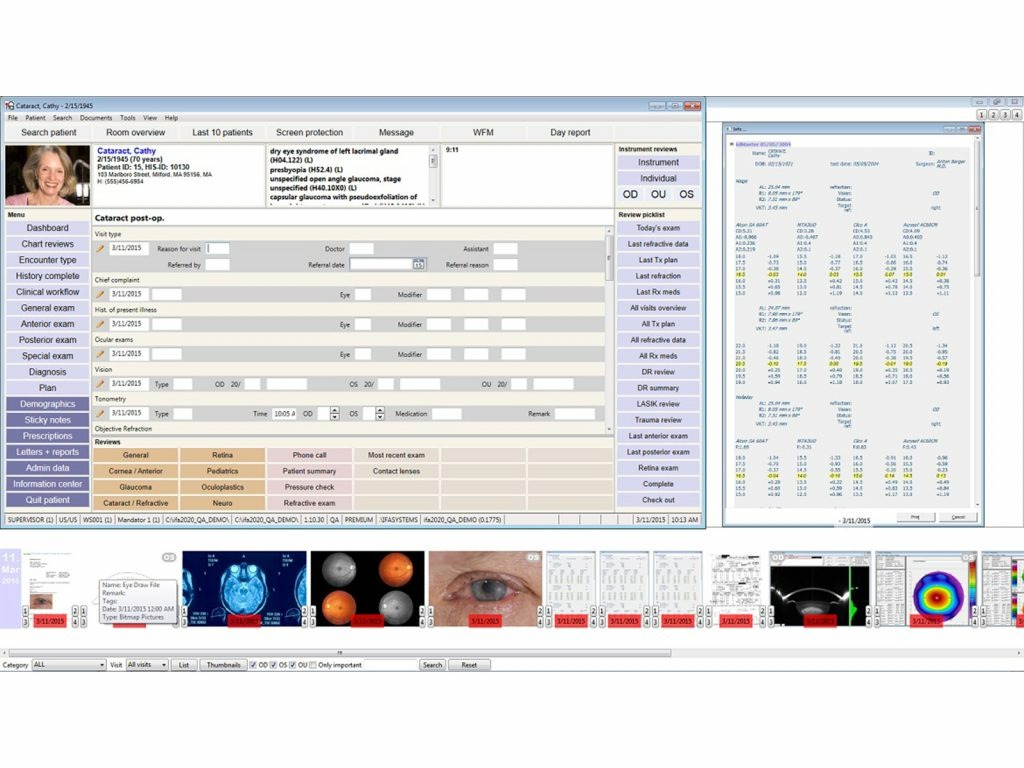
EyeMD EMR is built exclusively for ophthalmologists, making it one of the most accurate and efficient systems for vision care practices. It offers deep integration with diagnostic devices, a built-in PACS viewer, and highly specialized templates for retina, glaucoma, and surgical cases. Its strength lies in eliminating the need for third-party imaging tools and reducing documentation time.
When paired with a communication tool like Emitrr, EyeMD becomes even more powerful, allowing practices to automate appointment reminders, streamline follow-ups, and reduce front desk interruptions through real-time, HIPAA-compliant messaging that’s fully in sync with the EMR’s schedule.
2. ModMed
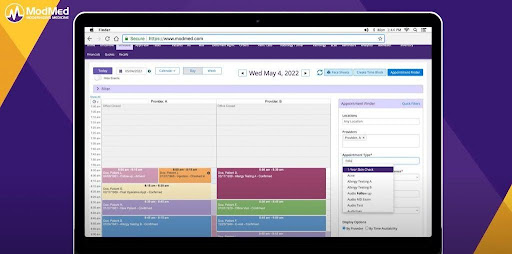
ModMed’s EMA platform is a favorite among tech-forward practices thanks to its iPad-based interface and adaptive learning engine. It learns from your workflow over time, suggesting the next steps during charting and helping reduce clicks. The system includes ophthalmology-specific content across subspecialties and offers real-time MIPS tracking, built-in ASC modules, and touch-optimized charting.
Combined with Emitrr, it supports a highly streamlined workflow where appointment flows trigger automated reminders and follow-up messages. Without switching platforms, teams can cut back on phone calls and re-engage no-show patients more effectively.
3. CureMD
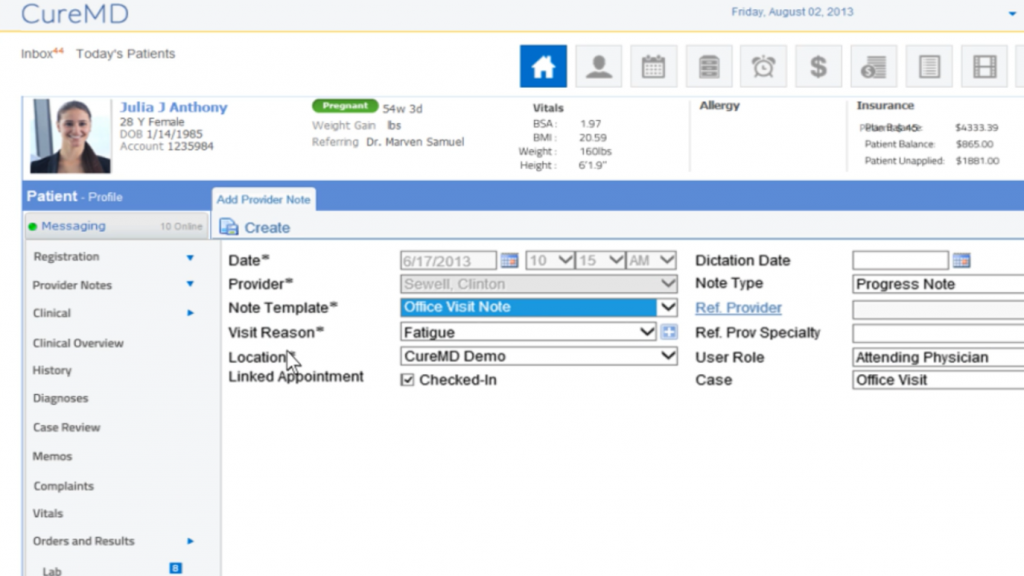
CureMD offers a flexible EMR system with dedicated ophthalmology modules that cover everything from optical inventory and lens prescriptions to e-prescribing and imaging. Its customizable templates and intuitive layout make it well-suited for small and mid-sized clinics that need both power and affordability.
With a real-time sync between CureMD’s calendar and Emitrr, practices can automate common touchpoints like recalls, confirmations, and feedback requests, helping staff stay ahead without lifting the phone.
4. Medflow
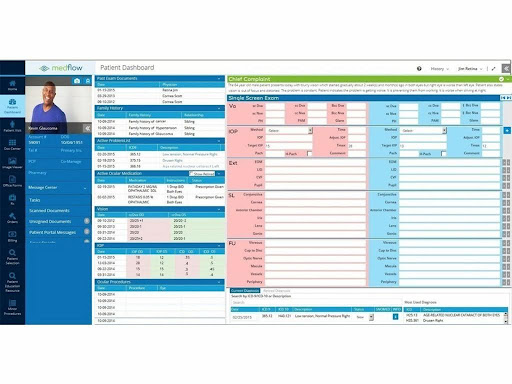
Built with long-term ophthalmology users in mind, Medflow offers a deeply customizable system with features like surgical scheduling, image management, and visual drawing tools. It’s built to support complex workflows and subspecialty needs across retina, glaucoma, and corneal care.
Many Medflow users pair it with Emitrr to handle outbound communication in the background. Whether it’s surgical reminders, patient reactivation, or education follow-ups, the integration keeps everything in motion, without disrupting the clinic’s daily flow.
5. Compulink Eyecare Advantage
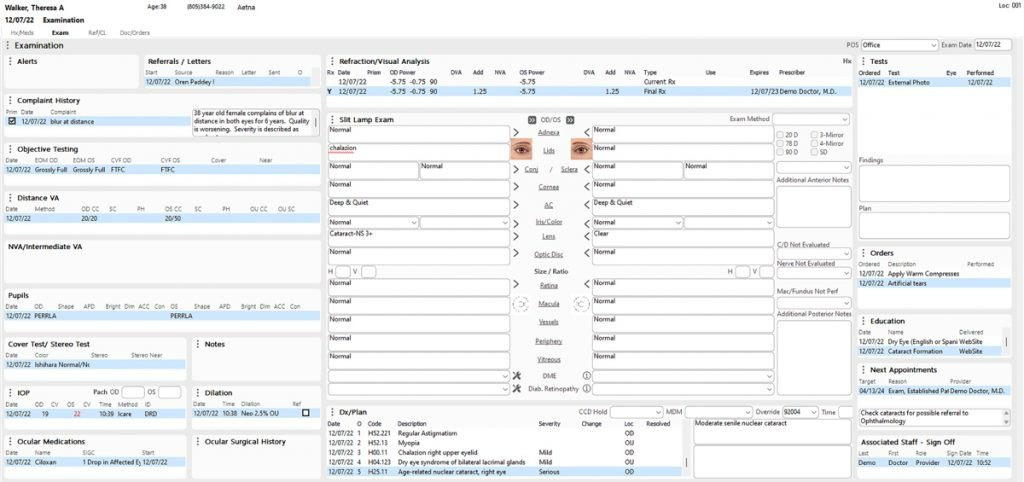
Compulink is a comprehensive EMR solution that handles everything from optical retail to ASC operations. With robust billing tools, telehealth support, and multi-location management, it’s ideal for growing eye care groups.
Practices using Compulink often integrate tools like Emitrr to stay proactive with their communication, sending appointment reminders, collecting reviews, and reducing no-shows through automated workflows that sync directly with the EMR schedule.
6. Nextech
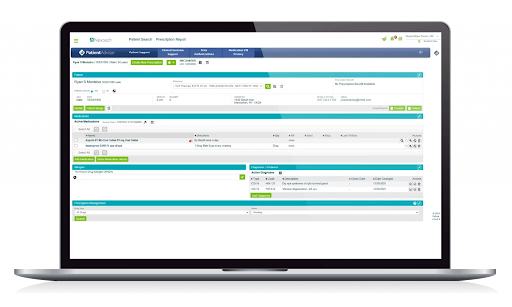
Nextech is a specialty-focused EHR and practice management platform designed for ophthalmology and other procedure-heavy specialties. For eye care practices, it combines ophthalmology-specific charting, diagnostic imaging, surgical workflows, scheduling, billing, and patient management in one system. Its strength is supporting complex clinical workflows while giving practices visibility across both medical and operational processes.
When paired with Emitrr, Nextech can extend those workflows into patient communication. Practices can automate appointment confirmations, reminders, recalls, and follow-ups based on scheduling activity, while using two-way, HIPAA-compliant messaging to reduce manual calls and improve patient engagement.
7. AdvancedMD
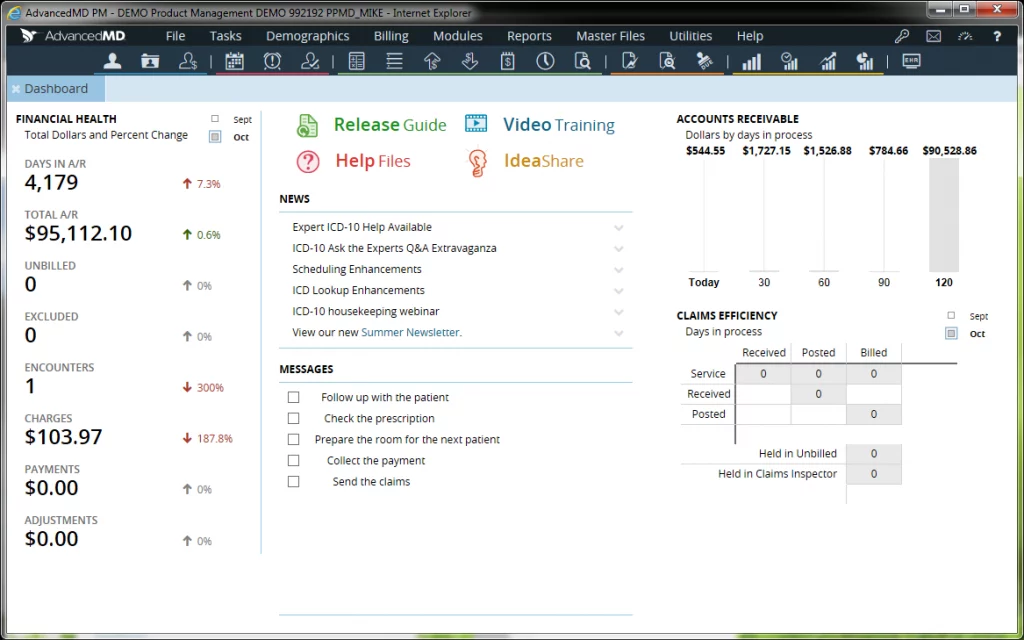
AdvancedMD is a cloud-based EHR and practice management platform designed for medical practices that need clinical documentation, scheduling, billing, and revenue cycle management in one system. Its customizable workflows, patient portal, reporting, and integrated practice management tools make it particularly useful for growing practices that want to manage both clinical and administrative operations from a single platform.
With Emitrr, AdvancedMD can help practices turn appointment and patient data into automated communication workflows. Teams can send reminders, confirmations, patient recall messages, review requests, and follow-ups automatically, reducing front-desk workload while helping practices improve attendance and stay connected with patients.
How Emitrr Works Alongside Your Ophthalmology EMR
- Schedule-Aware Patient Communication: Emitrr can use available EHR scheduling and resource fields to automate reminders and communication around high-volume clinic and OR schedules. Where the EHR supports scheduling APIs, workflows can respond to changes in provider, location, appointment, or surgical schedules.
- Pre-Visit Forms and Image Collection: Practices can send digital forms before appointments and allow patients to upload files such as insurance cards, IDs, or imaging-related documents. Where structured field mapping is supported, submitted information can reduce manual technician entry; otherwise, forms may need to be attached to the chart or entered manually.
- Secure Two-Way Texting: Emitrr can support secure communication for appointment reminders, pre-op instructions, and post-op check-ins. This gives patients a convenient way to ask questions or receive relevant information without requiring staff to handle every routine interaction by phone.
- AI After-Hours Support: Emitrr’s AI agent can help handle common after-hours patient questions and provide secure links to resources such as post-operative instructions. This extends communication beyond office hours while keeping PHI-related conversations within secure workflows.
- Bulk Schedule Notifications: When a provider, location, or OR schedule changes, staff can filter affected appointments and send notifications to multiple patients at once. This can be especially useful when an operating-room schedule changes and several surgical patients need to be contacted quickly.
- Post-Operative Follow-Up: Emitrr can automate follow-up communication after procedures, including check-in messages and links to post-op instructions. These workflows can help practices maintain consistent patient communication without requiring staff to manually track every follow-up.
- Number Porting and Patient Continuity: Practices moving an existing business number to Emitrr can use number-porting support to maintain continuity with patients who already have the number saved. This can make the transition to automated communication less disruptive.
- Integration Depends on Your EMR: The exact workflow depends on the ophthalmology EMR’s integration capabilities and configuration. Practices should verify whether their system supports structured field mapping, scheduling APIs, automated triggers, and chart attachments rather than assuming every workflow will synchronize automatically.
- SMS, MMS, and 10DLC Considerations: SMS campaigns generally require 10DLC registration, while MMS texting and image messaging can involve additional carrier-level costs and volume considerations. Practices should account for registration, messaging volume, and media usage when planning their communication workflows.
EMR Implementation Roadmap
Key Takeaways
- Ophthalmology EMR selection should be judged primarily on imaging device integration depth and surgical scheduling capability, not general documentation features.
- The most consequential blocker for surgery-focused practices is scheduling logic that cannot represent a full pre-op-to-post-op episode as a coordinated series.
- Structured data write-back from imaging devices should be verified device by device, since a general “imaging integration” claim does not guarantee support for a practice’s specific equipment.
- Patient matching and duplicate-record prevention matter more in ophthalmology than in many other specialties, given how frequently patients arrive through optometry referrals.
- Practices should prioritize vendors based on their actual surgical volume and imaging equipment rather than general market reputation alone.
FAQs
A specialty EMR for ophthalmology can better support eye exams, structured vision measurements, imaging, surgical workflows, and ophthalmology-specific scheduling. A standard EHR may work for simpler practices but could require more customization or third-party tools.
The cost of building an ophthalmology EMR depends on the features, integrations, security requirements, number of users, and deployment model. Imaging integration, ASC workflows, FHIR connectivity, billing, and specialty-specific documentation can significantly increase development costs.
Yes, migration to platforms such as Canvas or Medplum may be possible depending on your current system's data export capabilities and the target platform's integration options. Before migrating an ophthalmology EHR, practices should plan for clinical records, imaging, patient demographics, billing data, prescriptions, and historical documentation.
For most ophthalmology practices, imaging integration is highly valuable because OCT, fundus photography, visual fields, and other diagnostic data are central to eye care. The best ophthalmology EMR should connect with the specific imaging devices and software your practice already uses.
FHIR may not be essential for every practice today, but it is increasingly important for organizations exchanging data with hospitals, referral partners, and other healthcare systems. When evaluating ophthalmology EHR systems, practices expecting broader interoperability should consider platforms with FHIR capabilities.
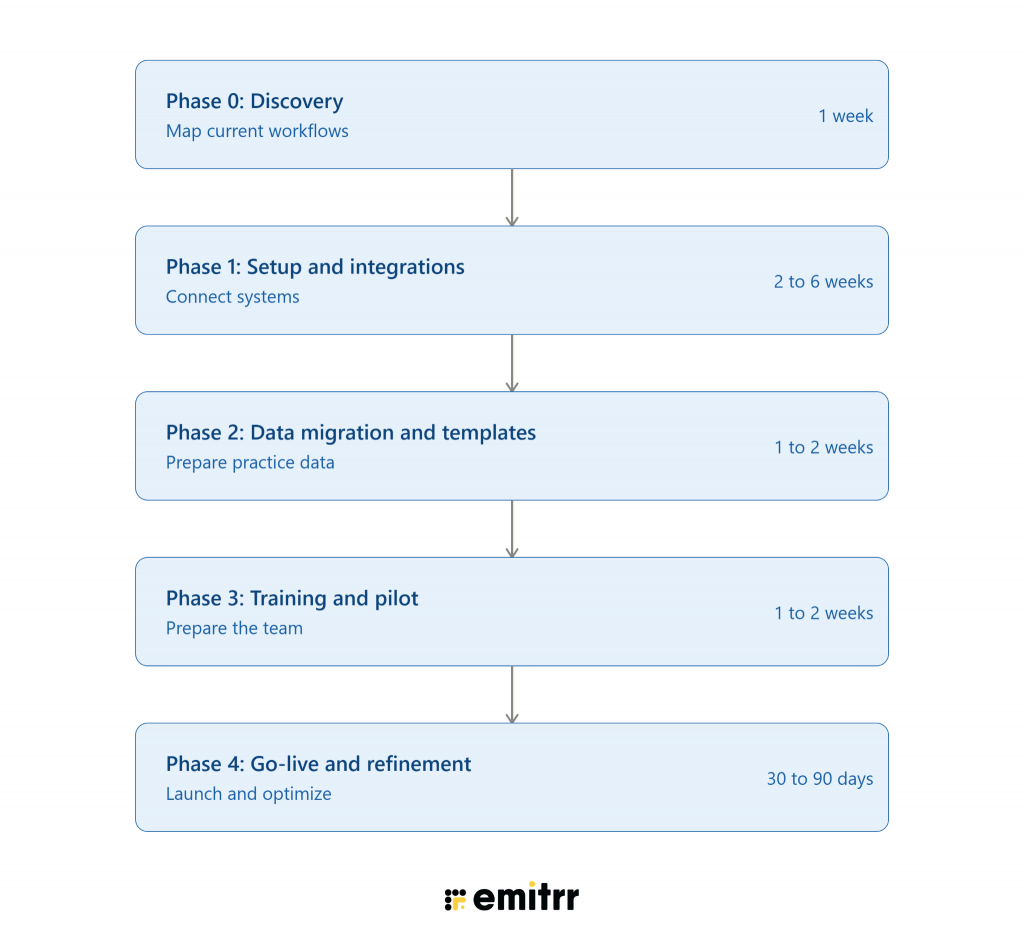
A 10-provider practice should generally plan for several weeks to several months depending on data migration, integrations, workflow configuration, training, and testing. A complex EMR for ophthalmology with imaging, surgical, billing, and multi-location workflows will typically require more implementation time than a basic deployment.
The best EHR for ophthalmology depends on your clinical workflows, surgical volume, imaging equipment, number of locations, billing requirements, and interoperability needs. Compare vendors based on real workflows rather than feature lists, and ask for demonstrations using your actual use cases.
Yes. An ophthalmology EHR can work alongside communication software to automate appointment reminders, confirmations, recalls, pre-op instructions, and post-op follow-ups. Platforms such as Emitrr can add a communication layer without replacing the clinical documentation or imaging functions of the EHR.
Conclusion
An EMR for ophthalmologists needs to connect three critical layers of the practice: structured clinical documentation, integrated diagnostic imaging, and specialized surgical workflows. The right ophthalmology EMR should capture eye-specific measurements in structured fields, bring imaging data directly into the patient chart, and support complex workflows from pre-op planning through surgery and post-op care.
The biggest gaps often appear where these workflows intersect: imaging systems that do not write structured data back to the chart, generic calendars that cannot handle surgical and ASC scheduling, fragmented referral workflows, and patient communication that still depends heavily on manual calls. When evaluating the best EHR for ophthalmology, assess your actual imaging devices, surgical volume, referral workflows, billing requirements, and integration needs. Ask vendors to demonstrate these workflows live rather than relying on general claims about “integration.”
Once your EMR handles the clinical record, the next opportunity is reducing the manual communication around it. See how Emitrr can work alongside your ophthalmology EMR to automate reminders, pre-op and post-op communication, recalls, and patient follow-ups. Book a demo now!!

 4.9 (400+
reviews)
4.9 (400+
reviews)